Share via

download microsoft teams add-in for classic outlook

Anonymous
2025-01-30T17:47:18+00:00

I need o reinstall microsoft teams add-in for outlook (classic). The add-in wasn't showing up in outlook, I went to your tutorials and uninstalled, but am unable to install. I can't find anywhere in the microsoft store a link for a download. I have windows 11.

Outlook | Windows | Classic Outlook for Windows | For home

Locked Question. This question was migrated from the Microsoft Support Community. You can vote on whether it's helpful, but you can't add comments or replies or follow the question.

0 comments No comments

25 answers

Sort by: Most helpful
  1. Anonymous
    2025-04-03T15:22:02+00:00

    Whoever thought having 2 versions of both teams and outlook was a good idea should be fired. Having the same issue with none of the fixes working. Does microsoft not understand how people use their PAID for software??

    Unbelievable that this is the issue that it is with no solutions from microsoft. Like an add-in installer is that hard to do??

    20+ people found this answer helpful.
    0 comments No comments
  2. Anonymous
    2025-03-19T14:22:09+00:00

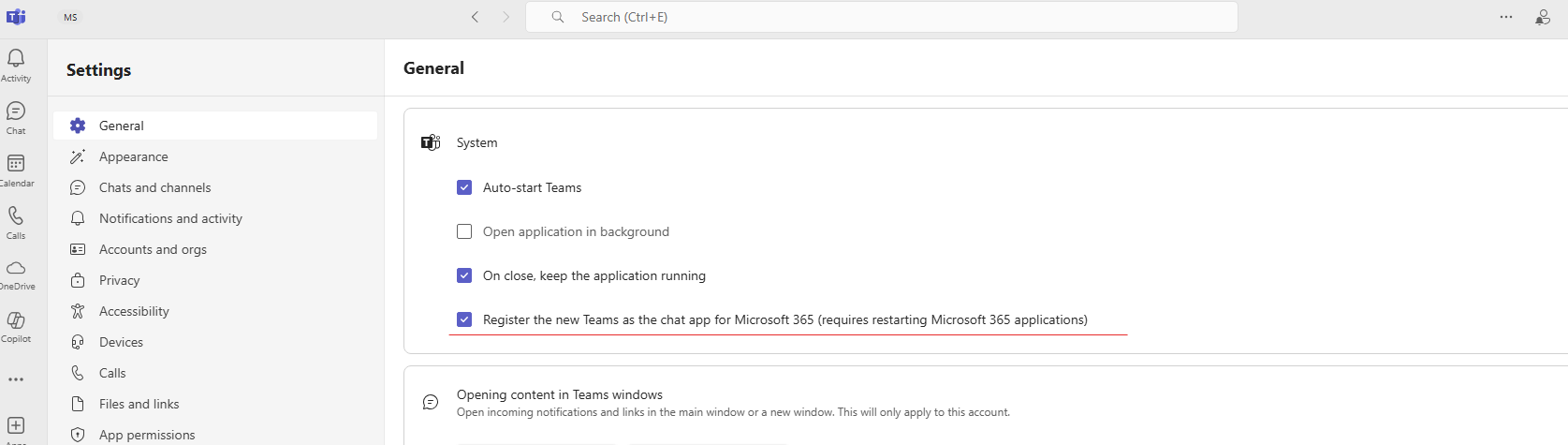
    The "Register Teams as the chat app for Office" is not shown, hence cannot check or uncheck it.

    Teams > General > System > (1) Auto-Start Teams, (2) Open application in background, is the only choice.

    10+ people found this answer helpful.
    0 comments No comments
  3. Anonymous
    2025-04-03T16:57:33+00:00

    Microsoft,

    I am plagued with this same issue. Teams updated to the new teams and the software is not installing the Add-in for Classic Outlook. I have tried all resolution steps, repairs and troubleshooters on my end with no fix. The Recovery Assistant troubleshoot tells you that Classic Teams must be installed for the troubleshooter to fix the issue and provides no link to download Classic teams to resolve.

    Microsoft needs to issue a Teams Add-in for Outlook Classic immediate as this is impacting our entire book of clients and causing productivity slowdowns caused by you and your New Teams update. No one wants to use Outlook (New) its terrible and not an improvement. I need a resolution on this, this week.

    Best Regards,

    Grant

    10+ people found this answer helpful.
    0 comments No comments
  4. Anonymous
    2025-01-30T19:22:18+00:00

    Hi Paloma,

    Thank you for reaching out to us regarding the issue you're experiencing with the Microsoft Teams add-in for Outlook (Classic). I understand how frustrating it can be when things don't work as expected, and we are here to assist you.

    Based on your description, it seems that the add-in was uninstalled and now you're unable to reinstall it. For me to get a clear picture of the situation could you kindly confirm if :

    Microsoft Teams client is installed on your computer and that you are signed in. The add-in requires the Teams client to be running.

    Check for teams add in Outlook Add-ins:

    To do this:

    • Open Outlook > File
    • Select Options and then Add-ins.
    • In the "Manage" dropdown, select "COM Add-ins" and click Go.
    • Check if Microsoft Teams Meeting Add-in for Microsoft Office is listed.
    • If it is, make sure it is checked and click OK.
    • Repair Office Installation: Go to Settings > Apps > Apps & features.
    • Find Microsoft Office in the list, select it, and click Modify.
    • Choose Quick Repair or Online Repair and follow the prompts.
    • Reinstall Teams Add-in:
    • If the add-in is not listed in the COM Add-ins, you may need to reinstall it.
    • Open the Teams client, go to Settings > General and ensure that "Register Teams as the chat app for Office" is checked.

    • Restart both Teams and Outlook.

    Could you please try the above steps. This will assist me in pinpointing the cause of the problem and offering a tailored solution.

    Please note that our initial response might not resolve the issue right away. However, with your cooperation and more detailed information, we can work together to find a solution.

    Sincerely

    Albert |Community Moderator

    6 people found this answer helpful.
    0 comments No comments
  5. Anonymous
    2025-04-02T19:36:32+00:00

    I am talking about a business account. O365.

    The are using Office 365.  What licenses do they need?  Are you saying that MS has essentially forced updates upon users that rendered past features like PSTs, integration of Teams to the Outlook Calendar, unstable or unusable. Yet the features are not said to be obsoleted themselves just broken all of a sudden. 

    Seems about right lately with my teams support (or lack there of) on recent issues that pop up.

    When M$ cannot play with their own tools it is pretty sad.

    JR

    5 people found this answer helpful.
    0 comments No comments