Hello Song J Y,
Good day to you!
Thank you for reaching out to the Microsoft Community! To help you understand more, I will explain the reason first.
In Outlook for Mac, declined meetings are deleted from the calendar to keep it uncluttered, reflecting only confirmed or tentative events. This design, rooted in Outlook’s Exchange/Office 365 protocols, moves declined invitations to the Deleted Items folder and removes them from the calendar to avoid showing events you won’t attend.
I will suggest you some possible workarounds:
1.Keep Declined Meetings Visible:
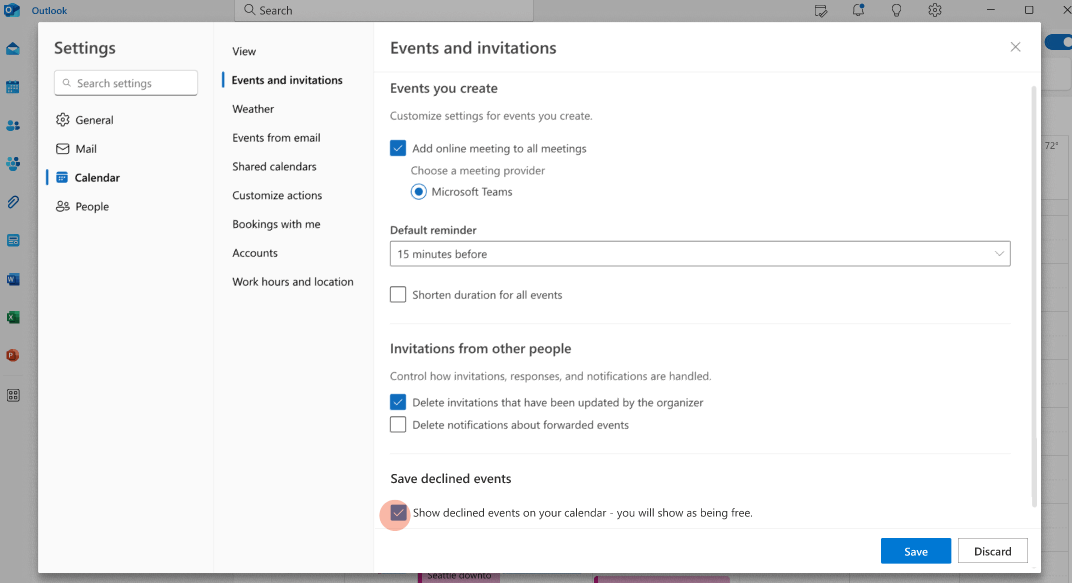
If the customer is using New Outlook for Mac, they can enable the option to show declining meetings on their calendar.
- Open Outlook Calendar.
- Go to View > Calendar Settings.
- In the Settings dialog, select Calendar > Events and Invitations.
- Under Save declined events, turn on Show declined events on your calendar.
- Click Save.
2. Recover from Deleted Items:
- If you declined to attend a meeting, check your Deleted Items folder in Outlook.
- Right-click the invitation and select “Change Response” → “Accept” to restore it
Once again, I’m truly sorry for the frustration you’ve experienced with this issue. As a forum moderator, I can share insights based on my knowledge and experience, but unfortunately, Outlook for Mac currently lacks a built-in option to retain declining meetings on the calendar. This is a limitation that needs to be addressed by the development team.
I encourage you to submit feedback through the Microsoft Community Hub or Outlook’s Help > Suggest a Feature to request this functionality. I’ll also escalate this issue to ensure it reaches the development team promptly.
If you have any further questions or concerns, please don't hesitate to reach out.
Best Regards,
Tina L - MSFT | Microsoft Community Support Specialist
' cx='32' cy='32' r='32' /%3E%3Ctext x='50%25' y='55%25' dominant-baseline='middle' text-anchor='middle' fill='%23FFF' %3EA%3C/text%3E%3C/svg%3E)
