Microsoft Teams | Microsoft Teams for business | Other
Additional features, settings, or issues not covered by specific Microsoft Teams categories

This browser is no longer supported.
Upgrade to Microsoft Edge to take advantage of the latest features, security updates, and technical support.
' cx='32' cy='32' r='32' /%3E%3Ctext x='50%25' y='55%25' dominant-baseline='middle' text-anchor='middle' fill='%23FFF' %3EDL%3C/text%3E%3C/svg%3E)
Hi there.
I would like to share computer audio on Teams in a meeting that I did not initiate. When I accept the invite to the meeting and click on my share tray I can share the relevant window but there are no options to share computer sound. I am running Teams on Mac and am up to date.
Any help appreciated
D
Additional features, settings, or issues not covered by specific Microsoft Teams categories

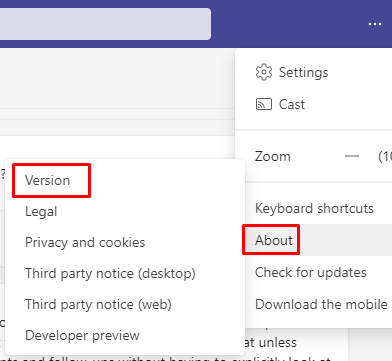
What is your MS Teams version? Go to About > Version.
Try pressing the audio button after sharing your screen. Make sure that your audio is turned up.

---------------------------
If this is helpful please accept answer.
This option is available when I start a meeting but isn't available when I join a meeting. This is the issue I'm having.
What happens when someone makes you a presenter (the host does)?
Doesn't seem to have made a difference unfortunately
' cx='32' cy='32' r='32' /%3E%3Ctext x='50%25' y='55%25' dominant-baseline='middle' text-anchor='middle' fill='%23FFF' %3EKY%3C/text%3E%3C/svg%3E)
Would you see this option (include computer sound) when you share your screen?
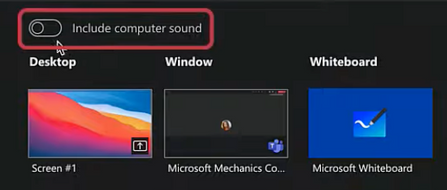
If not, would it work on Teams on the web?
I am writing here to confirm with you how thing going now?
Please let us know if you would like further assistance.