Microsoft 365 and Office | SharePoint | Development
The process of building custom applications and tools that interact with Microsoft SharePoint, including SharePoint Online in Microsoft 365.

This browser is no longer supported.
Upgrade to Microsoft Edge to take advantage of the latest features, security updates, and technical support.
' cx='32' cy='32' r='32' /%3E%3Ctext x='50%25' y='55%25' dominant-baseline='middle' text-anchor='middle' fill='%23FFF' %3EMR%3C/text%3E%3C/svg%3E)
Could someone please help me how can I achieve scrolling marquee text in SharePoint online?
Thanks!
' cx='32' cy='32' r='32' /%3E%3Ctext x='50%25' y='55%25' dominant-baseline='middle' text-anchor='middle' fill='%23FFF' %3ETZ%3C/text%3E%3C/svg%3E)
Hi @Muskan Regmi ,
We are currently doing some research on this issue, will let you know as soon as possible.
Hi @Muskan Regmi ,
According to my research and testing, there is no out-of-the-box way to display scrolling marquee in SharePoint Online. As a workaround, you can achieve it by coding, please refer to the following steps:
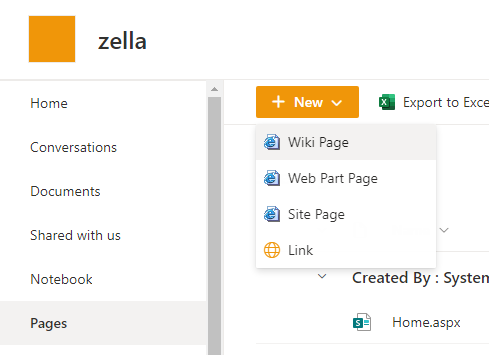
1.Click Page ->> New ->> Wiki Page
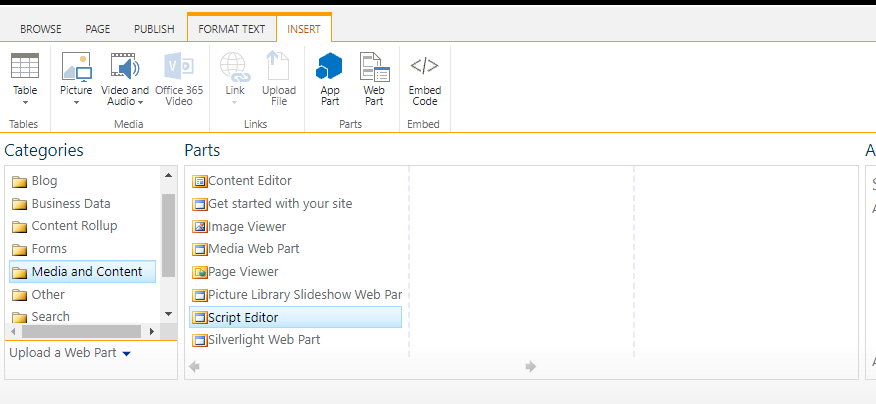
2.Click Insert ->> WebPart ->> Media and Content ->> Script Editor ->> Add
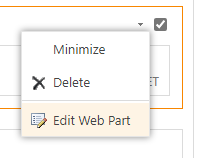
3.Click Edit Web Part
4.Click EDIT SNIPPET , then enter the following code,

<marquee width="100px" bgcolor="#cccccc" scrollamount="2" loop="-1">Scrolling Marquee</marquee>
Hope it can help you.
If the answer is helpful, please click "Accept Answer" and kindly upvote it. If you have extra questions about this answer, please click "Comment".
Note: Please follow the steps in our documentation to enable e-mail notifications if you want to receive the related email notification for this thread.
Hi @Muskan Regmi ,
Do you have any further questions about this thread? If you have any questions or progress, you can contact me in time.
' cx='32' cy='32' r='32' /%3E%3Ctext x='50%25' y='55%25' dominant-baseline='middle' text-anchor='middle' fill='%23FFF' %3ERJ%3C/text%3E%3C/svg%3E)
This will only work on a Webpart or Wiki page. Is it possible to do this on a modern site page?