Microsoft Security | Intune | Configuration Manager | Other
Other Configuration Manager-related features and issues

This browser is no longer supported.
Upgrade to Microsoft Edge to take advantage of the latest features, security updates, and technical support.
' cx='32' cy='32' r='32' /%3E%3Ctext x='50%25' y='55%25' dominant-baseline='middle' text-anchor='middle' fill='%23FFF' %3ESV%3C/text%3E%3C/svg%3E)
We have some computers using a metered Internet connection (or a regular connection incorrectly configured as metered). Our client policy did not allow communication over metered connections, thus these clients have not communicated for a while.
We want to change that and modified our client policy, so that it now allows communication over metered connections. However, clients never download the new client policy since the existing client policy does not allow client policy download over metered connections. Even reinstallation of the client does not help because "existing local client policy" takes precedence over "parameters on the ccmsetup command line" (as decribed here).
Is there any way to tweak the client policy locally (like copying a file from site server to client or setting a registry key)? Or should we uninstall and reinstall the client?

Hi,
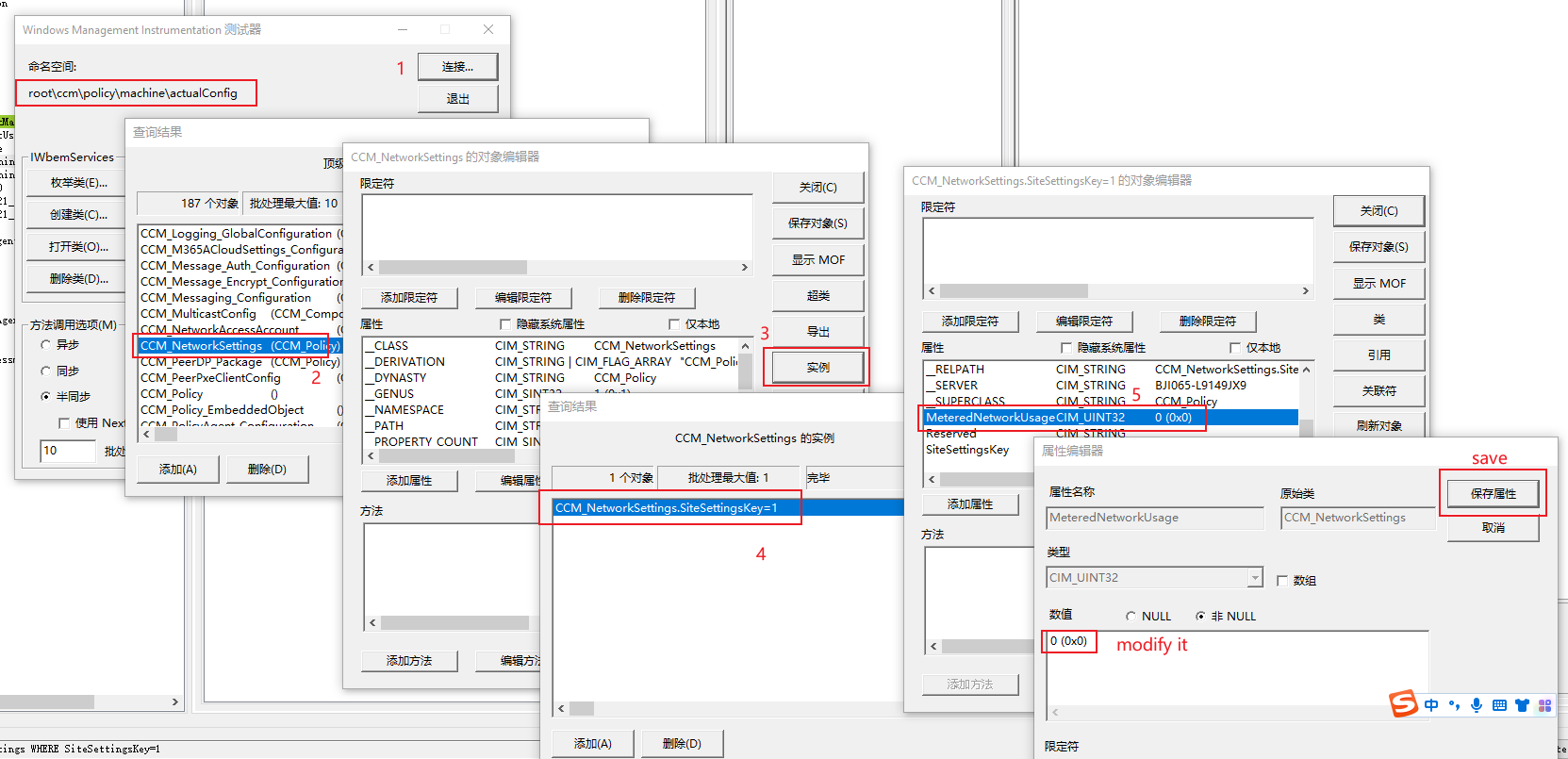
Client policy applies to client and make changes to client WMI Classes. In this case, it's CCM_NetworkSettings.
Namespace: root\ccm\policy\machine\actualconfig
Client WMI Class: CCM_NetworkSettings
Attribute: MeteredNetworkUsage
Namespace: root\ccm\policy\machine\actualconfig
I'm not sure if it's supported but you can try to use wbemtest.exe to modify it.
information about the WMI class: https://learn.microsoft.com/en-us/mem/configmgr/develop/reference/core/clients/sdk/ccm_networksettings-client-wmi-class
Thanks! I used this Powershell script to set the value from 4 (Blocked) to 1 (Allowed):
Get-CimInstance -ClassName CCM_NetworkSettings -Namespace root\ccm\policy\machine\actualConfig | Set-CimInstance -Property @{MeteredNetworkUsage=1}

Hi @Stephan van Helden ,
Thanks very much for your feedback. We're glad that the question is fixed now. It's appreciated that you could click "Accept Answer" to the helpful reply, this will help other users to search for useful information more quickly.
Thanks again for your time!
Best regards,
Cherry