Microsoft Security | Intune | Configuration Manager | Updates
Managing and deploying updates via Configuration Manager

This browser is no longer supported.
Upgrade to Microsoft Edge to take advantage of the latest features, security updates, and technical support.
' cx='32' cy='32' r='32' /%3E%3Ctext x='50%25' y='55%25' dominant-baseline='middle' text-anchor='middle' fill='%23FFF' %3EL%3C/text%3E%3C/svg%3E)
Hi, I move machine to new build sccm server but machine is not reporting any installed or requires any updates.
I have remove and reinstall the sccm client but still same issue.
My machine is Windows 10 20H2
When I look at the state message I see following error
Deployment "xxx20000" from site "xxx" was rejected because the client's platform is not supported.

Possible cause: The client received the deployment but rejected it because the client's platform was not included in the list of supported platforms specified for the program.
Solution: If the client should actually accept the deployment, either disable supported platform checking or modify the list of supported platforms specified on the Requirements tab of the Program's Properties dialog box. Changes to the program properties will not be detected until the client receives updated policy.
I dont know what package is xxx20000

Hi, @lalajee
Thank you for posting in Microsoft Q&A forum.
Windows 10 20H2 end the support on May 10, 2022, you may check the WuaHander.log on the machine to see if there any error?
It's recommended to upgrade the machine to a newer version.
If the answer is the right solution, please click "Accept Answer" and kindly upvote it. If you have extra questions about this answer, please click "Comment".
Note: Please follow the steps in our documentation to enable e-mail notifications if you want to receive the related email notification for this thread.
@AllenLiu-MSFT i'm in process of upgrading windows to 21H2 but what is xxx20000 package.
I dont see this package id any where on our system

xxx20000 is exactly the package ID. PackageID is combination of the site code (from the site you create the package) + 5 characters.
If you want to see the packageID, in the console, simply right click on the package columns and click "Package ID" to display in columns
Hi, @lalajee
It seems Deployment "xxx20000" is not corresponding to a specific package, the link for your reference.
https://www.reddit.com/r/SCCM/comments/m8mzci/deployment_deployid_from_site_sitecode_was/
(Please Note: Since the website is not hosted by Microsoft, just for your reference.)
Have you check the WuaHander.log on the machine like I suggest before?
The status message has nothing to do with software update reporting.
If you've enabled software update management function and everything is working well from server side, you don't need to deploy anything but just Software Update client policy.
SCCM client will report these information (required or installed update) when it run Software Updates Scan Cycle, which is defined in the client policy.
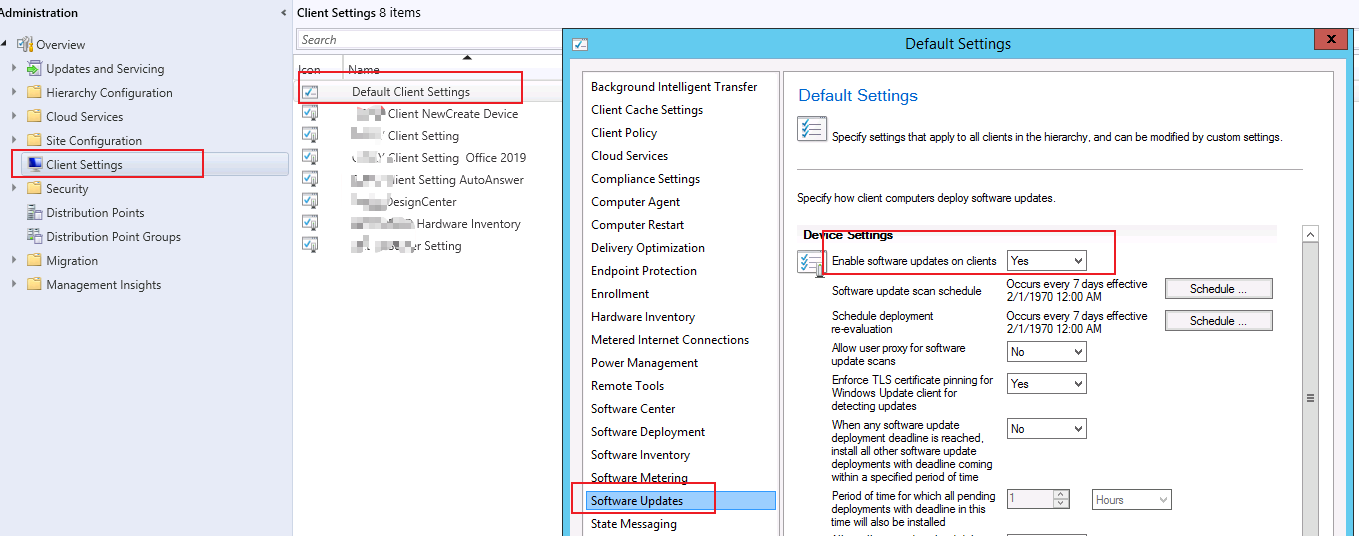
For the status message above:
The error message in the state message is clear. Find the package (xxx20000), right click the programs of the package and on 'Requirements' tag, select "On any platform" to see how it goes.