Folder shows as open in another program after it is content is sent by outlook

R081n 21 Reputation points
2022-09-15T04:29:40.093+00:00

When I attach a file in an email in Outlook, the folder where the file resides cannot be modified/moved, it complains that the folder is open in another program.

When I close Outlook, the "hook" is released and the folder can once again be modified/moved. Also when I open Outlook again it´s fine, it´s only during the same session as the file was sent. The file itself that is attached is not affected in the same way.

I posted the same questio but didn´t get an answer: https://answers.microsoft.com/en-us/outlook_com/forum/all/folder-shows-as-open-in-another-program-after-its/1faefd5e-9101-4416-9197-63533b7574f1

Outlook | Windows | Classic Outlook for Windows | For business
Exchange | Exchange Server | Management
The administration and maintenance of Microsoft Exchange Server to ensure secure, reliable, and efficient email and collaboration services across an organization.
{count} votes

Answer accepted by question author
  1. Faery Fu-MSFT 19,841 Reputation points Moderator
    2022-09-20T08:33:46.78+00:00

    Hi @R081n

    Thanks for your reply.

    According yo my test, I got the same result.
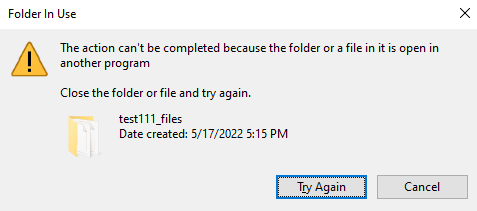
    242931-capture222.png
    Then I used Resource Monitor to find out which process locked the file, it was Outlook.
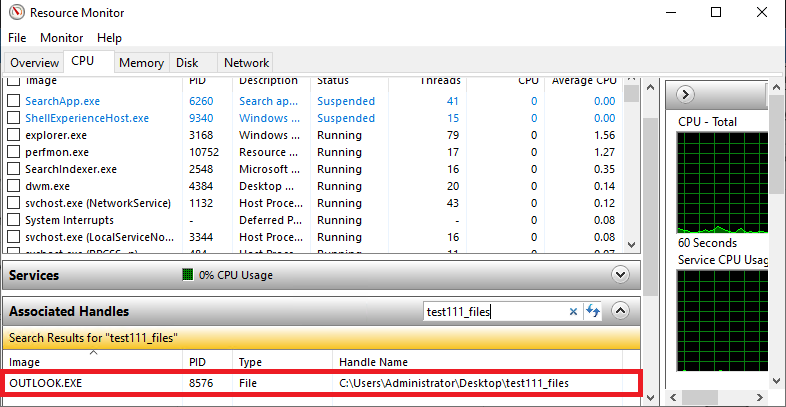
    242885-capture.png
    So I think it was a expected behavior, and as a alternative, it is recommended you attach the file by dragging and dropping.


    If the answer is helpful, please click "Accept Answer" and kindly upvote it, this will make answer searching in the forum easier and be beneficial to other community members as well.


0 additional answers

Sort by: Most helpful

Your answer

Answers can be marked as 'Accepted' by the question author and 'Recommended' by moderators, which helps users know the answer solved the author's problem.
