Exchange | Exchange Server | Management
The administration and maintenance of Microsoft Exchange Server to ensure secure, reliable, and efficient email and collaboration services across an organization.
This browser is no longer supported.
Upgrade to Microsoft Edge to take advantage of the latest features, security updates, and technical support.
' cx='32' cy='32' r='32' /%3E%3Ctext x='50%25' y='55%25' dominant-baseline='middle' text-anchor='middle' fill='%23FFF' %3EIH%3C/text%3E%3C/svg%3E)
We have exchange 2019 and want to export pst of ex employees. These issues are encountered when exporting a .pst file.
Before that everything was working fine even did not change anything on the server side.
The administration and maintenance of Microsoft Exchange Server to ensure secure, reliable, and efficient email and collaboration services across an organization.
' cx='32' cy='32' r='32' /%3E%3Ctext x='50%25' y='55%25' dominant-baseline='middle' text-anchor='middle' fill='%23FFF' %3EAL%3C/text%3E%3C/svg%3E)
Hi,
I wonder how do you export the PST file from mailbox? Do you export it through eDiscovery in the EAC?
If not, can you conveniently tell us how did you export it ?
Not from eDiscovery but I tried both method from EAC, mailbox export to a pst file and also used EMS New-MailboxExportRequest -Mailbox AylaKol -FilePath "\SERVER01\PSTFileShare\xxxxxx.pst" and encountered problems..
' cx='32' cy='32' r='32' /%3E%3Ctext x='50%25' y='55%25' dominant-baseline='middle' text-anchor='middle' fill='%23FFF' %3EAS%3C/text%3E%3C/svg%3E)
Regarding the current issue, PST file size is more than Recoverable Items that might cause mailbox size issue. When you export the mailbox to .pst, all items in the mailbox, including Recoverable Items, will be exported to the .pst file. But when you check mailbox size in EMC, you check the size of the mailbox without Recoverable Items, so this is a size difference. In Recoverable Items, you can find all items deleted by the user which can be restored and calendar versioning its dumpster. For more reference, please see:
Export mailbox to pst larger than mailbox size
http://exchangeblog.pl/en/2012/11/export-mailbox-to-pst-larger-than-mailbox-size/
You can use the following cmdlet to check the percentage completed when Importing PST files to Exchange Server.
Get-MailboxExportRequest | Get-MailboxExportRequestStatistics | ft -AutoSize
For more details, you see: Get-MailboxExportRequest and New-MailboxExportRequest Powershell Command
To get the update status of the export pst file I found this EMS cmdlet Get-MailboxExportRequest -status failed. Get-MailboxExportRequestStatistics -IncludeReport | Format-List > \ex01\pstfiles\report.txt which has detailed the root cause of the error and hopefully resolves the issue.
Hi @Innocent Heartvoice ,
mailbox export to a pst file
Do you mean to export emails through Outlook client ? Can I know which version of Outlook client you use? Have you received any errors when did you export it?
----------
used EMS New-MailboxExportRequest -Mailbox AylaKol -FilePath "\SERVER01\PSTFileShare\xxxxxx.pst" and encountered problems
Please have a check the following points before you export emails using this command:
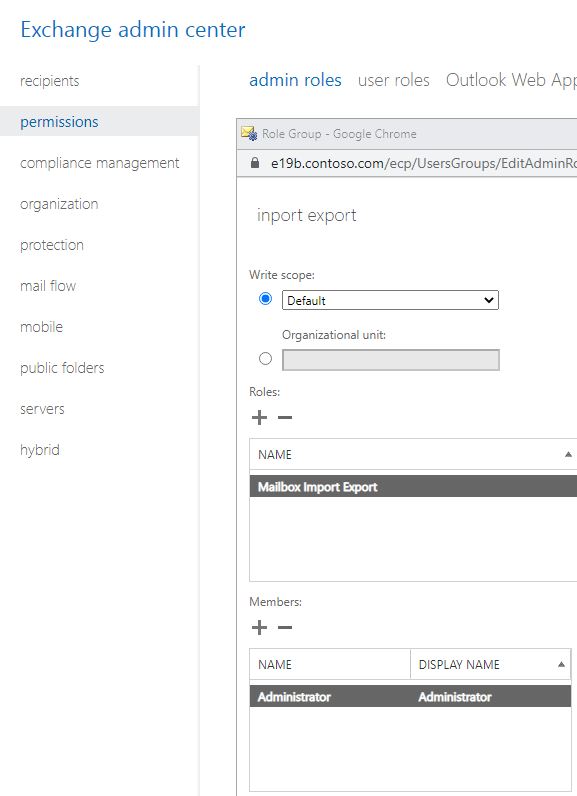
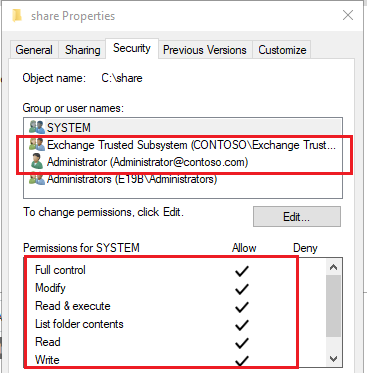
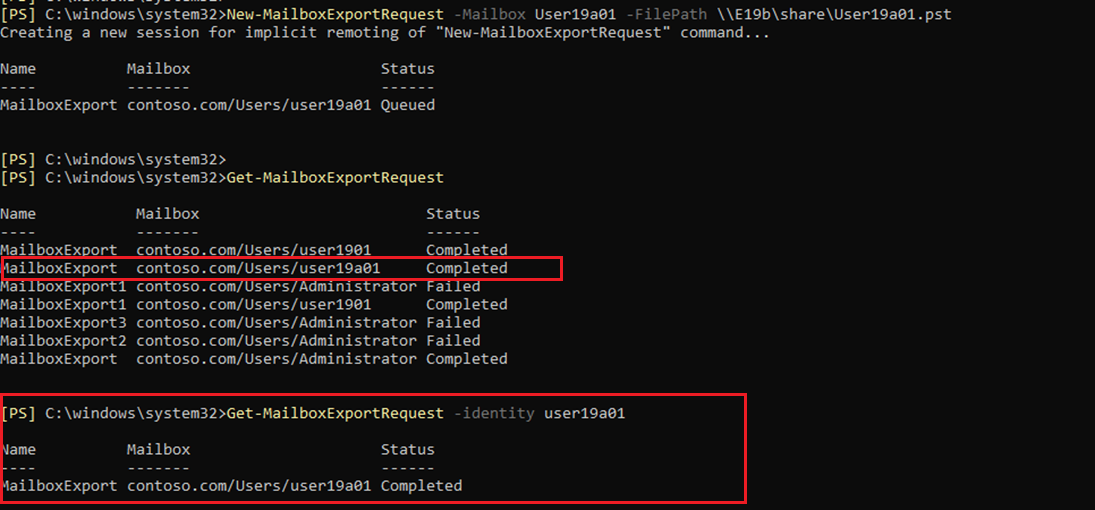
In addition , I would suggest you also could refer to the following link to export specify the user mailbox use eDiscovery search.
Create an In-Place eDiscovery search in Exchange Server | Microsoft Learn
Exchange Server: Export eDiscovery search results to a PST file | Microsoft Learn
If the answer is helpful, please click "Accept Answer" and kindly upvote it. If you have extra questions about this answer, please click "Comment".
Note: Please follow the steps in our documentation to enable e-mail notifications if you want to receive the related email notification for this thread.