Here is the straightforward code inside the WM_PAINT:
   bool HandlePaint() {
           PAINTSTRUCT ps;
           BeginPaint(state.hwnd, &ps);

           if (state.d2dDeviceContext && state.dxgiSwapChain) {
               state.d2dDeviceContext->BeginDraw();

               state.d2dDeviceContext->Clear(D2D1::ColorF(1, 1, 1, 1));

               DWRITE_TEXT_METRICS textMetrics;
               state.displayTextLayout->GetMetrics(&textMetrics);

               D2D1_RECT_F rectf = D2D1::RectF(
                   state.displayRectOrigin.x,
                   state.displayRectOrigin.y,
                   textMetrics.width + 10,
                   textMetrics.height + 10
               );

               state.d2dDeviceContext->DrawRectangle(
                   rectf,
                   state.rectColorBrush,
                   0.0f,
                   nullptr
               );

               state.d2dDeviceContext->DrawTextLayout(
                   D2D1::Point2F(state.displayRectOrigin.x + 5, state.displayRectOrigin.y + 5),
                   state.displayTextLayout,
                   state.textColorBrush
               );

               HRESULT hresult = state.d2dDeviceContext->EndDraw();
               if (hresult == D2DERR_RECREATE_TARGET) {
                   state.d2dDeviceContext->SetTarget(nullptr);
                   SafeRelease(&state.d2dDeviceContext);
                   DiscardBrushes();

                   if (!CreateDirect3DDevice()) return false;
                   if (!CreateDirect2DDevice()) return false;
                   if (!CreateSwapChain(state.hwnd)) return false;
                   if (!ConfigureSwapChain(state.hwnd)) return false;

                   if (!CreateBrushes()) return false;

                   return true;
               }

               state.dxgiSwapChain->Present(1, 0);
           }

           EndPaint(state.hwnd, &ps);
           return true;
       }
The problem is simple, my goal is to surround the text with a blue-colored box, which is like 5 pixels around the text (5 pixel padding), but the rectangle doesnt draw at all.
There is no error.
Also, the variable rectf has a valid rectangle size. I have no idea why the rectangle doesnt drawn on.
Edit: Its a misusage of DrawRectangle(), I should use FillRectangle(), but this makes the other problem, it only draws a small part of the rectangle, not even surround the text!
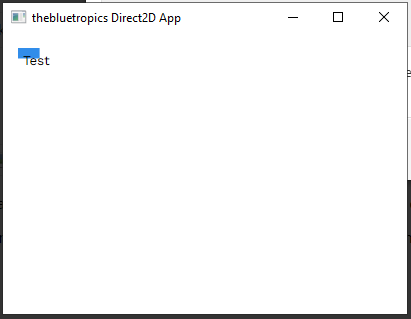
Here is the full code.