Azure Logic Apps
An Azure service that automates the access and use of data across clouds without writing code.
This browser is no longer supported.
Upgrade to Microsoft Edge to take advantage of the latest features, security updates, and technical support.
' cx='32' cy='32' r='32' /%3E%3Ctext x='50%25' y='55%25' dominant-baseline='middle' text-anchor='middle' fill='%23FFF' %3EKW%3C/text%3E%3C/svg%3E)
The error message says it is expecting an array in this context. Any suggestions?

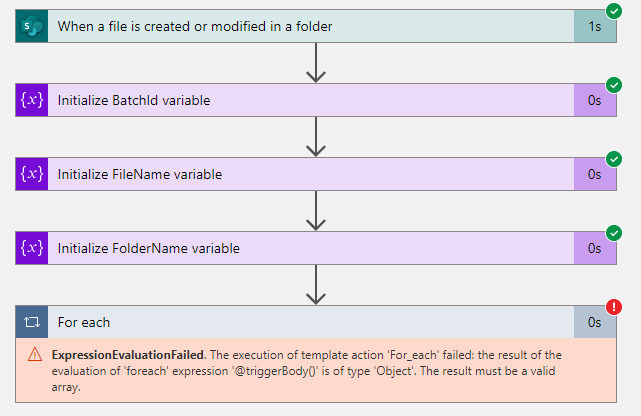


The for each statement is excepting an array to be defined in the trigger body. The likely hood is that you are referencing the entire JSON object from the trigger body with the dynamic value 'triggerBody()'. Chances are if you are wanting to loop through multiple objects within the trigger, then you'd need to reference it like 'triggerBody().AnArray'. The below examples show the syntax in JSON of an object, wrapped with braces "{ }" and arrays, with square brackets "[ ]".
"body :{
"AnArray: ["A","B",C"]
}
If there isn't multiple objects, then simple do not use the foreach loop. If this still doesn't make sense, share the output of the trigger "when a file is created or modified in a folder".
kind regards
Alistair
Thank you! Your response got me thinking out loud, and my Logic App flow did not really call for a For Each statement loop to work, so I ripped it out and the flow worked as expected.