Developer technologies | Windows Forms
A set of .NET Framework managed libraries for developing graphical user interfaces.
This browser is no longer supported.
Upgrade to Microsoft Edge to take advantage of the latest features, security updates, and technical support.

Application: C# WinForm .NETFramework,Version=v4.7.2; VS 2022 on Win10 21H2 Pro
I have a combobox (named RetrieveCBX) on which I'm attempting to use a DrawMode of OwnerDrawFixed in order to differentiate a specific item from the rest of the listing. When an item in the dropdown list has mouse-over or is selected the focus rectangle highlighting is not contrasting the text as is normal:
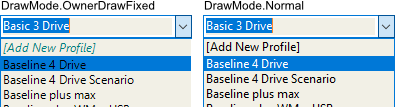
The result is clearly unreadable. I've tried with and without e.DrawFocusRectangle() but that doesn't change behaviour and MSDN examples for e.DrawFocusRectangle() merely show it as a line item in the code with no explanation in the Remarks. Following is (I believe) the relevant code. The DrawItem event handler contains my attempt at solving the problem.
        private void Select4Trkg_Load(object sender, EventArgs e)
        {
            _disinctProfs = DBconnect.LoadProfilesDistinctNames(_identity);
            if (_disinctProfs.Count > 0) RetrieveCBX_NormalSetup();

            if (multiple conditions)  // use Drawmode.Normal
            else  RetrvCBX_Draw();
 }
        private int RetrieveCBX_NormalSetup()
        {
            _profiles = new List<string>();
            foreach (var pname in _disinctProfs) _profiles.Add(pname.ProfName);
            _profiles.Sort();
            if (_state == Terms.Trk_Rvw) _profiles.Insert(0, "[Add New Profile]");

            foreach (var p in _profiles) RetrieveCBX.Items.Add(p);
        }
        private void RetrieveCBX_Draw()
        {
            RetrieveCBX.DrawMode = DrawMode.OwnerDrawFixed;
            RetrieveCBX.DrawItem += RetrieveCBX_DrawItem;
        }
        private void RetrieveCBX_DrawItem(object sender, DrawItemEventArgs e)
        {
            e.DrawBackground();
            Font iFont;
            for (int i = 0; i < _profiles.Count; i++)
            {
                if (i == 0)
                {
                    if (e.Index == i && (e.State == DrawItemState.Selected
                                         || e.State == DrawItemState.Focus
                                         || e.State == DrawItemState.HotLight))
                    {
                        iFont = new Font("Segoe UI", 9, FontStyle.Italic);
                        e.Graphics.DrawString(_profiles[i], iFont, Brushes.White, new RectangleF(
                            e.Bounds.X, e.Bounds.Y, e.Bounds.Width, e.Bounds.Height));
                    }
                    else if (e.Index == i)
                    {
                        iFont = new Font("Segoe UI", 9, FontStyle.Italic);
                        e.Graphics.DrawString(_profiles[i], iFont, Brushes.Teal, new RectangleF(
                            e.Bounds.X, e.Bounds.Y, e.Bounds.Width, e.Bounds.Height));
                    }
                }
                else
                {
                    if (e.Index == i && (e.State == DrawItemState.Selected
                                         || e.State == DrawItemState.Focus
                                         || e.State == DrawItemState.HotLight))
                    {
                        iFont = new Font("Segoe UI", 9, FontStyle.Regular);
                        e.Graphics.DrawString(_profiles[i], iFont, Brushes.White, new RectangleF(
                            e.Bounds.X, e.Bounds.Y, e.Bounds.Width, e.Bounds.Height));
                    }
                    else if (e.Index == i)
                    {
                        iFont = new Font("Segoe UI", 9, FontStyle.Regular);
                        e.Graphics.DrawString(_profiles[i], iFont, Brushes.Black, new RectangleF(
                            e.Bounds.X, e.Bounds.Y, e.Bounds.Width, e.Bounds.Height));
                    }
                }
            }
           e.DrawFocusRectangle();
        }
There must be some parameter I'm missing. Any assistance will be appreciated.

This works for me to change the brush (then DrawString with myBrush ):
        Brush myBrush = System.Drawing.Brushes.Black;
        if ((e.State & DrawItemState.Selected) == DrawItemState.Selected)
            myBrush = System.Drawing.Brushes.White;
with sample from MSDN :
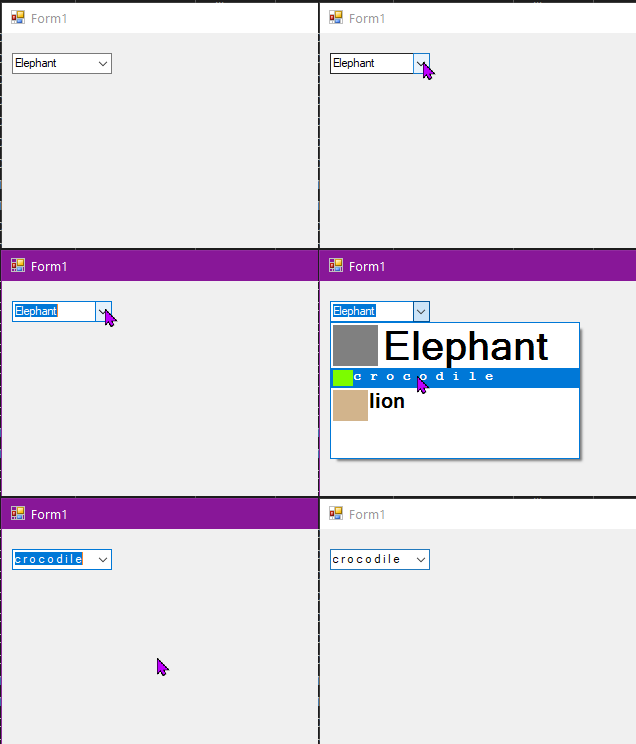
@Castorix31 Thank you very much. It's interesting because I'd used the referenced MSDN article as my template I'd actually already made the brush change to no effect. the solution is::
if (e.Index == i && (e.State == DrawItemState.Selected)
// changed to
if (e.Index == i && ((e.State & DrawItemState.Selected) == DrawItemState.Selected))
Working great.