Microsoft Security | Intune | Configuration Manager | Other
Other Configuration Manager-related features and issues

This browser is no longer supported.
Upgrade to Microsoft Edge to take advantage of the latest features, security updates, and technical support.
' cx='32' cy='32' r='32' /%3E%3Ctext x='50%25' y='55%25' dominant-baseline='middle' text-anchor='middle' fill='%23FFF' %3EDK%3C/text%3E%3C/svg%3E)
Hi All,
I got a question regarding optimized reporting. I read a lot of posts about not turning AI on, due to chaos it might cause (and if I'm correct, it will be also decommissioned)
This doesn't bother me really much, but I realized that the most common reports on software, are based on them. Someone told that there are other ways to get these information and I wonder how?
Reporting should take information stored in DB, which means I can check for example, which devices do have certain software installed, or what version of certain software is installed globally, because that data is gathered with scans, so instead of CMPivot, which tries to get that data in real time.
Are there any hints how I can do proper reporting on what software is on end user machines, without AI?
Thank You
Other Configuration Manager-related features and issues
Answer accepted by question author

Hi, @Damian Kinowski
Thank you for posting in Microsoft Q&A forum.
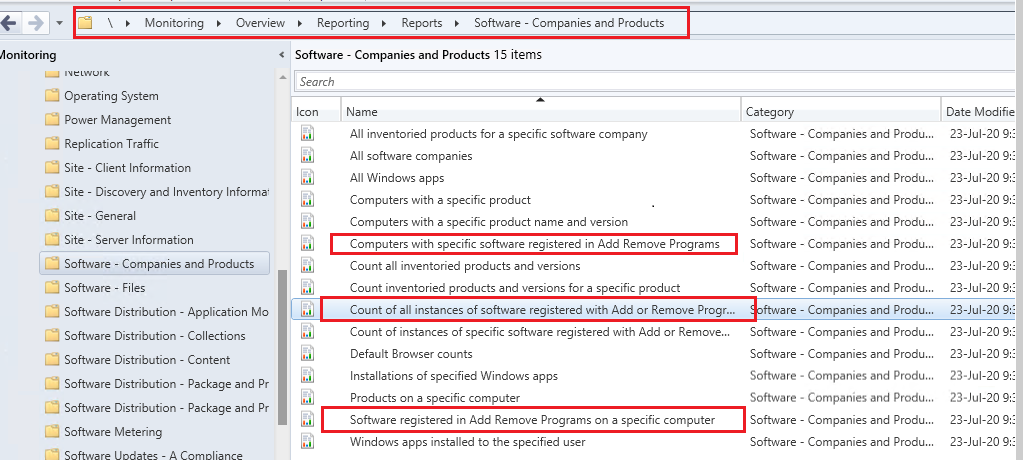
Here is the common reports we use about client software, the data is collected by hardware inventory like Garth mentioned:
Count of all instances of software registered with Add or Remove Programs:
Displays a summary of all instances of software installed and registered with Add or Remove Programs or Programs and Features on computers within the specified collection.
Software registered in Add Remove Programs on a specific computer:
Displays a summary of the software installed on a specified computer that is registered in Add Remove Programs or Programs and Features.
Computers with specific software registered in Add Remove Programs:
Displays a summary of all computers with specified software registered in Add Remove Programs or Programs and Features.
If the answer is the right solution, please click "Accept Answer" and kindly upvote it. If you have extra questions about this answer, please click "Comment".
Note: Please follow the steps in our documentation to enable e-mail notifications if you want to receive the related email notification for this thread.
That is weird, I do not have any of these
Any hint what might be goin on?
If I run any of the Asset Intelligence ones as I mentioned before, nothing comes up, however other seems to work.
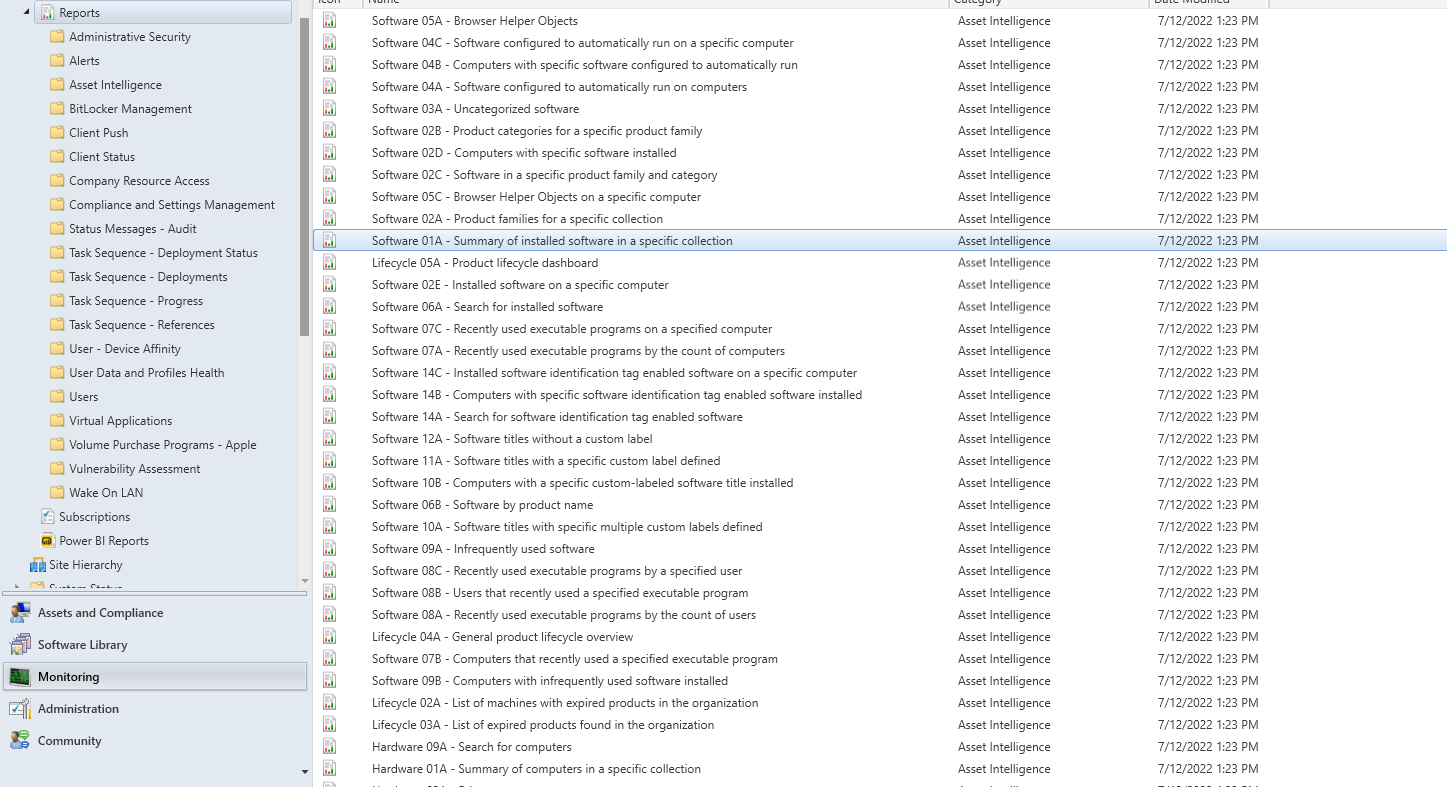

Check you reporting point logs to confirm everything is healthy. It doesn't appear as if it is.
Thanks for hint, I think I found the culprit
System.Web.Services.Protocols.SoapException: The path of the item 'Software - Companies and Products' is not valid. The full path must be less than 260 characters long; other restrictions apply. If the report server is in native mode, the path must start with slash. ---> Microsoft.ReportingServices.Diagnostics.Utilities.InvalidItemPathException: The path of the item 'Software - Companies and Products' is not valid. The full path must be less than 260 characters long; other restrictions apply. If the report server is in native mode, the path must start with slash.~   at Microsoft.ReportingServices.Library.ReportingService2005Impl.GetPolicies(String Item, Policy[]& Policies, Boolean& InheritParent)~   at Microsoft.ReportingServices.WebServer.ReportingService2005.GetPolicies(String Item, Policy[]& Policies, Boolean& InheritParent)	SMS_SRS_REPORTING_POINT	9/22/2022 4:04:47 PM	15124 (0x3B14)
Failed to retrieve existing folder security for folder [Software - Companies and Products].	SMS_SRS_REPORTING_POINT	9/22/2022 4:04:47 PM	15124 (0x3B14)
I have see this error many time before (even in my own labs) but have never found the solution to this problem. Maybe @Jason Sandys knows how to solve it?

I'm not familiar with this issue. Please open a support case for assistance.
To summarize, I wanted to know how to report without AI on what software is installed on all devices.
@AllenLiu-MSFT showed me some reports that could be used instead but I couldn't find them at all.
@Garth advised to check logs which gave me following:
System.Web.Services.Protocols.SoapException: The path of the item 'Software - Companies and Products' is not valid. The full path must be less than 260 characters long; other restrictions apply. If the report server is in native mode, the path must start with slash. ---> Microsoft.ReportingServices.Diagnostics.Utilities.InvalidItemPathException: The path of the item 'Software - Companies and Products' is not valid. The full path must be less than 260 characters long; other restrictions apply. If the report server is in native mode, the path must start with slash.~   at Microsoft.ReportingServices.Library.ReportingService2005Impl.GetPolicies(String Item, Policy[]& Policies, Boolean& InheritParent)~   at Microsoft.ReportingServices.WebServer.ReportingService2005.GetPolicies(String Item, Policy[]& Policies, Boolean& InheritParent)    SMS_SRS_REPORTING_POINT    9/22/2022 4:04:47 PM    15124 (0x3B14)
 Failed to retrieve existing folder security for folder [Software - Companies and Products].    SMS_SRS_REPORTING_POINT    9/22/2022 4:04:47 PM    15124 (0x3B14)
I've fixed this with reinstalling the reporting services role.
This made all reports to show again, which I could use from now on.
@Jason Sandys Advised about AI and I've turned it on and enhanced my reporting even further
Thanks all:)
Thanks for the update.
I read a lot of posts about not turning AI on, due to chaos it might cause
Although yes, shouldn't just blindly enable all of the classes in AI, it's quite standard to enable some of the classes including the software inventory related ones as these add a layer of rationalization and reporting. Thus, I'd completely disagree with anyone who claims it causes any sort of chaos.
it will be also decommissioned
No, this is not correct. There are a couple of pieces of AI including the online catalog that will be deprecated, but the core functionality that most folks use is not going away. Full details at https://learn.microsoft.com/en-us/mem/configmgr/core/clients/manage/asset-intelligence/deprecation.
Are there any hints how I can do proper reporting on what software is on end user machines, without AI?
This is a loaded, unanswered question as you must first define what it means for software to be "on end user machines" as there are multiple ways to potentially achieve this generic state and no single, enforced standard within Windows (unfortunately). That was one of the main reasons AI was created but even it can fall short in reporting what is "on end user machines".
Hi and thanks for awesome reply.
Based on it I will turn on AI and try to find options that would suit me.
During the work with the post and within infrastructure, I can see that part of my reports do not appear due to error message I've posted above.
Returning to question in main post, by end user devices I mean W10. I would like to achieve results like:
These seem pretty basic to me but I was deceived that part of reports work and part not, hence whole confusion. I am trying to figure out a way to deal with above error now, but the question still stays the same
Thanks!
Hardware inventory will get all the application installed (arp data), plus there are builtin report for it. These report do NOT use ai data.