

IIS 10 - Run Asp.Net Core on port 80

Cenk 1,041 Reputation points
2022-09-22T11:41:47.83+00:00

Hello,

I wonder if I can run my application on port 80? If so, how.

Thank you.

Windows development | Internet Information Services
0 comments No comments
{count} votes

Answer accepted by question author
  1. Sam Wu-MSFT 7,566 Reputation points Microsoft External Staff
    2022-09-23T03:21:21.55+00:00

    @Cenk

    You can follow the steps below to set the port number to 80:

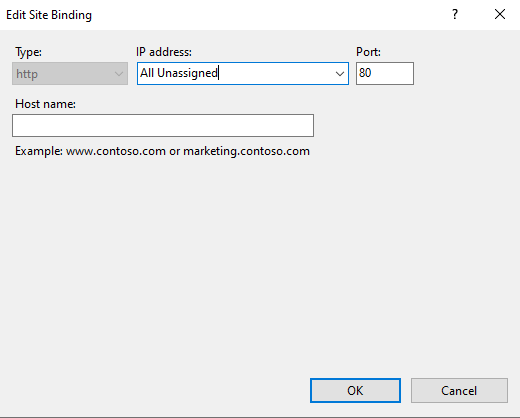
    1. Double-click Internet Information Services (IIS) Manager.
    2. Right click your website and select Bindings.
    3. Select the http(https) setting and click Edit, change the port number to 80 and click OK.
    244113-5.png


    If the answer is the right solution, please click "Accept Answer" and kindly upvote it. If you have extra questions about this answer, please click "Comment".

    Note: Please follow the steps in our documentation to enable e-mail notifications if you want to receive the related email notification for this thread.

    0 comments No comments

2 additional answers

Sort by: Most helpful
  1. Sreeju Nair 12,756 Reputation points
    2022-09-22T12:54:27.253+00:00

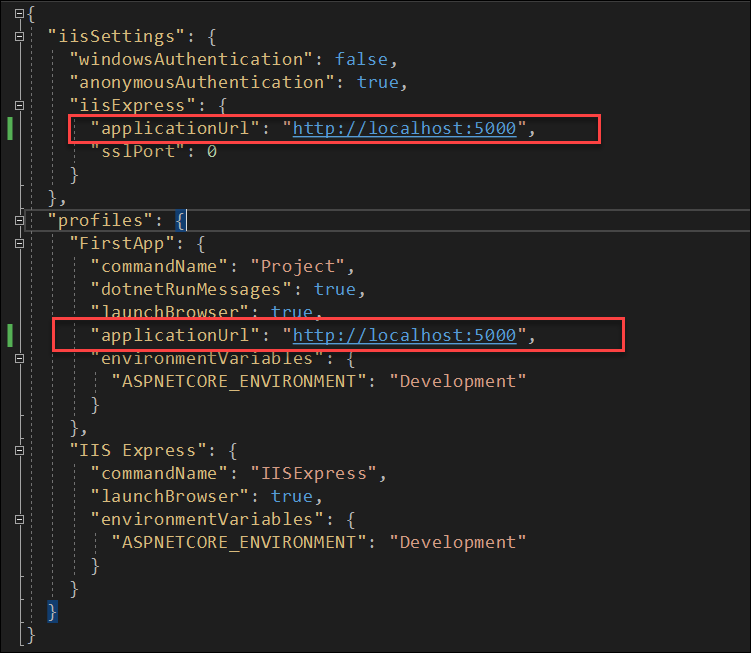
    Do you mean to run the application from Visual Studio under port 80, or to host the application in IIS under Port 80? Visual studio uses Kerstel or IIS express to run the application. To change the port the application is using, Open the file lunchSetting.json. You will find it under the properties folder in your project and as shown below.

    243850-image.png

    If you are planning to host the application under IIS, refer the following article to see to install ASP.Net core hosting bundle in IIS.
    https://learn.microsoft.com/en-us/aspnet/core/host-and-deploy/iis/?view=aspnetcore-6.0

    In IIS, you can change the bindings to define the port. See the following article.

    https://support.gpsgate.com/hc/en-us/articles/360017075999-How-to-change-the-default-IIS-port-for-your-server-website

    Hope this helps.

    0 comments No comments

  2. Cenk 1,041 Reputation points
    2022-09-22T13:21:02.527+00:00

    yes hosting on IIS port 80.

    0 comments No comments

Your answer

Answers can be marked as 'Accepted' by the question author and 'Recommended' by moderators, which helps users know the answer solved the author's problem.