Azure Machine Learning
An Azure machine learning service for building and deploying models.
This browser is no longer supported.
Upgrade to Microsoft Edge to take advantage of the latest features, security updates, and technical support.
' cx='32' cy='32' r='32' /%3E%3Ctext x='50%25' y='55%25' dominant-baseline='middle' text-anchor='middle' fill='%23FFF' %3EAG%3C/text%3E%3C/svg%3E)
I am using Azure ML Notebook with python kernel to run the following code:
%reload_ext rpy2.ipython

from azureml.core import Dataset, Datastore,Workspace

subscription_id = 'abc'
resource_group = 'pqr'
workspace_name = 'xyz'

workspace = Workspace(subscription_id, resource_group, workspace_name)
datastore = Datastore.get(workspace, 'mynewdatastore')

# create tabular dataset from all parquet files in the directory
tabular_dataset_1 = Dataset.Tabular.from_parquet_files(path=(datastore,'/RNM/CRUD_INDIFF/CrudeIndiffOutput_PRD/RW_Purchases/2022-09-05/RW_Purchases_2022-09-05T17:23:01.01.parquet'))
df=tabular_dataset_1.to_pandas_dataframe()
print(df)
After executing this code, I am getting the Cancelled message from the notebook cell and also getting the message on top of the cell as:
 The code being run in the notebook may have caused a crash or the compute may have run out of memory.
 Jupyter kernel is now idle.
 Kernel restarted on the server. Your state is lost.
The Parquet file which I am using in the code is of size 20.25 GiB and I think due to the large size of this file, this problem is being created. Can anyone please help me how to resolve this error without breaking the file into multiple files of small sizes. Any help would be appreciated.

@Ankit19 Gupta What is the compute size or type that is setup for your instance? I think the error does indicates the processing of your file fails.
There is an option to mount the data from Azure storage or dataset which could reduce the need to read the data from storage account or datastore while processing this command.
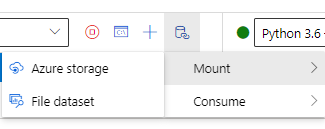
If this does not help, you could try creating a new instance with higher capacity and check if it works since the compute instance cannot be scaled once created. Thanks!!
@romungi-MSFT 2 cores, 14 GB RAM and 28 GB Disk Space is allocated. This code can read small-sized parquet files like 300 MiB but while reading files with sizes in GiB, it is crashing. Is it possible to resolve this error through some code so that it can read and process large-sized data in notebook cells ?
@Ankit19 Gupta After checking with the dev team, they confirmed that using such a huge paraquet file with compute instance will exhaust the memory on any instance type. It is recommended to use smaller files by pre-processing the file.
' cx='32' cy='32' r='32' /%3E%3Ctext x='50%25' y='55%25' dominant-baseline='middle' text-anchor='middle' fill='%23FFF' %3EB%3C/text%3E%3C/svg%3E)
Hello
@romungi-MSFT I have the same issue reading a parquet file of 66Mb and a compute instance of 4cores, 28Gb Ram and 56Gb disk.
Is there any possible reason.
Thanks