Azure Logic Apps
An Azure service that automates the access and use of data across clouds without writing code.
This browser is no longer supported.
Upgrade to Microsoft Edge to take advantage of the latest features, security updates, and technical support.

I am using Logic app to detect any change in a FTP folder. There are 30+ files and whenever there is any change the storage copies the file to blob. The issue is it's firing on each file if 30 files are changed then it will fire 30 times. I want it to fire only once no matter how many files in a folder changed. After blobs are copied I am firing a Get request so that my website is updated also. Am I using the wrong approach? Below you can see my whole logic.


@Alamzaib Thanks for reaching out and apology for the delay. As per your verbatim you have mentioned that you are using the FTP connector but as per your screenshot (that has included file content property on the trigger) it looks like you are using the SFTP-SSH connector trigger as FTP trigger doesn't have that property. Please correct if my understanding is correct.
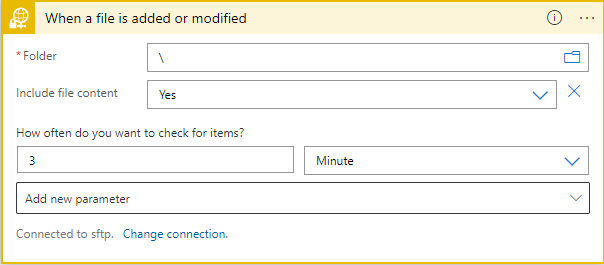
If you are using When a file is added or modified trigger, then it will trigger your workflow on every file that is modified or added, and this is expected behavior that it will trigger your workflow on every file that is modified or added.
But if you are using the When files are added or modified (properties only) then this action has the setting Split On property which you can disable (by default enabled) so your workflow will execute only once for all the files that are added or modified for the How often do you want to check for the item? property time you have configured.
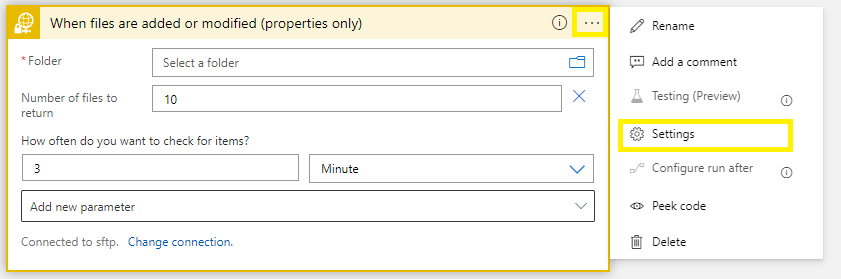
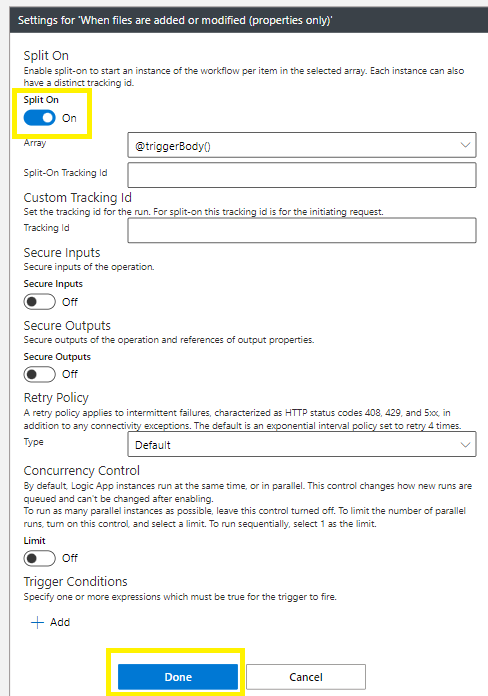
In case if it is FTP connector then you need to disable the Split On property and it still holds valid. For more details refer to this section.