Windows Storage Pool : cannot delete 2 disks

Blacktime2 1 Reputation point
2022-09-25T14:18:44.71+00:00

Hello guys,

I need your expertise today regarding a Windows storage pool problem.
Thank you very much to those who will take the time to answer me !

I have a computer with Windows 11 and a storage pool composed of 6 disks of 1To.
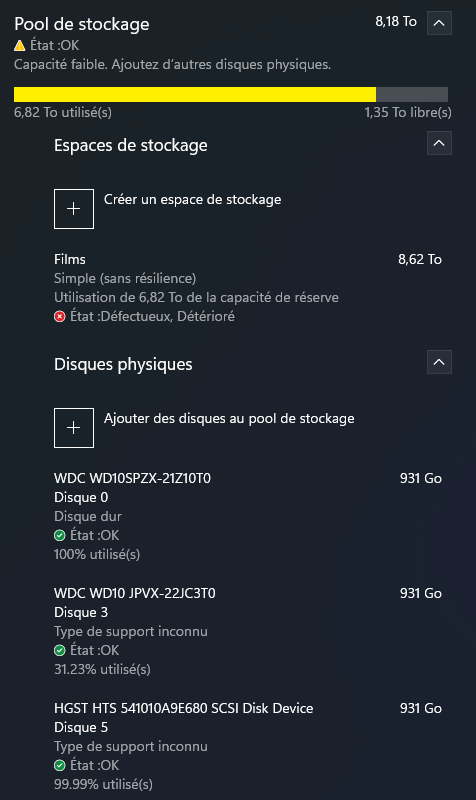
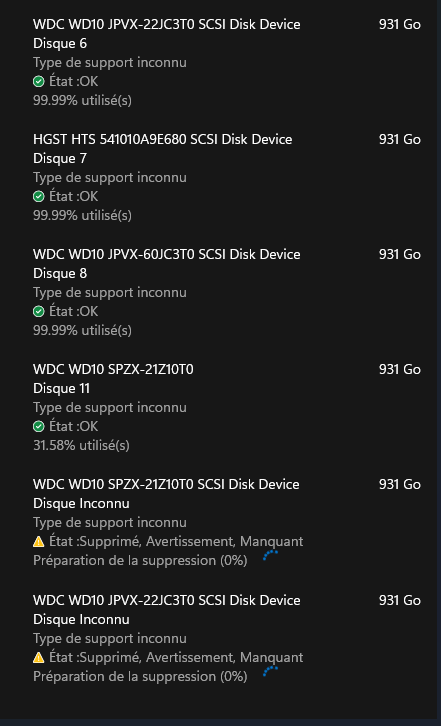
The problem is that after many hardware failure, my storage pool it was damaged. I have the same disk twice and I can't delete the duplicates.
Note that I have no raid, it is a simple pool (without resilience).
My pool :

244499-capture-d-cran-2022-09-25-133338.png

244507-capture-d-cran-2022-09-25-133408.png

As you can see, the last two disks are duplicates of the previous two (because I tried to delete them and then put them back).
At this point, everything is almost fine except that I would like to get rid of the two duplicates (the last two disks) but the delete bar has been stuck at 0% for over 18 hours now.
Do you have any ideas?

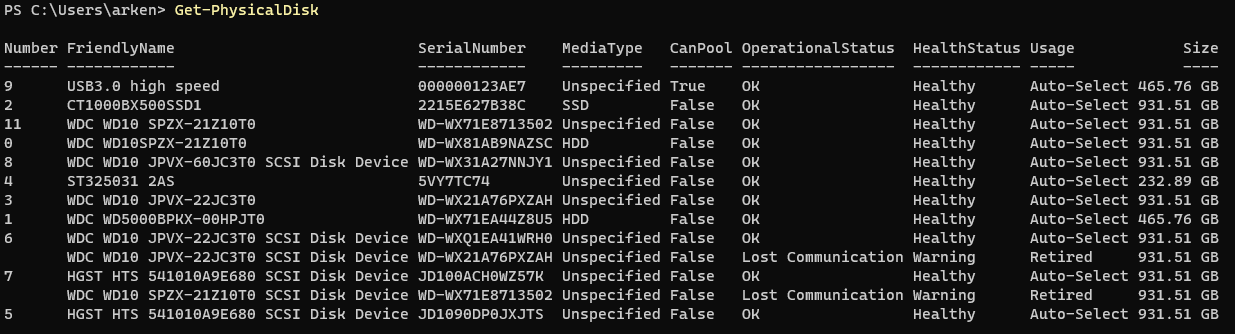
I also tried with PowerShell. The disks list :
244528-capture-d-cran-2022-09-25-133522.png

And the attempt to delete (which did not work) :

244555-capture-d-cran-2022-09-25-133437.png

Windows for business | Windows Server | Storage high availability | Other
Windows for business | Windows Client for IT Pros | User experience | Other
0 comments No comments
{count} votes

1 answer

Sort by: Most helpful
  1. Limitless Technology 45,126 Reputation points
    2022-09-28T08:43:13.72+00:00

    Hello there,

    I would suggest you to check the health and operational states in Server Manager, or with PowerShell.Every storage pool has a health status - Healthy, Warning, or Unknown/Unhealthy, as well as one or more operational states.

    You can use the steps as per this article https://learn.microsoft.com/en-us/windows-server/storage/storage-spaces/storage-spaces-states

    The best practice when decommissioning a Storage Spaces system is to remove the Virtual Disks, then the Storage Pool. This will release the disk drives and remove the Storage Pool metadata. When removing single disks and leaving the Storage Pool intact, you will simply retire the disk.

    ---------------------------------------------------------------------------------------------------------------------------

    --If the reply is helpful, please Upvote and Accept it as an answer--


Your answer

Answers can be marked as 'Accepted' by the question author and 'Recommended' by moderators, which helps users know the answer solved the author's problem.