Developer technologies | XAML
A language based on Extensible Markup Language (XML) that enables developers to specify a hierarchy of objects with a set of properties and logic.
This browser is no longer supported.
Upgrade to Microsoft Edge to take advantage of the latest features, security updates, and technical support.
' cx='32' cy='32' r='32' /%3E%3Ctext x='50%25' y='55%25' dominant-baseline='middle' text-anchor='middle' fill='%23FFF' %3ESS%3C/text%3E%3C/svg%3E)
Please see the attached image
We need to design the tooltip as shown in below picture(green area). We are looking for the solution with "Path data" in xaml file, similar to the solution provided in the below link.
https://learn.microsoft.com/en-us/answers/questions/649007/baloon-tooltip-above-the-overlay-using-wpf.html
 Example for Path data :
 <Path x:Name="Container"
Canvas.Left="0" Canvas.Top="0"
Margin="0" Data="M 0,45 L10,40 L160,40 C160,40 170,40 170,35 L170 10 C170,10 170,5 160,5 L10,5 C10,5 0,5 0,10 L0,35 C0,35 0,40 0,45 Z"
Stroke="LightSkyBlue">
<Path.Fill>
<SolidColorBrush Color="DeepSkyBlue"/>
</Path.Fill>
</Path>
' cx='32' cy='32' r='32' /%3E%3Ctext x='50%25' y='55%25' dominant-baseline='middle' text-anchor='middle' fill='%23FFF' %3EHL%3C/text%3E%3C/svg%3E)
For drawing paths, you could try to refer to Shapes and Basic Drawing in WPF Overview.
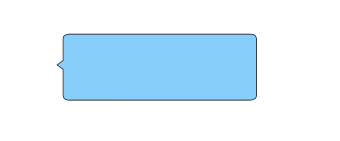
The bubble tooltip is in the Grid, you can set the length and width of the Grid to set its size.
<Grid Width="300" Height="100">
            <Path Fill="LightSkyBlue" Stretch="Fill" Stroke="#FF000000"
                  Data="M 0,40 L5,45  L5,75 C5,75 5,80 10,80 L160,80 C160,80 165,80 165,75 L165,10 C165,10 165,5 160,5 L10,5 C10,5 5,5 5,10 L5,35 Z" />
        </Grid>
The result:
----------------------------------------------------------------------------
If the response is helpful, please click "Accept Answer" and upvote it.
Note: Please follow the steps in our documentation to enable e-mail notifications if you want to receive the related email notification for this thread.