Microsoft 365 and Office | SharePoint | For business | Windows
A group of Microsoft Products and technologies used for sharing and managing content, knowledge, and applications.

This browser is no longer supported.
Upgrade to Microsoft Edge to take advantage of the latest features, security updates, and technical support.
' cx='32' cy='32' r='32' /%3E%3Ctext x='50%25' y='55%25' dominant-baseline='middle' text-anchor='middle' fill='%23FFF' %3EJW%3C/text%3E%3C/svg%3E)
Hi , I set the term set on my sharepoint online website,
like the picture, (term set is "JON" & "JET")

but where can I find the term set which I set before ?
I see the guide of microsoft documentation

like the center picture , It will automative producing like the "tag"?
where can I get the answer?

Hi @Jasper Wang
We are currently doing some research on this issue, will let you know as soon as possible.
Hi @Jasper Wang
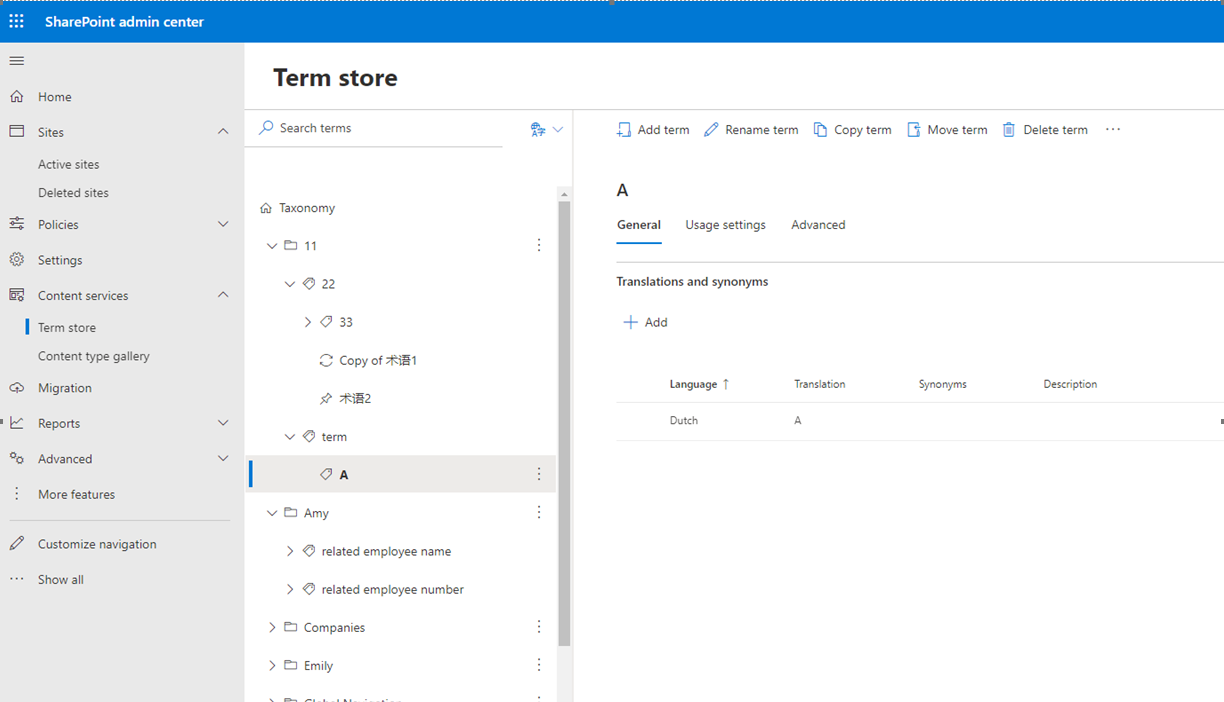
You could find your term in term store: log in SharePoint admin center > Content Services > Term store (here you could find all the term set created in the same tenant)
If the answer is helpful, please click "Accept Answer" and kindly upvote it. If you have extra questions about this answer, please click "Comment".
Note: Please follow the steps in our documentation to enable e-mail notifications if you want to receive the related email notification for this thread.
Yes,I can find it by myself.
but I want to know how to show it on my site?
like the example on the microsoft documentation
245044-image.png
Hi @Jasper Wang
If you want to use these tags in a managed metadata column:
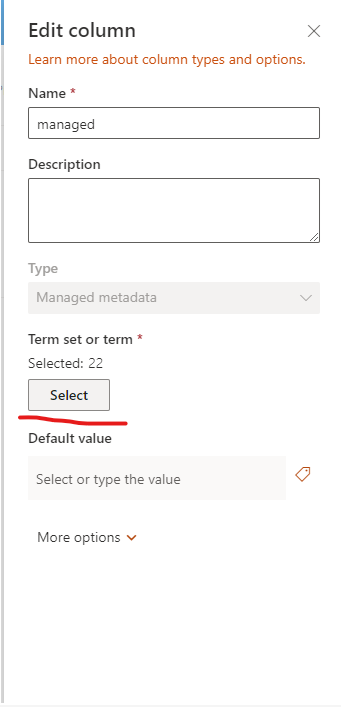

After you create the managed metadata column, you could use the tags to fill in the field:

If the answer is helpful, please click "Accept Answer" and kindly upvote it. If you have extra questions about this answer, please click "Comment".
Note: Please follow the steps in our documentation to enable e-mail notifications if you want to receive the related email notification for this thread.
OK. I got it on the new column ! thanks.
but I still want to know how to let the "tag" format accessing?

Hi @Jasper Wang
Currently in UI we could not access the view in screenshot you provide. When it comes to term store, we could only add global term group in SharePoint center where you have found.
Or you could add site level term groups in private site which is not contained in public site:


There are on other places to manage term store except the two.
