Azure Storage
Globally unique resources that provide access to data management services and serve as the parent namespace for the services.
This browser is no longer supported.
Upgrade to Microsoft Edge to take advantage of the latest features, security updates, and technical support.
' cx='32' cy='32' r='32' /%3E%3Ctext x='50%25' y='55%25' dominant-baseline='middle' text-anchor='middle' fill='%23FFF' %3EH0%3C/text%3E%3C/svg%3E)
Hi,
I need your help as new to AZ copy.
I have on -primise file share server and blob storage where client storing same files. Now I need to sync azure blob storage with on-prem by using AZCopy tool.
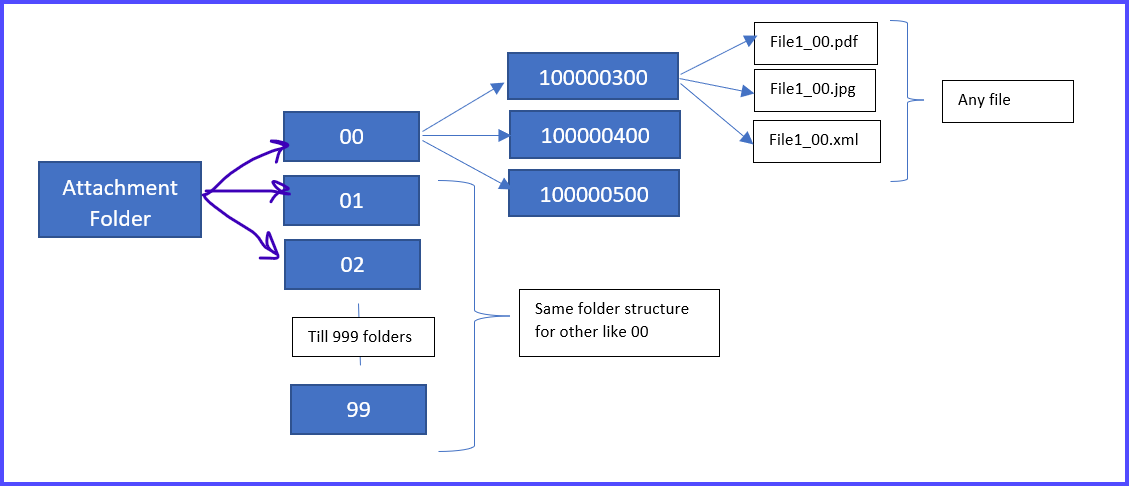
On-prem structure workflow – on-prem server have Attachment folder for each environment with 0-99 sub folders. Now whenever system generate loan like 100000367, all the documents associated to loan goes to last 2-digit folder (for “100000367”, all documents file go in 67 folder which loanid folder and then store all files in it.)
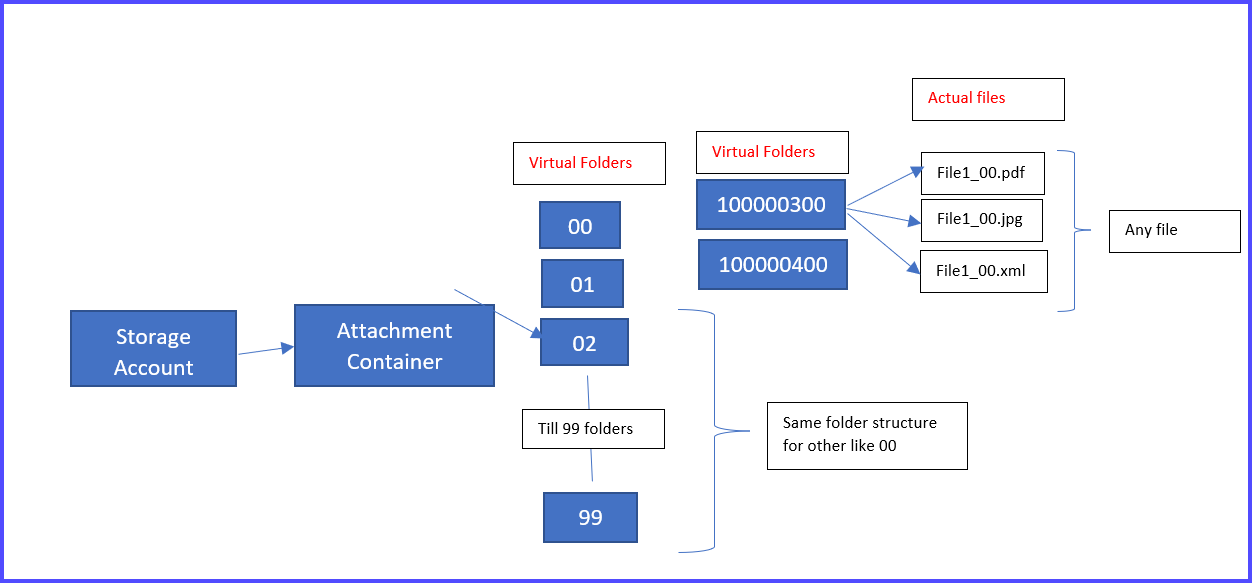
Azure storage workflow - have Attachment container for each environment with 0-99 sub virtual folders. Now whenever system generate loan like 100000367, all the documents associated to loan goes to last 2-digit folder (for “100000367”, all documents’ files go in 67 virtual folder which loanid virtual folder and then store all files in it.).
System storing this folder structure mapping of each file in client database table like loanid – parent folderid-child folder and files
Parent folder id folderid filename Storage type
67 100000367 File1.pdf, File2.xml On-prem
67 100000367 File1.pdf, File2.xml, File3.jpg Blob storage
Is there a way to script AZCopy tool to perform file to file mapping and sync both environment for each client with the help of mapping stored in database?
Any suggestion on tool or script for reference would great help…
Note - client is not using azure file share due to cost constraint, and hence azure file sync is not an option.

@HemantSudehely-0557 , Firstly, Thanks for raising this good question. I’m checking on this internally with the product team and will get back to you with something concrete. Apologies for the delay in responding here,
Thanks for help
@HemantSudehely-0557 , For better understanding the issue : Why is the mapping required? I’m a bit confused. Why can’t they sync local -> blob directly since they have the same folder structure?
Hi Sumanth,
The application going to have multiple sub institutions and these sub-institutions and choice to configure storage(on-prem, Azure file share, blob storage) so where ever they create loan, or delete or update any existing resources, we need to sync old three storage. now on-prem and Azure File share support nested folder structure but azure blob storage i guess not as i am not sure how AZCopy sync the virtual folder.
I have tried creating nested folder in azure portal but it is only allowing me to download file not the folder structure associated to file.
Does this answer your question...
@HemantSudehely-0557 You can use virtual directories with the blob service. In other words, there’s no need to create the virtual directories explicitly, you just name your blobs accordingly.
For example, if you name your blob /container/dir1/dir2/file.txt, you have virtual directories called dir1 which has a sub virtual directory dir2.
I guess I still don’t understand why you are looking for mapping.
So if i not use file to file mapping, does AZCopy sync will both storage no matter how much nested level file storage I have?
@HemantSudehely-0557 Yes. https://learn.microsoft.com/en-us/azure/storage/common/storage-use-azcopy-blobs-synchronize?toc=%2Fazure%2Fstorage%2Fblobs%2Ftoc.json
Please let us know if you have any further queries. I’m happy to assist you further.
----------
Please do not forget to " ” and “up-vote” wherever the information provided helps you, this can be beneficial to other community members.
