Azure Functions
An Azure service that provides an event-driven serverless compute platform.
This browser is no longer supported.
Upgrade to Microsoft Edge to take advantage of the latest features, security updates, and technical support.
' cx='32' cy='32' r='32' /%3E%3Ctext x='50%25' y='55%25' dominant-baseline='middle' text-anchor='middle' fill='%23FFF' %3ECK%3C/text%3E%3C/svg%3E)
Hi Team,
There is requirement to set the connection string in EventHubTrigger dynamically. Either using KeyVault, CI/CD pipeline or other config file. I tried multiple way but its not working. Somehow we can not expose connection string in function app configuration as well. What are the possible way to implement this.
sample code:
[Function("HubTriggerFunction")]
public void Run([EventHubTrigger("demoeventhubname", Connection = "demoeventhunconnection")] string[] input)
{
_logger.LogInformation($"Test Event Hub: {input[0]}");
}
My Local Setting file:
"demoeventhunconnection": "@Microsoft.KeyVault(VaultName=demo-dev-kv;SecretName=AzureEventHubConnectionString)"
Thanks,
Chandan Singh
' cx='32' cy='32' r='32' /%3E%3Ctext x='50%25' y='55%25' dominant-baseline='middle' text-anchor='middle' fill='%23FFF' %3EBL%3C/text%3E%3C/svg%3E)
Did you get to the point of adding the hub connection string to local.settings.json , run locally (visual studio debugger?) and confirm it can pull event/messages from the hub?
Did you add a Vault Policy to allow the azure function to access the vault?
Yes I added hub connection string in local.setting.json. Its throwing error.. I did not added any policy on key vault. function is in error: Microsoft.Azure.WebJobs.Host: Error indexing method 'Functions.HubTriggerFunction'. Microsoft.Azure.EventHubs: Illegal connection string parameter name '@Microsoft.KeyVault(VaultName' (Parameter 'connectionString').
Hi @Chandan Kumar Singh
Did you manage to get that working? I noticed some single quotes on your vault reference. I think that will cause an error
'@Microsoft.KeyVault(VaultName' (Parameter '**connectionString'**)
Notice mine is : "demoeventhunconnection": "@Microsoft.KeyVault(VaultName=sv-fordemo-akl;SecretName=connectionString)"
Le me know if you need further suggestions.
Rewinding back to before adding the connection string to the vault, did that work if you add the hub connection string direct in local.settings.json?
Try to add like this first and hit F5 to make sure you can first make work like this and be sure the value you will add to the vault is correct
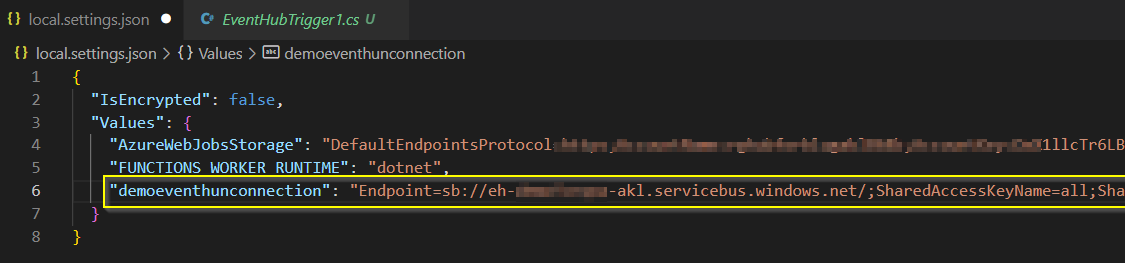
Once you are sure it works without the vault:
1. make sure you are logged in in Visual Studio with the same login you use to access azure (will use different account for test/prod in the cloud)
2. go to the vault , create the secret and add the connection string to the value

3. in the left menu in the vault, click access policies
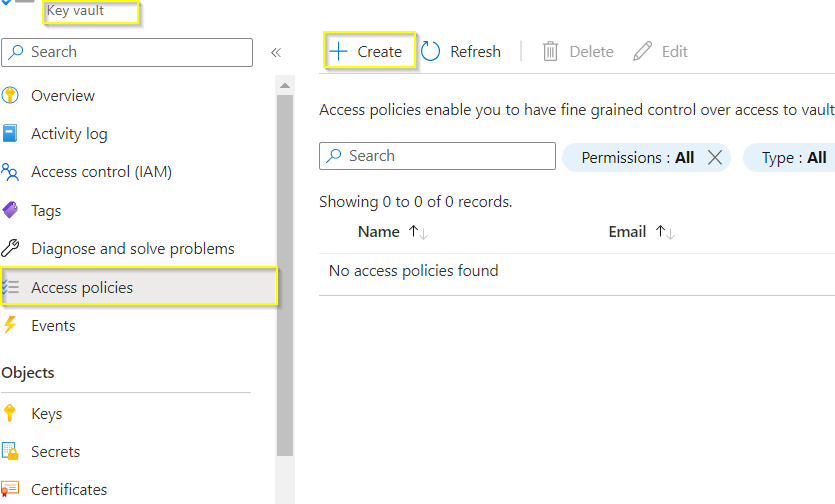
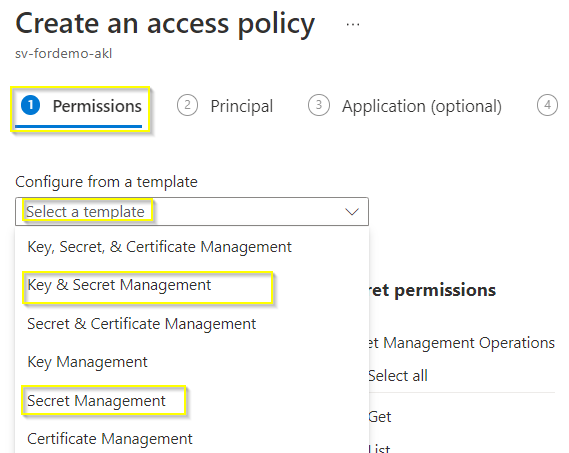
4. select a template. we are only reading secrets:
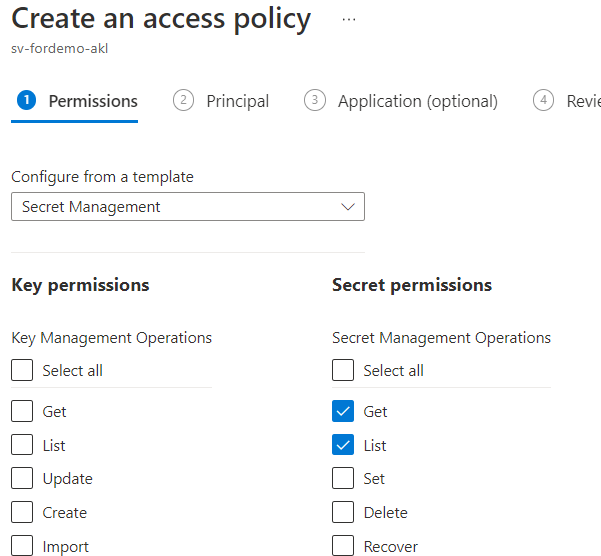
5.We are just reading, so get and list should be enough
6. step 2 we add the same user we have in Visual studio, I login in VS as myself, so I grant the permission to myself. Different story when you deploy to test or prod in the cloud. there you can use a proper service account
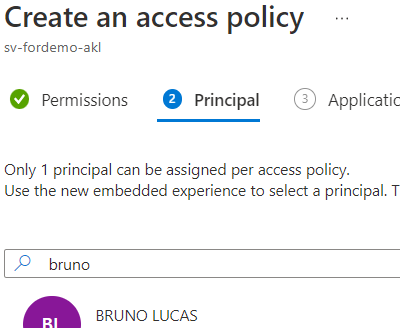
7.skipp all to way to the last step and create. You should now have a policy that will allow you to use the vault reference
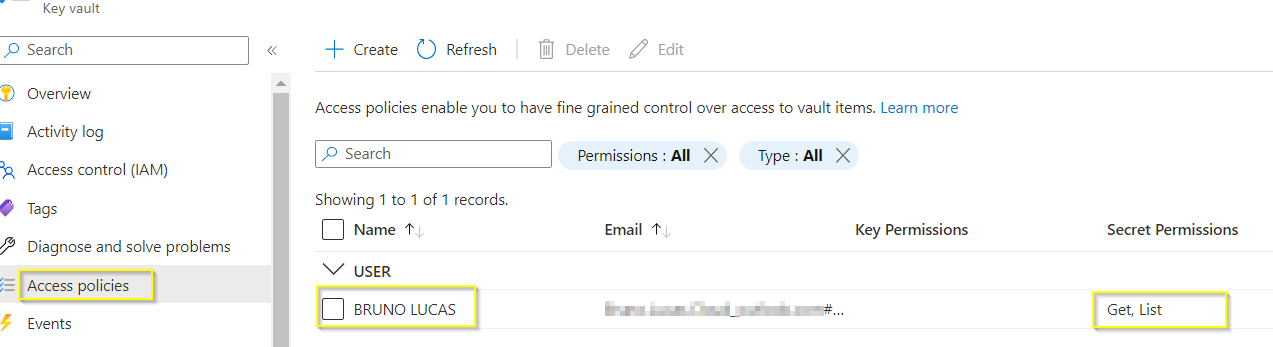
make sure you are using the correct sintax for vault reference: https://learn.microsoft.com/en-us/azure/app-service/app-service-key-vault-references?tabs=azure-cli#reference-syntax
This worked for me:
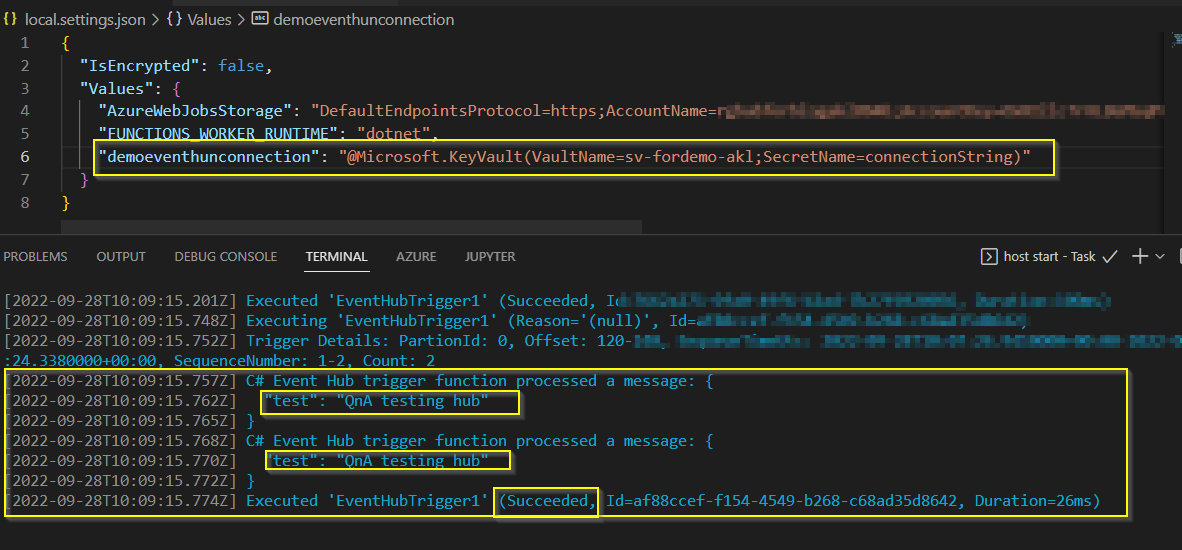
Case that information helps, don't forget to vote or mark as Answer to help the community. Cheers!