Exchange | Exchange Server | Management
The administration and maintenance of Microsoft Exchange Server to ensure secure, reliable, and efficient email and collaboration services across an organization.
This browser is no longer supported.
Upgrade to Microsoft Edge to take advantage of the latest features, security updates, and technical support.
' cx='32' cy='32' r='32' /%3E%3Ctext x='50%25' y='55%25' dominant-baseline='middle' text-anchor='middle' fill='%23FFF' %3ESA%3C/text%3E%3C/svg%3E)
My Server with Exchange 2013 was recently crashed while Exchange 2013 data was in migration process, but unfortunately in new server with exchange 2013 users half data migration is completed and other user data is stuck in old server which was crashed.
I am trying to recover exchange server so data migration can be completed on new server.
But unfortunately the machine which was crashed is giving below mention issue while installation of Exchange server 2013.
Please guide how to resolve this.
Your quick response in this regard will be highly appreciated.
Regards,
Sam
Setup.exe /IAcceptExchangeServerLicenseTerms /Mode:RecoverServer
Welcome to Microsoft Exchange Server 2013 Unattended Setup
Copying Files...
File copy complete. Setup will now collect additional information needed for
installation.
Languages
Mailbox role: Transport service
Mailbox role: Client Access service
Mailbox role: Unified Messaging service
Mailbox role: Mailbox service
Management tools
Client Access role: Client Access Front End service
Client Access role: Front End Transport service
Performing Microsoft Exchange Server Prerequisite Check
Configuring Prerequisites                               COMPLETED
Prerequisite Analysis                                   COMPLETED
Configuring Microsoft Exchange Server
Preparing Setup                                         COMPLETED
Stopping Services                                       COMPLETED
Copying Exchange Files                                   COMPLETED
Language Files                                           COMPLETED
Restoring Services                                       COMPLETED
Language Configuration                                   COMPLETED
Mailbox role: Transport service                         FAILED

The following error was generated when "$error.Clear();
      $maxWait = New-TimeSpan -Minutes 8
      $timeout = Get-Date;
      $timeout = $timeout.Add($maxWait);
      $currTime = Get-Date;
      $successfullySetConfigDC = $false;

      while($currTime -le $timeout)
      {
        $setSharedCDCErrors = @();
        try
        {
          Set-SharedConfigDC -DomainController $RoleDomainController -ErrorV
ariable setSharedCDCErrors -ErrorAction SilentlyContinue;
$successfullySetConfigDC = ($setSharedCDCErrors.Count -eq 0);
          if($successfullySetConfigDC)
          {
            break;
          }
          Write-ExchangeSetupLog -Info ("An error ocurred while setting shar
ed config DC. Error: " + $setSharedCDCErrors[0]);
}
catch
{
Write-ExchangeSetupLog -Info ("An exception ocurred while setting
shared config DC. Exception: " + $_.Exception.Message);
}
Write-ExchangeSetupLog -Info ("Waiting 30 seconds before attempting
again.");
Start-Sleep -Seconds 30;
$currTime = Get-Date;
}
      if( -not $successfullySetConfigDC)
      {
        Write-ExchangeSetupLog -Error "Unable to set shared config DC.";
      }
    " was run: "Unable to set shared config DC.".
The administration and maintenance of Microsoft Exchange Server to ensure secure, reliable, and efficient email and collaboration services across an organization.
' cx='32' cy='32' r='32' /%3E%3Ctext x='50%25' y='55%25' dominant-baseline='middle' text-anchor='middle' fill='%23FFF' %3EJS%3C/text%3E%3C/svg%3E)
Hi @Sam Aly
Looks like you have successfully finished the recovery, you could share the method to this question, this will be helpful to other users who encounter the same issue and read this thread. Thanks for your understanding!
If an Answer is helpful, please click "Accept Answer" and upvote it.
Note: Please follow the steps in our documentation to enable e-mail notifications if you want to receive the related email notification for this thread.
After reboot when again trying to install Exchange 2013 getting below mention error
C:\Windows\system32>Setup.exe /IAcceptExchangeServerLicenseTerms /Mode:RecoverSe
rver
Welcome to Microsoft Exchange Server 2013 Unattended Setup
Languages
Mailbox role: Transport service
Mailbox role: Client Access service
Mailbox role: Unified Messaging service
Mailbox role: Mailbox service
Management tools
Client Access role: Client Access Front End service
Client Access role: Front End Transport service
File exchangeserver.msi does not exist in specified directory C:\Program
Files\Microsoft\Exchange Server\V15\bin.
Specified directory C:\Program Files\Microsoft\Exchange Server\V15\bin\Updates
does not exist.
The Exchange Server setup operation didn't complete. More details can be found
in ExchangeSetup.log located in the <SystemDrive>:\ExchangeSetupLogs folder.
C:\Windows\system32>
Hi @Sam Aly ,
Please check if you are performing the correct steps introduced here to recover your server: Recover an Exchange Server. And are you using the existing crashed server to do this recovery?
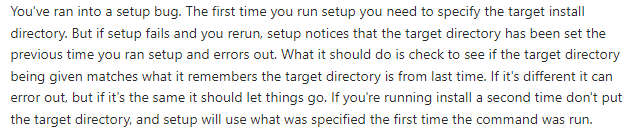
Looks like your issue is related to not specifying or creating the install path manually.
If Exchange is installed in a location other than the default location, you must use the /TargetDir switch to specify the location of the Exchange binary files. If you don't use the /TargetDir switch, the Exchange files are installed in the default location (%ProgramFiles%\Microsoft\Exchange Server\V15).
I find a related thread discussed the similar issue as yours: Failed Exchange 2016 CU2 install
Ended up manually creating the install path manually "D:\Program Files\Microsoft\Exchange Server\V15”. Then ran the GUI setup and browsed to the path I created and it finished the install.
' cx='32' cy='32' r='32' /%3E%3Ctext x='50%25' y='55%25' dominant-baseline='middle' text-anchor='middle' fill='%23FFF' %3EJZ%3C/text%3E%3C/svg%3E)
Hi @Sam Aly ,
Do you still have doubts about this issue? If you have any questions or needed further help on this issue, please feel free to post back.
If the issue has been resolved, please accept the helpful replies as answers, this will make answer searching in the forum easier and be beneficial to other community members as well.