Developer technologies | C#
An object-oriented and type-safe programming language that has its roots in the C family of languages and includes support for component-oriented programming.
This browser is no longer supported.
Upgrade to Microsoft Edge to take advantage of the latest features, security updates, and technical support.
' cx='32' cy='32' r='32' /%3E%3Ctext x='50%25' y='55%25' dominant-baseline='middle' text-anchor='middle' fill='%23FFF' %3EDK%3C/text%3E%3C/svg%3E)
I have below JSON, and would like to make sure atleast one device present under "Devices" node.
{
  "pageNumber": 1,
  "pageSize": 250,
  "data": [
    {
      "Id": "6817662d",
      "LastModified": "2022-04-09T06:40:40+00:00",
      "IsActive": true
      "Devices": [
        {
          "Id": "d58f034b",
          "IsActive": true,
          "SerialNumber": "754"
        },
  {
          "Id": "005056963bac",
          "IsActive": true,
          "SerialNumber": "707"
        }
      ]
 }
}

There is Json.NET Schema for performing validation.
Yes, right, I used custom validation along with schema validation.
' cx='32' cy='32' r='32' /%3E%3Ctext x='50%25' y='55%25' dominant-baseline='middle' text-anchor='middle' fill='%23FFF' %3EA%3C/text%3E%3C/svg%3E)
Hi @DEEPAK KUMPALA ,
You can use Deserialize subsections of a JSON payload to finish it.
I test it under. Net6.0.
Below is the code:
using System.Collections.Generic;
using System;
using System.Text.Json;

namespace DeserializeExtra
{
	public class Rootobject
	{
		public int pageNumber { get; set; }
		public int pageSize { get; set; }
		public Datum[] data { get; set; }
	}

	public class Datum
	{
		public string Id { get; set; }
		public DateTime LastModified { get; set; }
		public bool IsActive { get; set; }
		public Device[] Devices { get; set; }
	}

	public class Device
	{
		public string Id { get; set; }
		public bool IsActive { get; set; }
		public string SerialNumber { get; set; }
	}

	public class Program
	{
		public static void Main()
		{
			string jsonString =
@" {
 	""pageNumber"": 1,
 	""pageSize"": 250,
 	""data"": [{
 		""Id"": ""6817662d"",
 		""LastModified"": ""2022-04-09T06:40:40+00:00"",
 		""IsActive"": true,
 		""Devices"": [{
 				""Id"": ""d58f034b"",
 				""IsActive"": true,
 				""SerialNumber"": ""754""
 			},
 			{
 				""Id"": ""005056963bac"",
 				""IsActive"": true,
 				""SerialNumber"": ""707""
 			}
 		]
 	}]
 }
";

			Rootobject? rootobject =
				JsonSerializer.Deserialize<Rootobject>(jsonString);

			foreach (var datum in rootobject.data)
			{
				if (datum.Devices != null) {
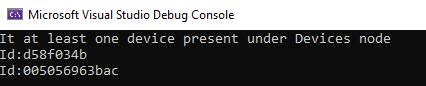
					Console.WriteLine("It at least one device present under Devices node");
				}
				foreach (var device in datum.Devices)
				{
					Console.WriteLine($"Id:{device.Id}");
				}
			}
		}
	}
}
Output:
If the answer is the right solution, please click "Accept Answer" and kindly upvote it. If you have extra questions about this answer, please click "Comment".
Note: Please follow the steps in our documentation to enable e-mail notifications if you want to receive the related email notification for this thread.
Hi @DEEPAK KUMPALA , do you have any updates?
Thanks, My real time Json is very huge and can not do manual check.