Hi @Vijayaguru M ,
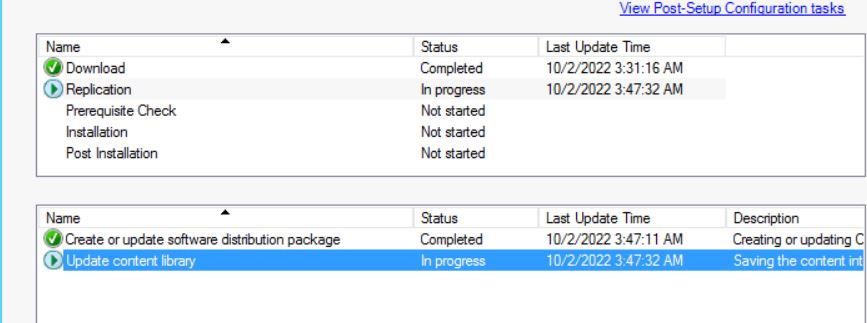
1, Please retry the content replication for EasySetup package.
Start Windows PowerShell and run the following command:
(gwmi -Namespace "ROOT\SMS\site_<SITE CODE>" -query "select * from SMS_CM_UpdatePackages where PackageGuid = '<Package Guid>'").RetryContentReplication($true)
The link for your reference:
Understand and troubleshoot Updates and Servicing - Configuration Manager | Microsoft Learn
2, For CM Update Reset tool, have you tried running the command to force remove the problematic update package? For example,
CMUpdateReset.exe -FDELETE -S SQLServerFQDN -D CM_SiteCode -P <PackageGuid>
The link for your reference:
SCCM Update Reset Tool - CMUpdateReset.EXE Tool (prajwaldesai.com)
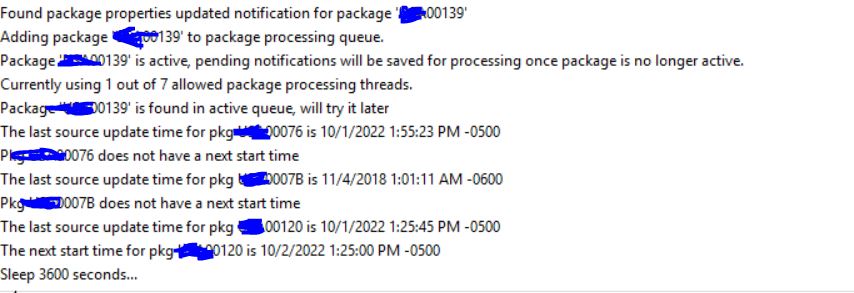
3, Please check the Despool.log, it will record the despooler moves the content file into the ContentLib content library folder on the primary site server computer. Are there any errors?
PS: …\Microsoft Configuration Manager\Logs\Despool.log
The link for your reference:
Understand and troubleshoot Updates and Servicing - Configuration Manager | Microsoft Learn
' cx='32' cy='32' r='32' /%3E%3Ctext x='50%25' y='55%25' dominant-baseline='middle' text-anchor='middle' fill='%23FFF' %3EVM%3C/text%3E%3C/svg%3E)
' cx='32' cy='32' r='32' /%3E%3Ctext x='50%25' y='55%25' dominant-baseline='middle' text-anchor='middle' fill='%23FFF' %3ECH%3C/text%3E%3C/svg%3E)
' cx='32' cy='32' r='32' /%3E%3Ctext x='50%25' y='55%25' dominant-baseline='middle' text-anchor='middle' fill='%23FFF' %3ESP%3C/text%3E%3C/svg%3E)


' cx='32' cy='32' r='32' /%3E%3Ctext x='50%25' y='55%25' dominant-baseline='middle' text-anchor='middle' fill='%23FFF' %3EPM%3C/text%3E%3C/svg%3E)