
5,099 questions
This browser is no longer supported.
Upgrade to Microsoft Edge to take advantage of the latest features, security updates, and technical support.
' cx='32' cy='32' r='32' /%3E%3Ctext x='50%25' y='55%25' dominant-baseline='middle' text-anchor='middle' fill='%23FFF' %3ECB%3C/text%3E%3C/svg%3E)
I updated my WORK laptop over the weekend to Win 11 version 22H2, and now my remote virtual desktop will not work. I log into my remote desktop using a domain, through the internet. It does not have an actual "program" that is installed on my laptop, but a domain name that I log into (which, incidentally, is supported by Windows Server 2016). I am able to successfully LOG IN, and a status bar comes up that says "initiating remote connection", then "securing remote connection", then "loading the virtual machine". Generally, after the "loading the virtual machine" it will pop up the remote desktop in a new environment (that can be windowed), looks just like it would if you are starting up your computer. However, now it is just sitting at "loading the virtual machine" and does not progress.
To compare, I have a PERSONAL laptop that also runs Win 11, but has NOT been updated to the new version, and I can log into my remote desktop from it with NO PROBLEMS. (no, I can not use it for work as it has no anti virus on it and I work in healthcare).
I have contacted my IT department and they say this is not something they can troubleshoot.
Please help.
' cx='32' cy='32' r='32' /%3E%3Ctext x='50%25' y='55%25' dominant-baseline='middle' text-anchor='middle' fill='%23FFF' %3EAS%3C/text%3E%3C/svg%3E)
I am a complete novice here with this stuff. Can anyone explain the steps as if they are explaining them to a 5-year-old? @JimmySalian-2011 @Cynthia Brown
Sure, it is still fresh in my head haha.
So per the link provided below -
You will click in your search icon on Win 11 and type Registry Editor, which will bring up the registry editor. When it asks if you want to allow it to make changes, you click Yes.
You will expand the folder that says HKEY_LOCAL_MACHINE, then expand the folder that says SOFTWARE, then expand Policies, then Microsoft, then Windows NT, then Terminal Services, then Client.
You will then select the Client folder so that its highlighted (it's blue on mine), and in the menu bar at the top, click EDIT, NEW, DWORD (32-bit) Value. The 32 and 64 bits have nothing to do with your computer being a 64bit or 32bit, by the way.
Then you will will see a new item pop up in the right side of the screen that says New Value #1. You will edit that to say fClientDisableUDP. Then you will right click on it, and select MODIFY, and in the box with the 0 in it, change that to 1.
Then reboot your computer and it should fix it.
Hope this helps!
it worked!! <3

Glad to know it help and fixed the issue.
' cx='32' cy='32' r='32' /%3E%3Ctext x='50%25' y='55%25' dominant-baseline='middle' text-anchor='middle' fill='%23FFF' %3EJK%3C/text%3E%3C/svg%3E)
This worked perfectly! Thank you so much. I work an overnight shift and after the computer I use updated my sleep deprived brain couldn't handle the idea of being forced to upgrade windows just to use the remote desktop. If I could up vote this a million times I would.
Hi JhorenKei,
Glad to know the fix provided worked for you and Please don't forget to upvote and Accept as answer if the reply is helpful
Regards.
I'm glad it helped!
' cx='32' cy='32' r='32' /%3E%3Ctext x='50%25' y='55%25' dominant-baseline='middle' text-anchor='middle' fill='%23FFF' %3ESD%3C/text%3E%3C/svg%3E)
This fixed the issue for me, thank you.
' cx='32' cy='32' r='32' /%3E%3Ctext x='50%25' y='55%25' dominant-baseline='middle' text-anchor='middle' fill='%23FFF' %3EAS%3C/text%3E%3C/svg%3E)
Thanks! Worked beautifully!
' cx='32' cy='32' r='32' /%3E%3Ctext x='50%25' y='55%25' dominant-baseline='middle' text-anchor='middle' fill='%23FFF' %3EG%3C/text%3E%3C/svg%3E)
Thanks dude, I registered an account just so I could give a like for this!
Thank you I registered a profile just to like this!
' cx='32' cy='32' r='32' /%3E%3Ctext x='50%25' y='55%25' dominant-baseline='middle' text-anchor='middle' fill='%23FFF' %3ETP%3C/text%3E%3C/svg%3E)
I’ve tried this and sadly it hasn’t worked. Can you offer any other solutions?
Unfortunately, I do not. Maybe the original guy that answered my question will have some other ideas. Or you can create a new post, detailing your issue and see if you get another Microsoft answer. Sorry I couldn't help.
' cx='32' cy='32' r='32' /%3E%3Ctext x='50%25' y='55%25' dominant-baseline='middle' text-anchor='middle' fill='%23FFF' %3EMH%3C/text%3E%3C/svg%3E)
This worked for one of my Windows 11 customers for about a week, then it reverted, back, I tried everything to get this fix work again but couldnt, I ended up turning off UDP with a local group policy instead and it worked.
Computer Configuration > Administration Templates > Windows Components > Remote Desktop Services > Remote Desktop Connection Client. Set the "Turn Off UDP On Client" setting to Enabled.
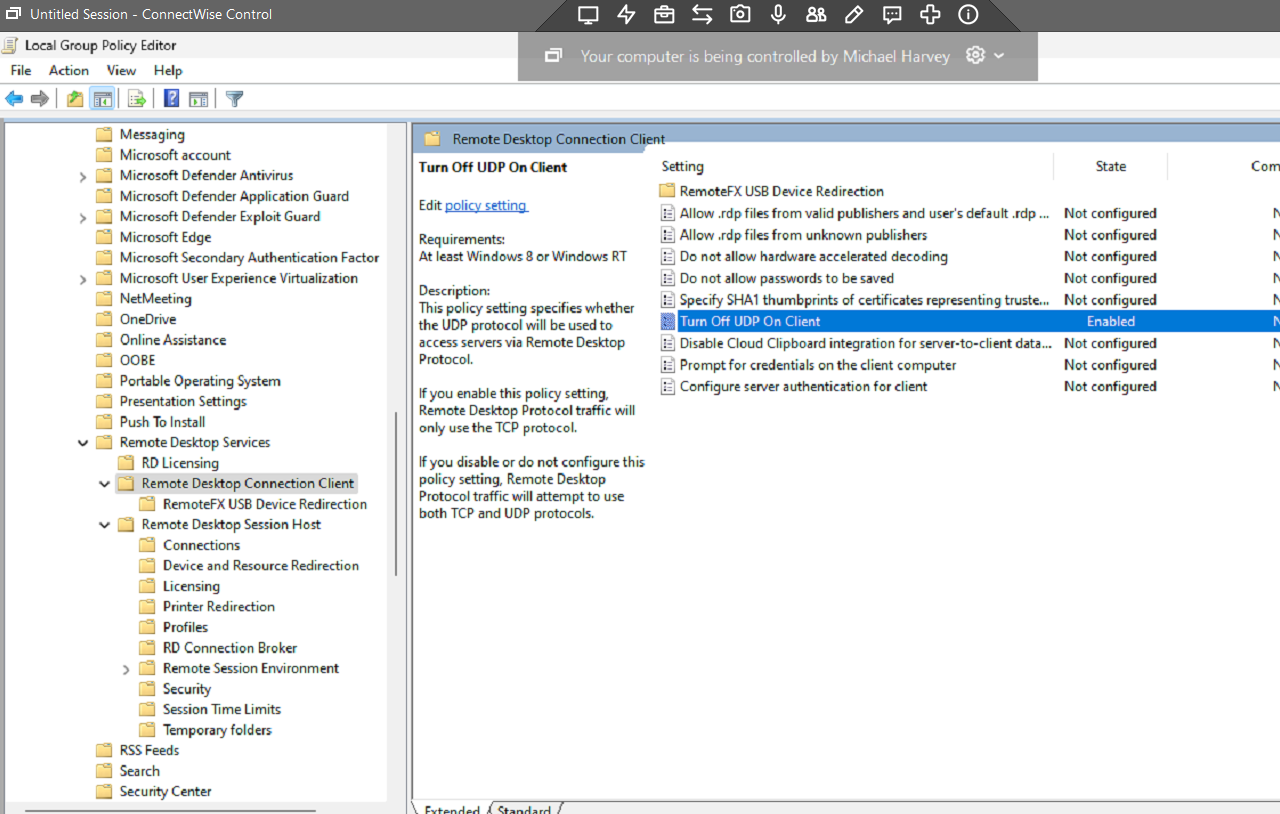

Yes, it works!
Thanks.
The regedit did not work for me!
' cx='32' cy='32' r='32' /%3E%3Ctext x='50%25' y='55%25' dominant-baseline='middle' text-anchor='middle' fill='%23FFF' %3EMM%3C/text%3E%3C/svg%3E)
Same here!
' cx='32' cy='32' r='32' /%3E%3Ctext x='50%25' y='55%25' dominant-baseline='middle' text-anchor='middle' fill='%23FFF' %3EDR%3C/text%3E%3C/svg%3E)
Me too! Thank you CynthiaBrown-6251
Hi Cynthia,
Check this link and the registry settings windows-11-22h2-rdp-disconnects-and.html
Hope this helps.
==
Please "Accept the answer" if the information helped you. This will help us and others in the community as well.
Thank you. Other than me having to google how to do the things advised in that link (I am no computer genius) - this worked beautifully.
Glad to know it help and fixed the issue.
' cx='32' cy='32' r='32' /%3E%3Ctext x='50%25' y='55%25' dominant-baseline='middle' text-anchor='middle' fill='%23FFF' %3EPG%3C/text%3E%3C/svg%3E)
FIX 1: Disable UDP Network Protocol
FIX 2: Disable the “Turn Off UDP On Client” Policy
FIX 3: Downgrade to Windows 11 21H2
Regards,
Peter
Yes, it works!
gpedit.msc
The regedit.msc did not work for me.
Thanks!