
Read the user names from a file.
$AllUsers = Get-Content -Path "C:\data\users.txt"
foreach ($UserName in $AllUsers) {
    "Adding $UserName"
    New-Item "\\server\home\PIT\$UserName\Recover" -type directory -Force
}
This browser is no longer supported.
Upgrade to Microsoft Edge to take advantage of the latest features, security updates, and technical support.
' cx='32' cy='32' r='32' /%3E%3Ctext x='50%25' y='55%25' dominant-baseline='middle' text-anchor='middle' fill='%23FFF' %3EEO%3C/text%3E%3C/svg%3E)
I would like to create a script to create a new folder called Recover in a new users home folder and using the inherited permissions. I was able to get the it to work by using the following code
$UserName = Read-Host -Prompt 'Enter User ID'
#$FolderName = Read-Host -Prompt 'Input Folder Name'
New-Item "\server\home\PIT\$UserName\Recover" -type directory -Force
but how would I get it to work without prompting for a username is this possible?

Read the user names from a file.
$AllUsers = Get-Content -Path "C:\data\users.txt"
foreach ($UserName in $AllUsers) {
"Adding $UserName"
New-Item "\\server\home\PIT\$UserName\Recover" -type directory -Force
}
The issue I am having I am trying to create a sub folder called Recover in a new user's home directory after the user created from ADUC but we use Manage Engines AD Manager Plus. The initial home drive user folder is created like normal using the \server\home\site code\%username%. When using the code below the subfolder never creates. Our home share is setup with 10 site code folders then the user folder inside of the parent. I don't understand what I would have to put in my code for it to read or know what site code\$username for the Subfolder Recover to auto create.
New-Item "\server\home\PIT\$UserName\Recover" -type directory -Force
Does Get-ADUser return the correct home directory?
https://morgantechspace.com/2016/04/get-ad-user-home-directory-using-powershell.html
@MotoX80
That cmdlet does work but what I am trying to do I don't know if possible. In our environment we have the following OU's "BOS,HBG,DC,DEL,NRK,PCT,PHL,PIT,RIC&WNY" where our users live and their home directories are setup as stated in the script "\server\home\OU\%username%" I got the script to work with one location using the following
New-Item "\\pdcfs01\home\PIT\$args\Recover" -type directory -Force
I am trying to figure out what I could change in the path so if a users home directory changes from PIT to BOS or HBG etc.. is there a line I am missing so I don't have to use the OU site code in the path for when a new user is created?
If AD Manager Plus is creating the user and setting the home directory attribute, then just read that from AD and create the folder.
Using the example from that web page...
$user = Get-ADUser -Identity 'Morgan' -Properties sAMAccountName,HomeDirectory
$FolderName = $user.HomeDirectory + "\Recover"
New-Item $FolderName -type directory -Force
@MotoX80
For the first line what if I don't want a user listed after identity. In AD Manager they are using the $args to password the $username or %username% to pass the variable. What you just gave works natively but getting AD Manager to password variable.
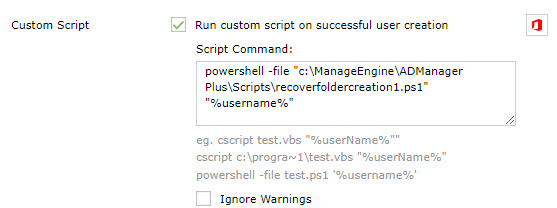
I do not have an AD environment to test with, so you will need to get the Get-ADUser command working for your environment.
[Cmdletbinding()]
Param(
    [string]$UserName = ""
)

$LogFile = "C:\temp\RecoverFolderCreation.log"

function LogIt($msg){
    $msg                            # display if we are invoked interactively.
    "$(get-date) - $msg" | Out-File $LogFile -Append
}

try {
    if ($UserName -eq "") {
        LogIt "No user name parameter was provided."
        return
    }
    LogIt "RecoverFolderCreation invoked for $username"
    $user = Get-ADUser -Identity $UserName -Properties sAMAccountName,HomeDirectory
    $FolderName = $user.HomeDirectory + "\Recover"
    LogIt "Creating $FolderName"
    New-Item $FolderName -type directory -Force

} catch {
    LogIt "We crashed."
    LogIt $_
}