Azure Data Factory
An Azure service for ingesting, preparing, and transforming data at scale.
This browser is no longer supported.
Upgrade to Microsoft Edge to take advantage of the latest features, security updates, and technical support.
' cx='32' cy='32' r='32' /%3E%3Ctext x='50%25' y='55%25' dominant-baseline='middle' text-anchor='middle' fill='%23FFF' %3EGS%3C/text%3E%3C/svg%3E)
Hi all,
Hope you are getting well.
I planned a Trigger to start pipeline automatically.
Sometimes, pipeline does not stop, keep running. See image bellow 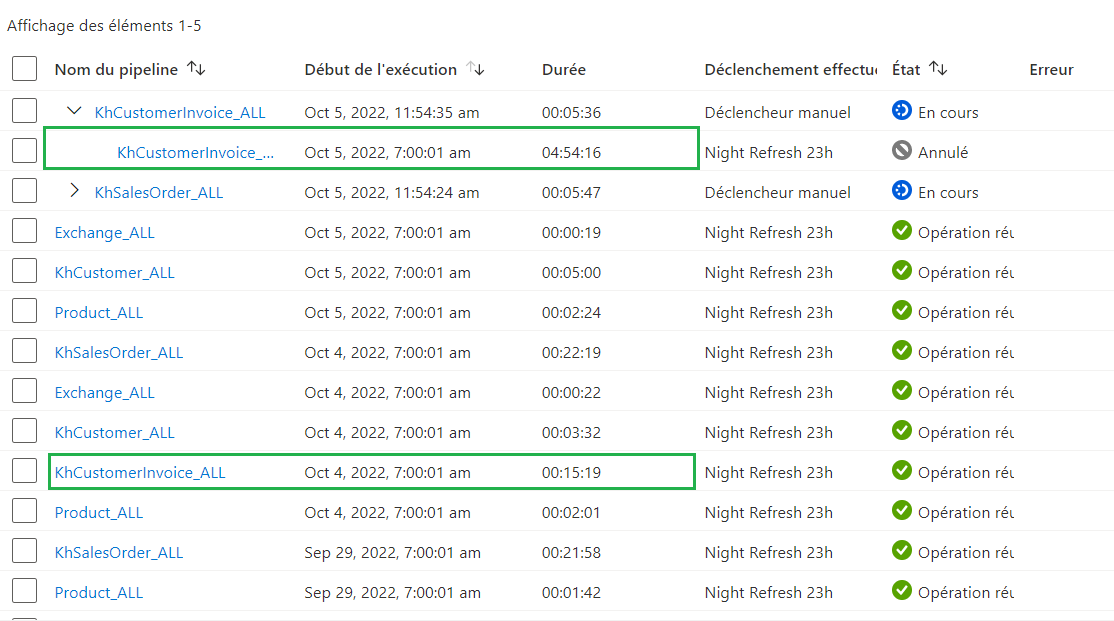
Any information on it? I can not explain why is still running.
Have a nice day

@Geoffrey SOUQUIÈRE : Can you please provide details like what activities are being performed / what is your source and sink type in your pipeline and its flow to better understand what's happening
Activities is to copy data from Odata (SAP) to Azure data studio.
The goal of the pipeline is to copy data from invoice with item and involved party
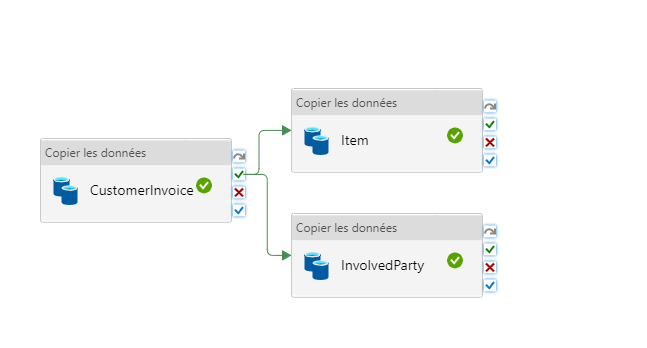
I got troubles on the piepline called "Item" which is the item/product inside invoice. Sometime this copy activity takes a lot of time more than half a day once (16 hours).
Thanks for providing the details of the issue @Geoffrey SOUQUIÈRE
As I can understand the Copy Activity named Item is sometimes taking a much longer time to complete
Have you seen the details of the copy activity during the run, it gives you details like how much time it took to connect to source, to get data from source and time to write to sink
There can be other factors as well like:
1) The source / sink data stores is connected via Self Hosted Integration Runtime (SHIR) and there is some bandwidth issue there
2) If SHIR is used then you can check if some other pipelines run in parallel to this pipeline, in this case, the IR network is distributed for those pipelines as well, which is causing this activity to take longer time than expected
3) Some queries are getting executed at source data store and the data fetch is provided less resources at source end to copy
Can you check these details and let me know, so we can further drill down this error?
Thanks