Azure Virtual Machines
An Azure service that is used to provision Windows and Linux virtual machines.
This browser is no longer supported.
Upgrade to Microsoft Edge to take advantage of the latest features, security updates, and technical support.
' cx='32' cy='32' r='32' /%3E%3Ctext x='50%25' y='55%25' dominant-baseline='middle' text-anchor='middle' fill='%23FFF' %3EGM%3C/text%3E%3C/svg%3E)
Hi All
i have a windows 10VM hosted in azure, i have uninstalled FSLogix software on it and rebooted the VM. After reboot i am able to login to the VM but i see black screen. Experts guide me how to fix the issue. even i tried with local administrator and other account also i am getting black screen.

Hi @Glenn Maxwell ,
maybe renaming the old profile folder in the VM might help. If you logon a new profile (profile folder) should be created.
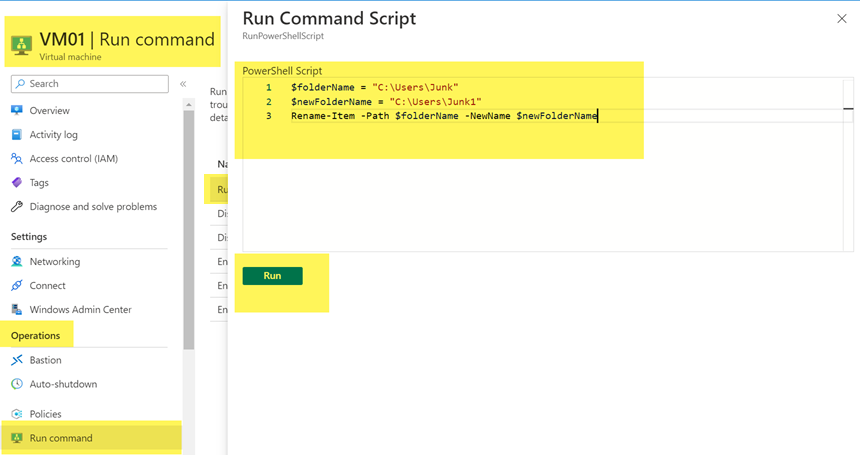
PowerShell script (just modify the name of the folder):
$folderName = "C:\Users\Junk"
$newFolderName = "C:\Users\Junk1"
Rename-Item -Path $folderName -NewName $newFolderName
You can run the script inside the VM via Azure Portal:
If it doesn't work you could rename the profile folder again to the original name.
----------
(If the reply was helpful please don't forget to upvote and/or accept as answer, thank you)
Regards
Andreas Baumgarten

Hi,
You can try to resize the VM which will move your VM to a different host and if the issue is from the physical node, then it will be resolved.
If that didn't work, you can try to take a snapshot and try to create a new VM with the snapshot.
Regards,
Karthik Srinivas
issue is not with the VM its only with the profile. is it something i can connect using remote registry and fix?
