Developer technologies | XAML
A language based on Extensible Markup Language (XML) that enables developers to specify a hierarchy of objects with a set of properties and logic.
This browser is no longer supported.
Upgrade to Microsoft Edge to take advantage of the latest features, security updates, and technical support.
' cx='32' cy='32' r='32' /%3E%3Ctext x='50%25' y='55%25' dominant-baseline='middle' text-anchor='middle' fill='%23FFF' %3ED%3C/text%3E%3C/svg%3E)
Hello,
I have a table (Sql) that contains all the users that can access to my app. I developed a WPF page where the user must insert User Code and Password. My C# program check if the user exists, if the password is correct, if the user is active. Now if validation is successful I would like to transmit some information (stored in the SQL table) from the logged user to all my WPF pages and C# programs in order to eventually exploit these information in the application.
What should be the best way to do it?
My C# 10 program is the following:
using XXXhome.DbModel;
using System;
using System.Collections.Generic;
using System.Linq;
using System.Text;
using System.Threading.Tasks;
using System.Windows;
using System.Windows.Controls;
using System.Windows.Data;
using System.Windows.Documents;
using System.Windows.Input;
using System.Windows.Media;
using System.Windows.Media.Imaging;
using System.Windows.Shapes;
namespace XXXhome
{
/// <summary>
/// Interaction logic for UserLogin.xaml
/// </summary>
public partial class UserLogin : Window
{
public UserLogin()
{
InitializeComponent();
}
    private void Entra_Click(object sender, RoutedEventArgs e)
    {
        string userName = (string) NameText.Text;
        string password = (string) PasswordText.Password;

        using XXXDbContext context = new();
        bool userfound = context.Users.Any(user => user.UserCode == userName && user.Password == password && user.IsActive == true && user.IsDeleted == false);

        if (userfound)
        {
            GrantAccess();
        }
        else
        {
            MessageBox.Show("Utente o Password non valido", "XXX - ERRORE", MessageBoxButton.OK, MessageBoxImage.Error);
        }
    }

    public void GrantAccess()
    {
        MainWindow mainWindow = new();
        this.Close();
        mainWindow.Show();
    }
}
}
' cx='32' cy='32' r='32' /%3E%3Ctext x='50%25' y='55%25' dominant-baseline='middle' text-anchor='middle' fill='%23FFF' %3EHL%3C/text%3E%3C/svg%3E)
Here is the sample code for the registration login page. You could try to refer to it.
SqlTable:
CREATE TABLE [dbo].[Registration] (
    [Id]        INT           IDENTITY (1, 1) NOT NULL,
    [FirstName] NCHAR (10)    NULL,
    [LastName]  NCHAR (10)    NULL,
    [Email]     NVARCHAR (50) NULL,
    [Password]  NCHAR (10)    NULL,
    [Address]   NCHAR (10)    NULL,
    [RefistrationOnTime] DATETIME NULL,
    [LoginOnTime] DATETIME NULL,
    PRIMARY KEY CLUSTERED ([Id] ASC)
);
MainWindow.xaml.cs:
using System;
using System.Data;
using System.Data.SqlClient;
using System.Text.RegularExpressions;
using System.Windows;

namespace loginandregistration
{
    public partial class MainWindow : Window
    {
        public MainWindow()
        {
            InitializeComponent();
        }
        private void Login_Click(object sender, RoutedEventArgs e)
        {
            Login login = new Login();
            login.Show();
            Close();
        }
        private void button2_Click(object sender, RoutedEventArgs e)
        {
            Reset();
        }
        public void Reset()
        {
            textBoxFirstName.Text = "";
            textBoxLastName.Text = "";
            textBoxEmail.Text = "";
            textBoxAddress.Text = "";
            passwordBox1.Password = "";
            passwordBoxConfirm.Password = "";
        }
        private void button3_Click(object sender, RoutedEventArgs e)
        {
            Close();
        }
        private void Submit_Click(object sender, RoutedEventArgs e)
        {
            if (textBoxEmail.Text.Length == 0)
            {
                errormessage.Text = "Enter an email.";
                textBoxEmail.Focus();
            }
            else if (!Regex.IsMatch(textBoxEmail.Text, @"^[a-zA-Z][\w\.-]*[a-zA-Z0-9]@[a-zA-Z0-9][\w\.-]*[a-zA-Z0-9]\.[a-zA-Z][a-zA-Z\.]*[a-zA-Z]$"))
            {
                errormessage.Text = "Enter a valid email.";
                textBoxEmail.Select(0, textBoxEmail.Text.Length);
                textBoxEmail.Focus();
            }
            else
            {
                string firstname = textBoxFirstName.Text;
                string lastname = textBoxLastName.Text;
                string email = textBoxEmail.Text;
                string password = passwordBox1.Password;
                if (passwordBox1.Password.Length == 0)
                {
                    errormessage.Text = "Enter password.";
                    passwordBox1.Focus();
                }
                else if (passwordBoxConfirm.Password.Length == 0)
                {
                    errormessage.Text = "Enter Confirm password.";
                    passwordBoxConfirm.Focus();
                }
                else if (passwordBox1.Password != passwordBoxConfirm.Password)
                {
                    errormessage.Text = "Confirm password must be same as password.";
                    passwordBoxConfirm.Focus();
                }
                else
                {
                    errormessage.Text = "";
                    string address = textBoxAddress.Text;
                    SqlConnection con = new SqlConnection("constr");
                     con.Open();

                    string cmdText = string.Format("SELECT ID FROM [dbo].[Registration] Where Email = '{0}' And Password = '{1}'", email, password);
                    SqlCommand cmd = new SqlCommand(cmdText, con);
                    object result = cmd.ExecuteScalar();
                    if (result != null)
                    {
                        errormessage.Text = "User existed";
                        passwordBoxConfirm.Focus();
                    }
                    else
                    {
                        DateTime registrationTime = DateTime.Now;
                        SqlCommand cmd1 = new SqlCommand("Insert into  [dbo].[Registration] (FirstName,LastName,Email,Password,Address,RefistrationOnTime) values('" + firstname + "','" + lastname + "','" + email + "','" + password + "','" + address + "','"+ registrationTime + "')", con);
                        cmd1.CommandType = CommandType.Text;
                        cmd1.ExecuteNonQuery();

                        errormessage.Text = "You have Registered successfully.";
                        Reset();
                    }
                    con.Close();
                }
            }
        }

    }
}
MainWindow.xaml:
247996-registion8.txt
Login.xaml:
 <Grid>
        <TextBlock Height="23" HorizontalAlignment="Left" Margin="10,10,0,0" Name="LoginHeading" Text="Login:" VerticalAlignment="Top" FontSize="17" FontStretch="ExtraCondensed"/>
        <TextBlock Height="50" HorizontalAlignment="Left" Margin="24,48,0,0" Name="textBlockHeading" VerticalAlignment="Top" FontSize="12" FontStyle="Italic" Padding="5">
            Note: Please login here to view the features of this site. If you are new on this site then <LineBreak /><!--line break-->
            please click on
            <TextBlock>
                 <Hyperlink Click="buttonRegister_Click" FontSize="14" FontStyle="Normal">Register</Hyperlink>
            </TextBlock>
            button
        </TextBlock>
        <TextBlock Height="23" HorizontalAlignment="Left" Margin="66,120,0,0" Name="textBlock1" Text="Email" VerticalAlignment="Top" Width="67" />
        <TextBlock Height="23" HorizontalAlignment="Left" Margin="58,168,0,0" Name="textBlock2" Text="Password" VerticalAlignment="Top" Width="77" />
        <TextBox Height="23" HorizontalAlignment="Left" Margin="118,115,0,0" Name="textBoxEmail" VerticalAlignment="Top" Width="247" />
        <PasswordBox Height="23" HorizontalAlignment="Left" Margin="118,168,0,0" Name="passwordBox1" VerticalAlignment="Top" Width="247" />
        <Button Content="Login" Height="23" HorizontalAlignment="Left" Margin="118,211,0,0" Name="button1" VerticalAlignment="Top" Width="104" Click="button1_Click" />
        <TextBlock Height="23" HorizontalAlignment="Left" x:Name ="errormessage" VerticalAlignment="Top" Width="247" Margin="118,253,0,0"  OpacityMask="Crimson" Foreground="#FFE5572C"  />
    </Grid>
Login.xaml.cs:
using System;
using System.Data;
using System.Data.SqlClient;
using System.Text.RegularExpressions;
using System.Windows;
namespace loginandregistration
{
    public partial class Login : Window
    {
        public Login()
        {
            InitializeComponent();
        }
        MainWindow registration = new MainWindow();
        Welcome welcome = new Welcome();
        private void button1_Click(object sender, RoutedEventArgs e)
        {
            if (textBoxEmail.Text.Length == 0)
            {
                errormessage.Text = "Enter an email.";
                textBoxEmail.Focus();
            }
            else if (!Regex.IsMatch(textBoxEmail.Text, @"^[a-zA-Z][\w\.-]*[a-zA-Z0-9]@[a-zA-Z0-9][\w\.-]*[a-zA-Z0-9]\.[a-zA-Z][a-zA-Z\.]*[a-zA-Z]$"))
            {
                errormessage.Text = "Enter a valid email.";
                textBoxEmail.Select(0, textBoxEmail.Text.Length);
                textBoxEmail.Focus();
            }
            else
            {
                string email = textBoxEmail.Text;
                string password = passwordBox1.Password;
                SqlConnection con = new SqlConnection("Data Source=(localdb)\\MSSQLLocalDB;Initial Catalog=RefistrationAndLogin;Integrated Security=True;Connect Timeout=30;Encrypt=False;TrustServerCertificate=False;ApplicationIntent=ReadWrite;MultiSubnetFailover=False");
                con.Open();
                SqlCommand cmd = new SqlCommand("Select * from  [dbo].[Registration]  where Email='" + email + "'  and password='" + password + "'", con);
                cmd.CommandType = CommandType.Text;
                object result = cmd.ExecuteScalar();
                SqlDataAdapter adapter = new SqlDataAdapter();
                adapter.SelectCommand = cmd;
                DataSet dataSet = new DataSet();
                adapter.Fill(dataSet);
                if (dataSet.Tables[0].Rows.Count > 0)
                {
                    DateTime loginTime = DateTime.Now;
                    string updateText = string.Format("UPDATE [dbo].[Registration] SET LoginOnTime = '{0}' WHERE ID = '{1}'", loginTime, result);
                    SqlCommand updateCmdText = new SqlCommand(updateText, con);
                    updateCmdText.ExecuteNonQuery();
                    string username = dataSet.Tables[0].Rows[0]["FirstName"].ToString() + " " + dataSet.Tables[0].Rows[0]["LastName"].ToString();
                    welcome.TextBlockName.Text = username;
                    welcome.Show();
                    Close();
                }
                else
                {
                    errormessage.Text = "Sorry! Please enter existing emailid/password.";
                }
                con.Close();
            }
        }
        private void buttonRegister_Click(object sender, RoutedEventArgs e)
        {
            registration.Show();
            Close();
        }
    }
}
Welcome.xaml:
 <Grid>
        <TextBlock Height="23" HorizontalAlignment="Left" Margin="10,10,0,0" x:Name="WelcomeHeading" Text="Welcome:" VerticalAlignment="Top" FontSize="17" FontStretch="ExtraCondensed"/>
        <TextBlock Height="23" HorizontalAlignment="Left" Margin="90,10,0,0" x:Name="TextBlockName"  VerticalAlignment="Top" FontSize="15" FontStretch="ExtraCondensed" />
    </Grid>
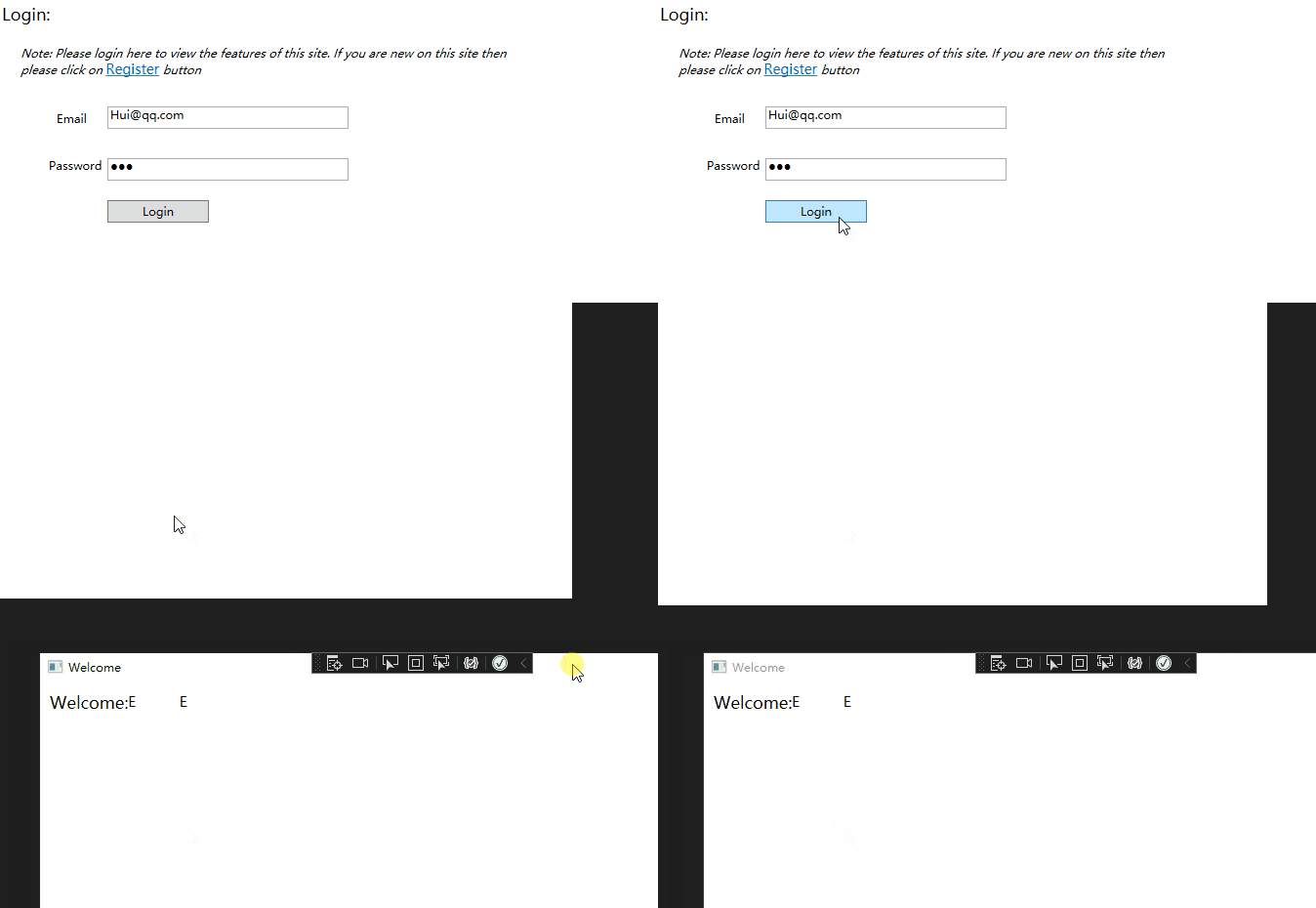
The result: Update the data table every time you log in, and jump to other pages with your username when you log in.

----------------------------------------------------------------------------
If the response is helpful, please click "Accept Answer" and upvote it.
Note: Please follow the steps in our documentation to enable e-mail notifications if you want to receive the related email notification for this thread.
Hi,@Dmtr_Grms . Is there any update to the question? Did the answer solve your problem? If so, you could accept it as the answer. It's helpful for community members with related questions.
Thanks for your answer. I had a look and at the end found my own solution base on you way of doing it.
' cx='32' cy='32' r='32' /%3E%3Ctext x='50%25' y='55%25' dominant-baseline='middle' text-anchor='middle' fill='%23FFF' %3EMT%3C/text%3E%3C/svg%3E)
Assuming the data you want to associate is tied to the user account itself then the correct approach would be to attach the authenticated user's data to the User object associated with the threads of your process. Normally this is the Windows user information but you can change that. It is a lot of code so refer to this really old article on one approach. Basically you'll create your own IIdentity implementation that has the data you care about related to the user. Authenticate the user as normal and return the IIdentity wrapped data. Then associate that identity with the current thread's User's identity and then it will be accessible elsewhere.
If the data is not related directly to the user account (for example the orders a user has made) then pass the user's unique ID (whatever that is for your system) to calls that require knowing the user.
Thanks for your answer. I had a look on it but I dont't want to write a lot of code and I'm not working with windows user and authentication.