Microsoft 365 and Office | OneDrive | For business | Windows
A Microsoft file hosting and synchronization service.

This browser is no longer supported.
Upgrade to Microsoft Edge to take advantage of the latest features, security updates, and technical support.
' cx='32' cy='32' r='32' /%3E%3Ctext x='50%25' y='55%25' dominant-baseline='middle' text-anchor='middle' fill='%23FFF' %3ED%3C/text%3E%3C/svg%3E)
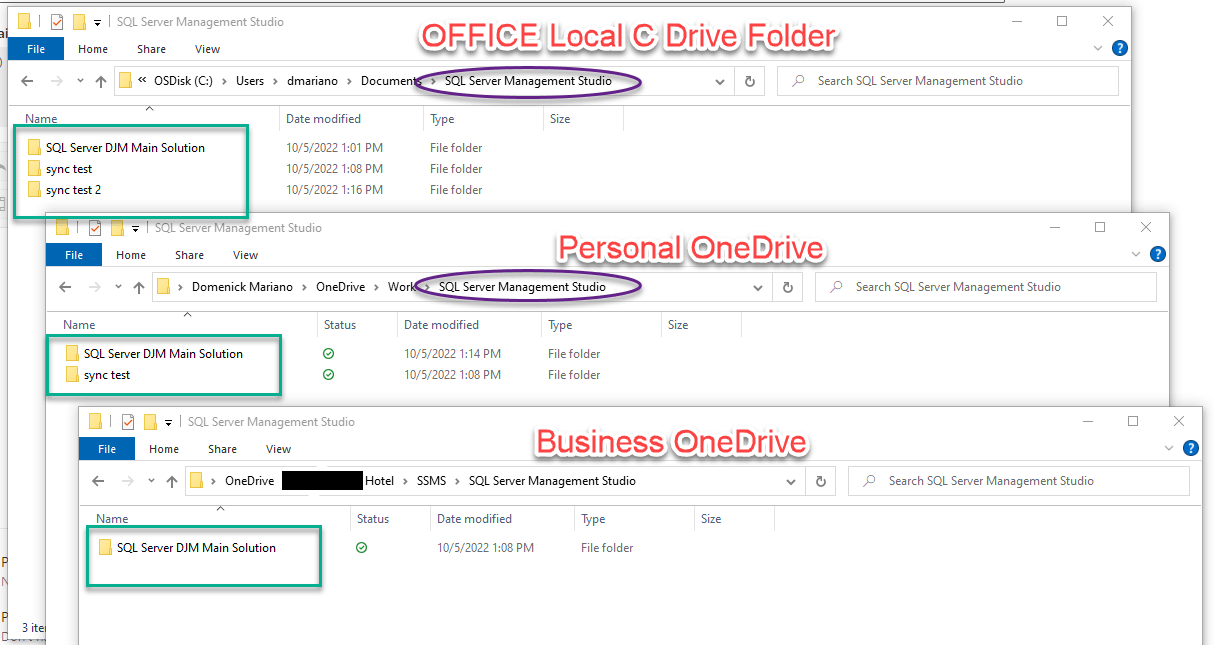
So, I thought this would be really simple, but I must be missing something. I just started working remotely so I am embracing OneDrive. I have a Business OD account and a Personal OD account. I do a lot of SQL server work that I need to keep saved on a local folder on my desktop's hard drive (for whatever reason that IT hasn't been able to explain, the files must be saved there to keep in sync with the rest of the organization). For working remotely, I need to be able to have the LOCAL folder (and all of its subfolders and files) constantly be synchronized with a designated folder on the Personal OD and the Business OD. If I add or change content on the local folder, everything should be copied to the two OD folders. If I modify a file on say, my Business OD, I would expect that those changes would sync back to the Local C drive folder. Isn't that the way that Cloud sync/storage is supposed to work? No?
I've exhausted my google search abilities trying to find a simple solution. If I'm going about this the wrong way, please advise on the best approach to accomplish (or come as close as possible) to what I'm trying to do. I had thought it would be as simple as right clicking on a folder or file and there would be a "Sync with OneDrive" option and then right click on a folder and hit "Refresh" or "Update" to synchronize the latest changes. Doesn't appear that it works like that. Any suggestions on how to facilitate this process would be greatly appreciated.
Same folder in three places - NOT Synchronized:
A Microsoft file hosting and synchronization service.
Locked Question. You can vote on whether it's helpful, but you can't add comments or replies or follow the question.
' cx='32' cy='32' r='32' /%3E%3Ctext x='50%25' y='55%25' dominant-baseline='middle' text-anchor='middle' fill='%23FFF' %3EA%3C/text%3E%3C/svg%3E)
You can use apps available in windws store freely available very easy to use see my blog for more details, these apps are very much easy to use without almost no glitch
https://[remove this space] artisthindustani.blogspot[DOT]com/2024/08/what-is-best-free-offline-folder-sync.html
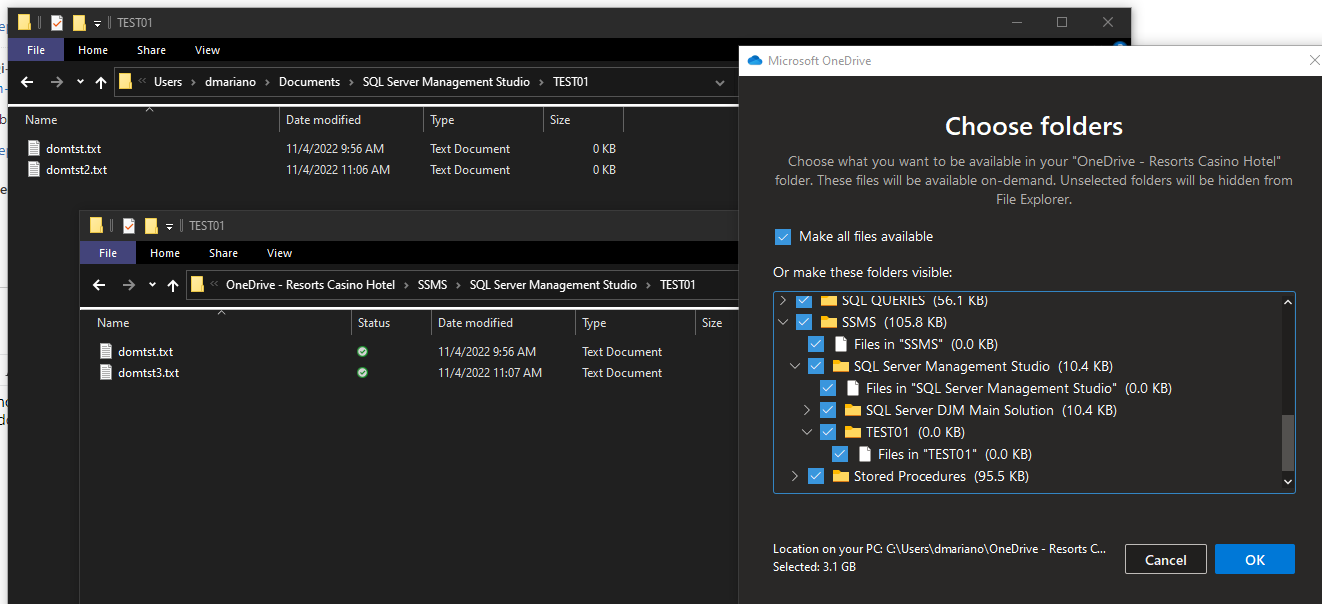
No, no luck with this. I still don't see any method to TELL OneDrive to sync with a particular folder on my C: drive. No right-click option to sync. If I drag a folder from C to OneDrive it will copy, but if I add files to the folder on C, they do NOT sync over to OneDrive (and vice versa). Thought this would be quite simple. Yes, the folder I dragged over DOES show up under "Choose Folders." The folder had one file in it when I copied it. Then I added a file to C drive and another one to OneDrive. No synchronization occurred.
Do I not understand how this is supposed to work? It seems like the only thing I can do use OneDrive like I would a shared drive on a network (just save my files to OneDrive all the time and never C drive. Unfortunately, this will not work for me because the critical files I need MUST be saved to a specific folder on C (my stored procedures on SSMS and my RDL files for Visual Studio). This is a business requirement for these applications.
So here is the Scenario:
If this is not something OD can do, is there some other (free) application that can or is there some other way within Windows?
' cx='32' cy='32' r='32' /%3E%3Ctext x='50%25' y='55%25' dominant-baseline='middle' text-anchor='middle' fill='%23FFF' %3ECG%3C/text%3E%3C/svg%3E)
Dom - Did anyone ever answer your question regarding the issues you were having syncing the C: drive folder ? I'm also interested in the answer.
' cx='32' cy='32' r='32' /%3E%3Ctext x='50%25' y='55%25' dominant-baseline='middle' text-anchor='middle' fill='%23FFF' %3ECQ%3C/text%3E%3C/svg%3E)
Hi, @Dom ,
First we recommend you the check the settings of OneDrive. Right click the icon of OneDrive and select "Settings", then go to account tap and click "Choose folders". Check if the folder need to be synchronized is selected.
If the issue is still there, please check the size of the folder. The size of the folder should not be larger than 15GB.
We also recommend you to have a check if the version of OneDrive. Right click the icon of OneDrive then choose Settings->About. If the version is not the latest version, please update the OneDrive version.
Also you need to have a check if there is any updates for Windows. Press Win+I then choose Update&Security to check if there is any update for windows.
If the response is helpful, please click "Accept Answer" and upvote it.
Note: Please follow the steps in email-notifications to enable e-mail notifications if you want to receive the related email notification for this thread.
Hi @Dom
Just checking in to see if the information is useful. Please let us know if you need further assistance.