Microsoft 365 and Office | SharePoint | For business | Windows
A group of Microsoft Products and technologies used for sharing and managing content, knowledge, and applications.

This browser is no longer supported.
Upgrade to Microsoft Edge to take advantage of the latest features, security updates, and technical support.
' cx='32' cy='32' r='32' /%3E%3Ctext x='50%25' y='55%25' dominant-baseline='middle' text-anchor='middle' fill='%23FFF' %3EED%3C/text%3E%3C/svg%3E)
I need to insert a text box on the "Shared with us" page to provide instructions to users who visit the page.
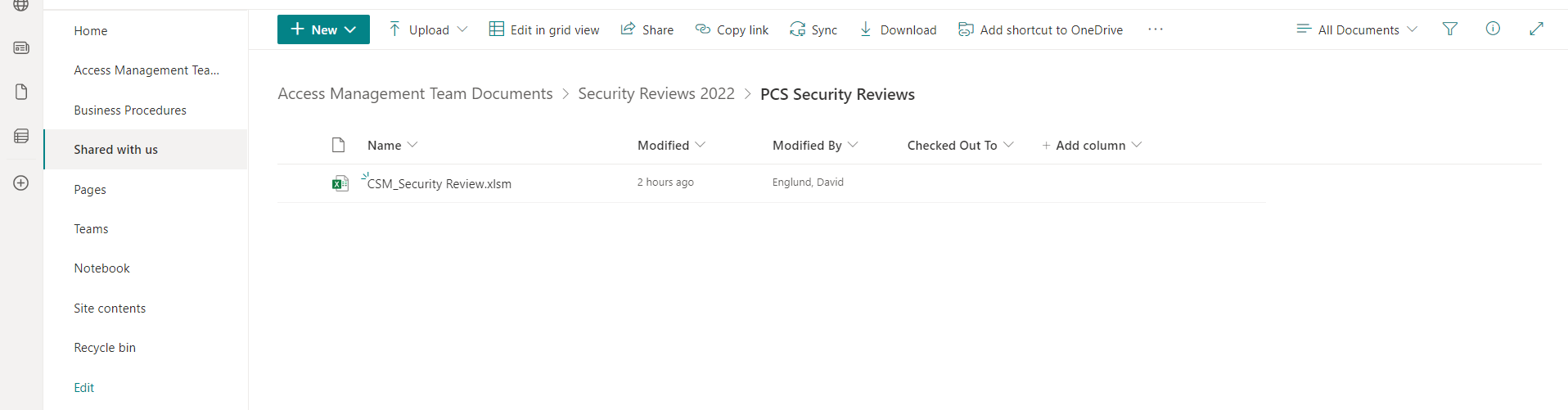
But, the SharePoint "Edit" link/icon is not available to me on this page (probably because its a view?). Suggestions? How can I get my instructions in front of those visitors?

Hi @Englund, D ,
We are currently looking into this issue and will give you an update as soon as possible.
Thank you for your understanding and support.
Dear @Englund, D ,
Thank you for your post in our forum.
According to your description, you want to customize the ‘Shared with us’ library page.
Your issue is related to the SPFX Extension. You could use SPFX to add scripts to a library page.
More information about SPFX Extension.
Should you have any questions or concerns, please do feel free to contact me.
Yours sincerely,
Renjie Sun
If the answer is helpful, please click "Accept Answer" and kindly upvote it. If you have extra questions about this answer, please click "Comment".
Note: Please follow the steps in our documentation to enable e-mail notifications if you want to receive the related email notification for this thread.
Hi @Englund, D ,
Is there any progress on this thread? Please feel free to let me know.
Hi @Englund, D ,
I’m checking how the things are going on about this issue. Whether the answer helps you?
If there is any problem with this issue, feel free to let me know.
If the answer is helpful, please click "Accept Answer" and kindly upvote it. If you have extra questions about this answer, please click "Comment".
Note: Please follow the steps in our documentation to enable e-mail notifications if you want to receive the related email notification for this thread.