Microsoft Security | Microsoft Entra | Microsoft Entra ID
A cloud-based identity and access management service for securing user authentication and resource access

This browser is no longer supported.
Upgrade to Microsoft Edge to take advantage of the latest features, security updates, and technical support.
' cx='32' cy='32' r='32' /%3E%3Ctext x='50%25' y='55%25' dominant-baseline='middle' text-anchor='middle' fill='%23FFF' %3EMF%3C/text%3E%3C/svg%3E)
I am looking for help with AAD domain join.
Running dsregcmd /join /debug, i am getting the following error:
Automatic device join pre-check tasks completed.
TenantInfo::Discover: Failed reading registration data from AD. Defaulting to autojoin disabled 0x80070002
DsrCmdJoinHelper::Join: TenantInfo::Discover failed with error code 0x801c001d.
dsregcmd /status:
AD Configuration Test : FAIL [0x80070002]
Error Phase : discover
Client ErrorCode : 0x801c001d
I also have 304 and 307 in the eventvwr:
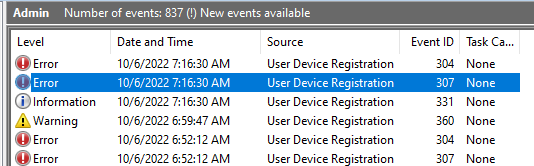
HKEY_LOCAL_MACHINE\SOFTWARE\Policies\Microsoft\Windows\CurrentVersion\MDM\AutoEnrollMDM is set yo "1"
And i have a bunch of 76 errors under Applications and Services Logs > Microsoft > Windows > DeviceManagement-Enterprise-Diagnostic-Provider
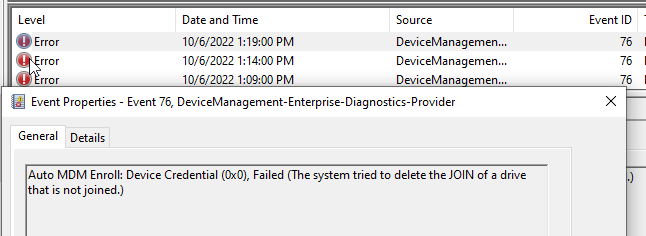
I have checked access to the folloing URLs:
https://enterpriseregistration.windows.net
https://login.microsoftonline.com
https://device.login.microsoftonline.com
I also tried running cmd as a system and set the proxy: netsh winhttp set proxy PROXY01:8080
but getting the same error:
TenantInfo::Discover: Failed reading registration data from AD. Defaulting to autojoin disabled 0x80070002
DsrCmdJoinHelper::Join: TenantInfo::Discover failed with error code 0x801c001d.
I was looking at the permission issues in AD but could not find anything.
Please help with any other troubleshooting steps or what else i can check to resolve an issue?
Thank you.
A cloud-based identity and access management service for securing user authentication and resource access

Hello @Anonymous ,
Please make sure your deployment is not failing due to the unsupported scenario.
As example for hybrid Azure AD join:
Sincerely,
Olga Os
Olga, thanks for the reply.
I am trying to enroll Windows 10 21h2. Not using USMT.
Thank you.
' cx='32' cy='32' r='32' /%3E%3Ctext x='50%25' y='55%25' dominant-baseline='middle' text-anchor='middle' fill='%23FFF' %3ESG%3C/text%3E%3C/svg%3E)
I wanted to check if you are still looking for an assistance on this issue that you have posted in this thread.
' cx='32' cy='32' r='32' /%3E%3Ctext x='50%25' y='55%25' dominant-baseline='middle' text-anchor='middle' fill='%23FFF' %3EJW%3C/text%3E%3C/svg%3E)
I have the exact same issue.
Anyone been able to solve this problem ? Would love some extra information on debugging this problem.
I am trying to connect a windows server 2019(Client) to my windows server 2016(AD)
' cx='32' cy='32' r='32' /%3E%3Ctext x='50%25' y='55%25' dominant-baseline='middle' text-anchor='middle' fill='%23FFF' %3EAS%3C/text%3E%3C/svg%3E)
How to solve the issue:
"TenantInfo::Discover: Failed reading registration data from AD. Defaulting to autojoin disabled 0x80070002
DsrCmdJoinHelper::Join: TenantInfo::Discover failed with error code 0x801c001d."
follow this guide:
https://blog.alschneiter.com/2018/08/16/configure-device-registration-with-azure-ad-connect/
But to successfully hybrid join your device, you should do the following steps afterwards: