Azure Internet of Things
A category of Azure services for internet of things devices.
This browser is no longer supported.
Upgrade to Microsoft Edge to take advantage of the latest features, security updates, and technical support.
' cx='32' cy='32' r='32' /%3E%3Ctext x='50%25' y='55%25' dominant-baseline='middle' text-anchor='middle' fill='%23FFF' %3ESS%3C/text%3E%3C/svg%3E)
Hello,
I'm trying to add the device update agent on my ubuntu 18.04 VM, following the provided reference (https://learn.microsoft.com/en-us/azure/iot-hub-device-update/device-update-ubuntu-agent#manually-prepare-a-device).
I got everything to the point where I need to start the daemon. The device update agent is unable to start on device with the error; Cannot read configuration file: /etc/adu/du-config.json
File(/etc/adu/du-config.json) looks like this:
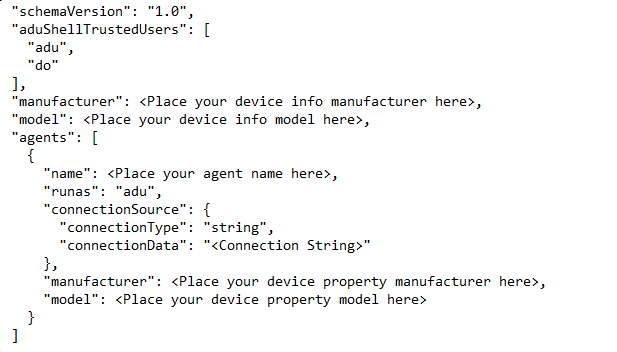
<Connection String> is obviously the primary connection String from my IoT Hub Device.
Here are the error logs from device update agent service on my ubuntu VM device when I am starting the device update agent service:-
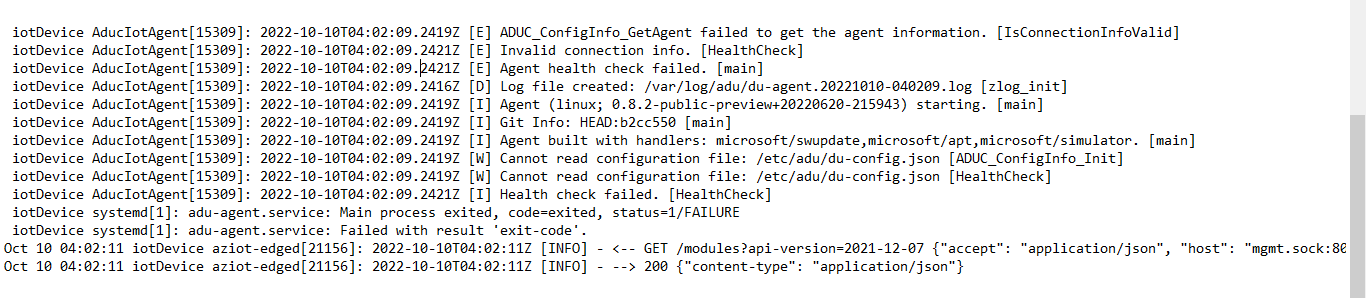
*Please note,
--> My device is already connected to IOT Hub as an edge device.
--> Device optimization service is up and running on my system.
--> Connection string is replaced in file.
--> The edgeAgent and edgeHub are in running state.
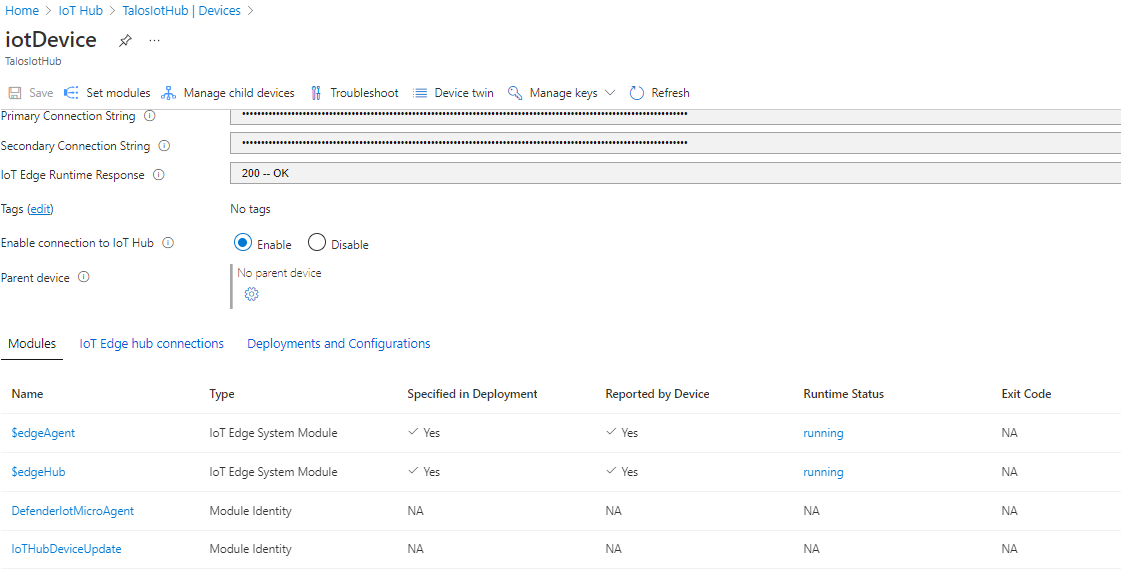
Please let me know the possible solutions. Also if any other information needed.

Based on your description it could be that the /etc/adu/du-config.json file is created by a root user and is not accessible for other users. You could verify by going to the /etc/adu directory (cd /etc/adu) and then perform a ls -la du-config.json. You will see the owner (probably root), the group (probably also root) and the access rights (probably -rw-------).
If this is the issue, you can allow all users on the system to read the file by executing chmod 644 du-config.json
This URL (https://www.guru99.com/file-permissions.html) describes the way linux rights work
@Bas Pruijn this is not good practice as in most cases people forget to reapply a secure setting. Although the default installation of the Debian package sets the right user and group ("adu").
@Simran Singh please check validity of you adjusted du-config.json file as mentioned in my previous comment.
I agree @chbeier that my suggestion was not to solve the issue, but to investigate the root cause of the issue. Thanks for pointing that one out. I still believe that extending the access to the file might give you insight in the root cause. If extending access does not solve the issue, the issue is related to the contents of the file.
The error message "cannot read config file" can be caused by either.
Good morning @Simran Singh ,
You mentioned that you replaced the connection string in the config. Did you also set manufacturer, model, and name to get a valid /etc/adu/du-config.json? You might load the resulting JSON config to vs code to check the syntax. Unfortunately, in my eyes the documentation is not perfectly accurate in step 3.
@Bas Pruijn , to me it looks like the default permission on /etc/adu/du-config.json are correct as mentioned by @chbeier
Sharing the default permissions set on file

' cx='32' cy='32' r='32' /%3E%3Ctext x='50%25' y='55%25' dominant-baseline='middle' text-anchor='middle' fill='%23FFF' %3EQ%3C/text%3E%3C/svg%3E)
Converting this to an Answer, so that other readers get benefit from this discussion.
Hello @Simran Singh Just checking on this.
Were you able to start the device update agent?//
Hello @QuantumCache , yes I am able to start the agent. Its working fine now.
Thanks
Thanks @chbeier for the approach. It helped in starting the device update agent.
Hello @Simran Singh If the response is helpful, please click "Accept Answer" and upvote it. So that we can close this thread and is helpful to other readers on the community.