
Try to set value as UInt32. It helped me, and hopefully it will help you. _rdpSession.Properties["FrameCaptureIntervalInMs"] = (uint)100;
This browser is no longer supported.
Upgrade to Microsoft Edge to take advantage of the latest features, security updates, and technical support.
' cx='32' cy='32' r='32' /%3E%3Ctext x='50%25' y='55%25' dominant-baseline='middle' text-anchor='middle' fill='%23FFF' %3EBG%3C/text%3E%3C/svg%3E)
In order to reduce CPU usage on the sharer side of an RDP session, I try to increase the frame capture interval.
Right after creating the RDPSession I set the "FrameCaptureIntervalInMs" property to a high number but it has no effect: on the viewer side the FPS is still as high as before, and on sharer side the CPU usage is still similar.
Is there anything I am missing to be ableto use this property?
    CHECK(CoInitializeEx(nullptr, COINIT_APARTMENTTHREADED));
    CHECK(m_rdpSession.CoCreateInstance(__uuidof(RDPSession), nullptr, CLSCTX_INPROC));

    // the following lines are intended to set a capture cadence of 1FPS
    CComPtr<IRDPSRAPISessionProperties> props;
    CHECK(m_rdpSession->get_Properties(&props));
    const CComBSTR propName = "FrameCaptureIntervalInMs";
    const CComVariant propValue{ 1000, VT_I4 };
    CHECK(props->put_Property(propName, propValue));
EDIT: m_rdpSession is declared as:
CComPtr<IRDPSRAPISharingSession> m_rdpSession;
A high-level, general-purpose programming language, created as an extension of the C programming language, that has object-oriented, generic, and functional features in addition to facilities for low-level memory manipulation.

Hello @BenoitVertutGE ,
Welcome to Microsoft Q&A!
Try it with the following code first, if there is still a problem, it may be an API problem.
const GUID CLSID_RDPSession = { 0x9B78F0E6, 0x3E05, 0x4A5B, 0xB2, 0xE8, 0xE7, 0x43, 0xA8, 0x95, 0x6B, 0x65 };
const GUID IID_IRDPSRAPISharingSession = { 0xeeb20886, 0xe470, 0x4cf6, 0x84, 0x2b, 0x27, 0x39, 0xc0, 0xec, 0x5c, 0xfb };

IRDPSRAPISharingSession* m_rdpSession;
    IUnknown* iUnknow;

   int res = CoInitializeEx(nullptr, COINIT_APARTMENTTHREADED);
    res = CoCreateInstance(CLSID_RDPSession, NULL, CLSCTX_ALL, IID_IUnknown, (void**)&iUnknow);
    res = iUnknow->QueryInterface(IID_IRDPSRAPISharingSession, (void**)&m_rdpSession);

   // the following lines are intended to set a capture cadence of 1FPS
    CComPtr<IRDPSRAPISessionProperties> props;
    m_rdpSession->get_Properties(&props);

   const CComBSTR propName = "FrameCaptureIntervalInMs";
    const CComVariant propValue{ 1000, VT_I4 };

   HRESULT hr = props->put_Property(propName, propValue);
Thank you @Junjie Zhu - MSFT for your quick answer.
Unfortunately using your code snippet with the hard-coded GUID does not help. I manage to set the "FrameCaptureIntervalInMs" property, and to get it back later with get_Property to check that the value is correctly set, but when a client is connected to the session I can observe that the framerate is way higher than 1FPS.
You can submit this issue in the Feedback Hub first.
I will discuss this issue with the team, if there is a result, I will notify you as soon as possible.
Issue is submitted to Feedback Hub:
https://aka.ms/AAic3vs
Hi @BenoitV-GE ,
Could you please provide more information to help us further check the problem for you? like the code snippet about view side and some test pictures.
Thank you,
Junjie
Hello @Junjie Zhu - MSFT ,
Please find attached an animated gif capturing sample server & client applications, and showing the frames being updated several dozens of time per second, despite the FrameCaptureIntervalInMs set to 1000 in the server.
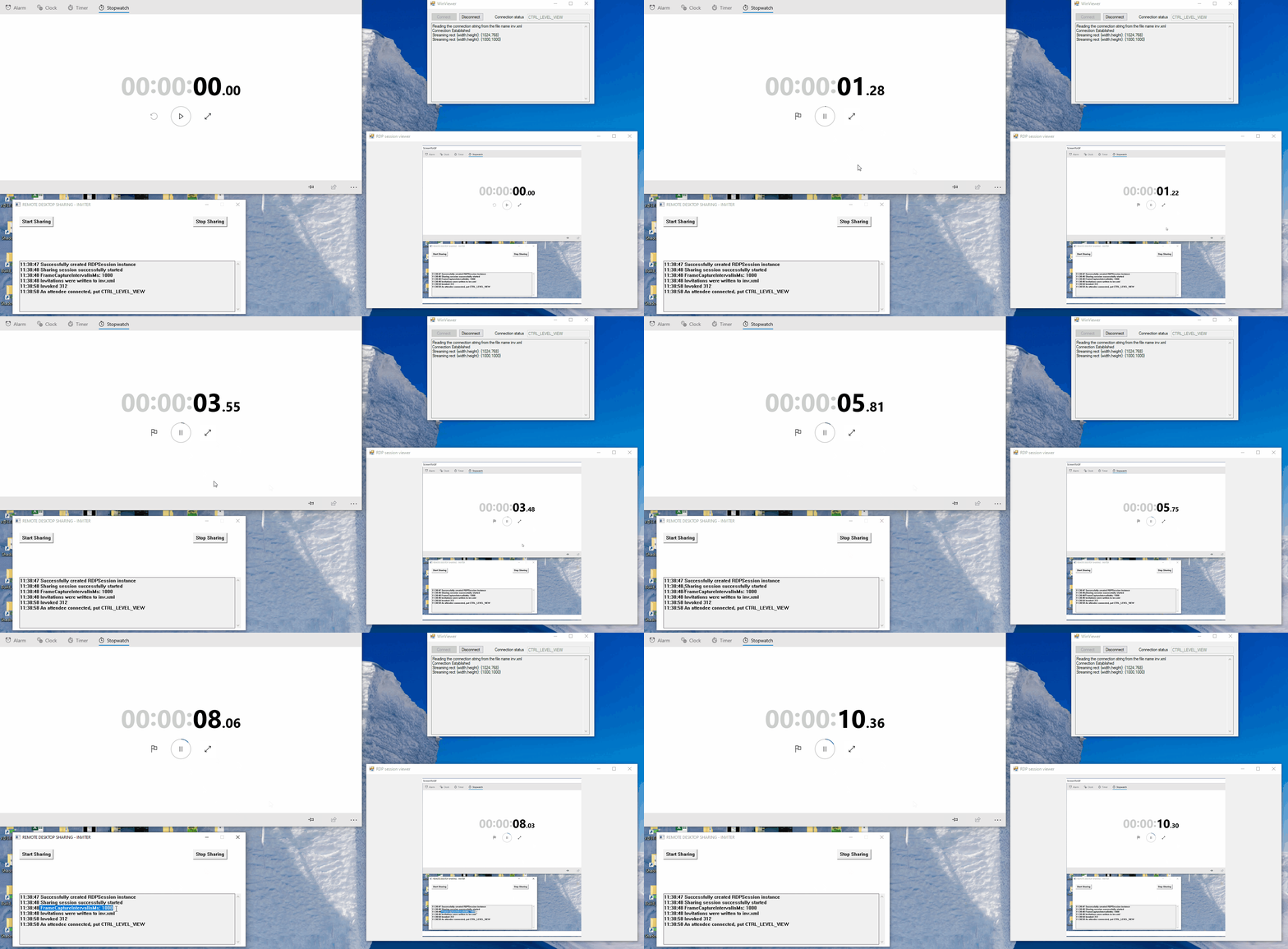
The viewer sample is written in C# and use AxRDPCOMAPILib.AxRDPViewer component. But my concern is more on the server side, since my point is to reduce the CPU usage on sharer machine.
I would happily share the source code from these samples but this forum does not allow me to attach a zip file. What would be the most convenient way to share it with you?
Best regards,
Benoît
You can share it via GitHub or OneDrive, please do not include any personal privacy. By the way, does the viewer on the right use an MFC control?
I uploaded the sample in a specific GitHub repository:
https://github.com/212668253/WDSRemoteControl
The viewer on the right is implemented in C# using .Net controls, in particular AxRDPCOMAPILib.AxRDPViewer
Hi @BenoitV-GE ,
Thank you for sharing the code, I will reproduce your problem as soon as possible.
Hello @Junjie Zhu - MSFT ,
Do you have any update on this issue? Did you manage to reproduce it?
' cx='32' cy='32' r='32' /%3E%3Ctext x='50%25' y='55%25' dominant-baseline='middle' text-anchor='middle' fill='%23FFF' %3EAI%3C/text%3E%3C/svg%3E)
Try to set value as UInt32. It helped me, and hopefully it will help you. _rdpSession.Properties["FrameCaptureIntervalInMs"] = (uint)100;
Indeed this helped! Changing my C++ code to:
const CComVariant propValue{ 1000u, VT_UI4 };
fixed the issue.
Thanks for the suggestion!
Answer accepted by question author
Try to set value as UInt32. It helped me, and hopefully it will help you. _rdpSession.Properties["FrameCaptureIntervalInMs"] = (uint)100;
' cx='32' cy='32' r='32' /%3E%3Ctext x='50%25' y='55%25' dominant-baseline='middle' text-anchor='middle' fill='%23FFF' %3EBH%3C/text%3E%3C/svg%3E)
I can also confirm this issue although I am using RDPCOMAPILib as I'm having a .Net-Framework application. Setting a value for "FrameCaptureIntervalInMs" to values like 500 should have a reasonably strong effect but it doesn't change anything.
Code in .Net is quite simple:
var _rdpSession = new RDPCOMAPILib.RDPSession();
_rdpSession.Properties["FrameCaptureIntervalInMs"] = 500; // tried to set the value before starting the host
_rdpSession.Open();
_rdpSession.Properties["FrameCaptureIntervalInMs"] = 500; // and also after starting the host
Did you manage to get this to work?
Regards,
Bruno