Developer technologies | Windows Presentation Foundation
A part of the .NET Framework that provides a unified programming model for building line-of-business desktop applications on Windows.
This browser is no longer supported.
Upgrade to Microsoft Edge to take advantage of the latest features, security updates, and technical support.
' cx='32' cy='32' r='32' /%3E%3Ctext x='50%25' y='55%25' dominant-baseline='middle' text-anchor='middle' fill='%23FFF' %3EPM%3C/text%3E%3C/svg%3E)
I have one label control. Im trying to copythat and create another label below it but when I paste it always goes in the same place
Can't i just copy and paste controls like in asp.net?

For example, if you place your label inside a StackPanel or WrapPanel, then you will see a different behaviour after Copy and Paste operations. To organise your window, you can also use a Grid and other containers.
' cx='32' cy='32' r='32' /%3E%3Ctext x='50%25' y='55%25' dominant-baseline='middle' text-anchor='middle' fill='%23FFF' %3EHL%3C/text%3E%3C/svg%3E)
Hi,@Partha Mandayam . Welcome Microsoft Q&A.
As Viorel-1 said, there are many controls for Layout in wpf, such as Grid, StackPanel, Canvas and so on. They each have different characteristics and usage methods. You could use layout controls as needed.
When you duplicate a control without setting another row and column for the control, it will be in the same position. You could set up rows and columns for the Controls in Grid.
 <Grid>
        <Grid.ColumnDefinitions>
            <ColumnDefinition/>
            <ColumnDefinition/>
        </Grid.ColumnDefinitions>
        <Label Grid.Column="0" Content="hello" Width="100" Height="50"/>
        <Label Grid.Column="1" Content="hello" Width="100" Height="50"/>
    </Grid>
StackPanel arranges child elements into a single line that can be oriented horizontally or vertically. Where you copy controls it will be arranged vertically by default.
For more controls, you can learn in the linked page.
----------------------------------------------------------------------------
If the response is helpful, please click "Accept Answer" and upvote it.
Note: Please follow the steps in our documentation to enable e-mail notifications if you want to receive the related email notification for this thread.
Seems quite complicated
Why do I need a stackpanel for a label
IN asp.net I can just drag and drop it on a form
Then I select copy and paste on next line
So simple!!!
THat's not working in wpf!!!
Hi,@Partha Mandayam . You can also copy and paste controls by dragging and dropping in wpf.
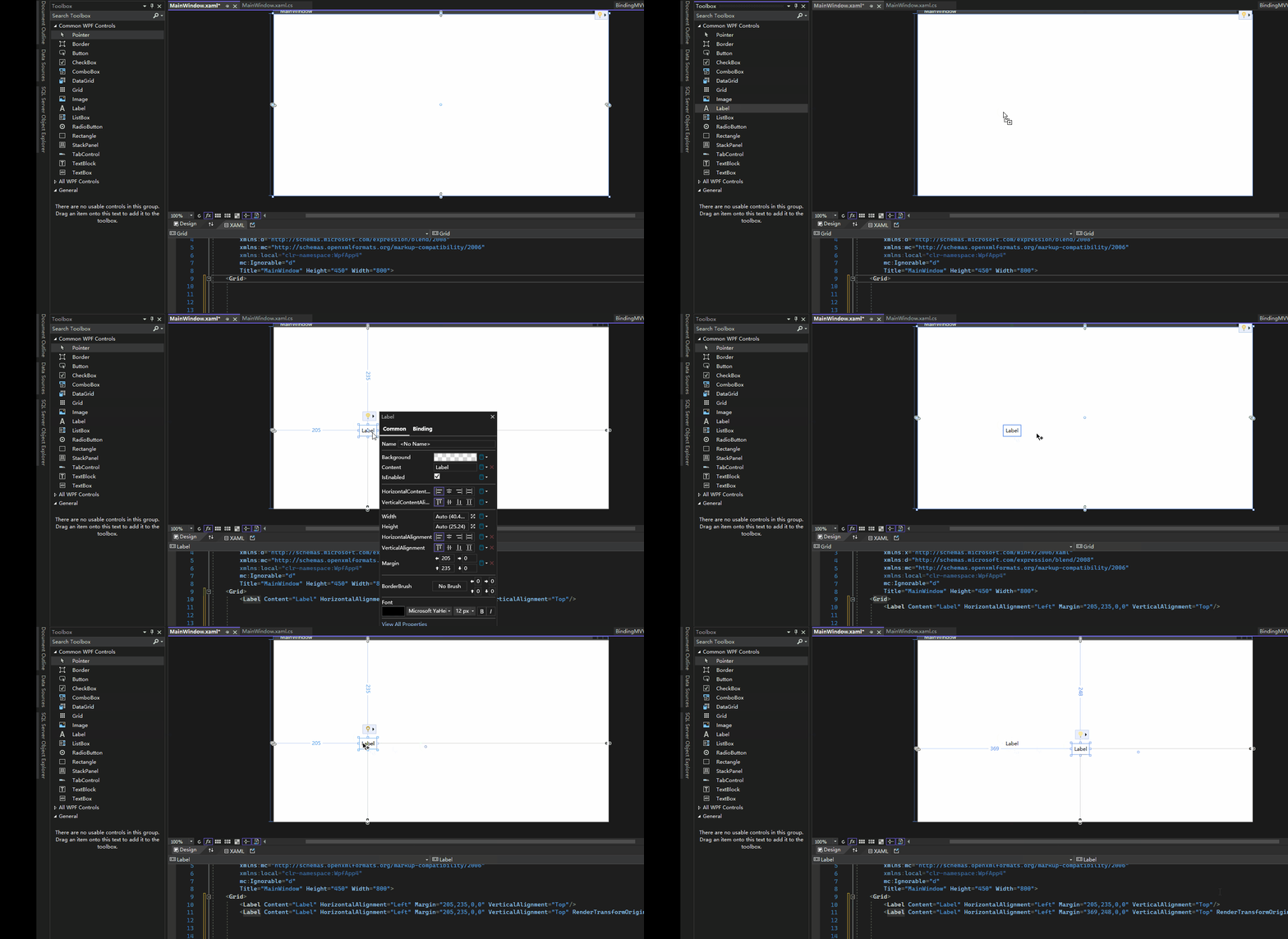
Get started with wpf here.
Hi,@Partha Mandayam . Is there any update to the question? Did the answer solve your problem? If so, you could accept it as the answer. It's helpful for community members with related questions.
I tried copy and paste but it's not working
It pastes at same location and if I try to drag elsewhere it doesn't work
asp.net is so much easier!!!
And how to open the xaml code?
I only see the wpf form
I want to see the autogenerated xaml also
Hi,@Partha Mandayam . You can learn wpf from Articles in Get started with WPF. It is recommended that you start with Tutorial: Create a new WPF app with .NET. Here you could see how wpf(designer,xaml,xaml.cs) is used.
That doesn't answer my questions
Hi,@Partha Mandayam . Could you me show a gif of your expected result (in asp.net) and a gif of the problem in wpf ?
I have created wpf form with drag and drop
How to see the xaml code
I don't see any xaml window
Hi, @Partha Mandayam . Is there any update to the question? Did the answer solve your problem? If so, you could accept it as the answer. It's helpful for community members with related questions. If there are still questions, I'd be happy to help.
You haven't answered my question
How to see the xaml of a cs wpf form in visual studio?
Hi,@Partha Mandayam .
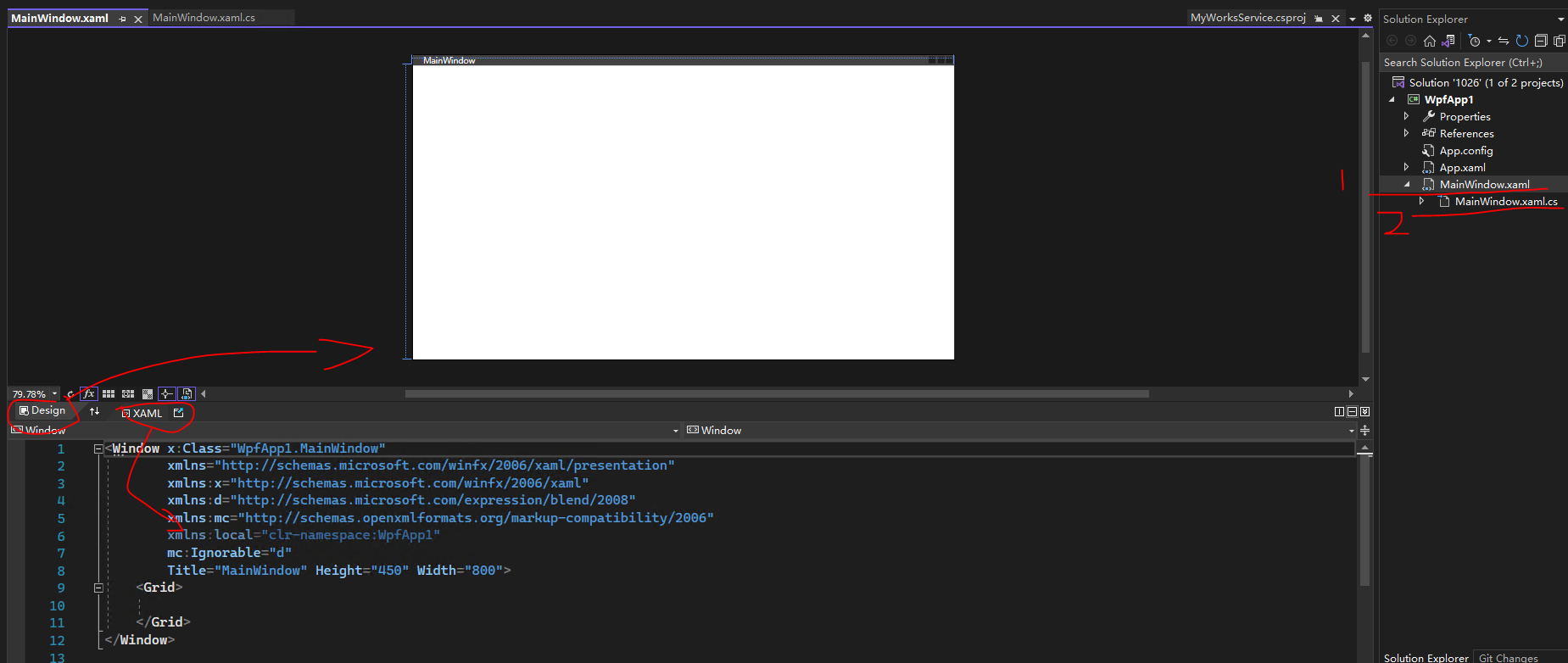
Could you share with me a screenshot of your VisualStudio project structure (like mine)?
You could click mark 1 in the screenshot to view the xaml code and design of the wpf project.
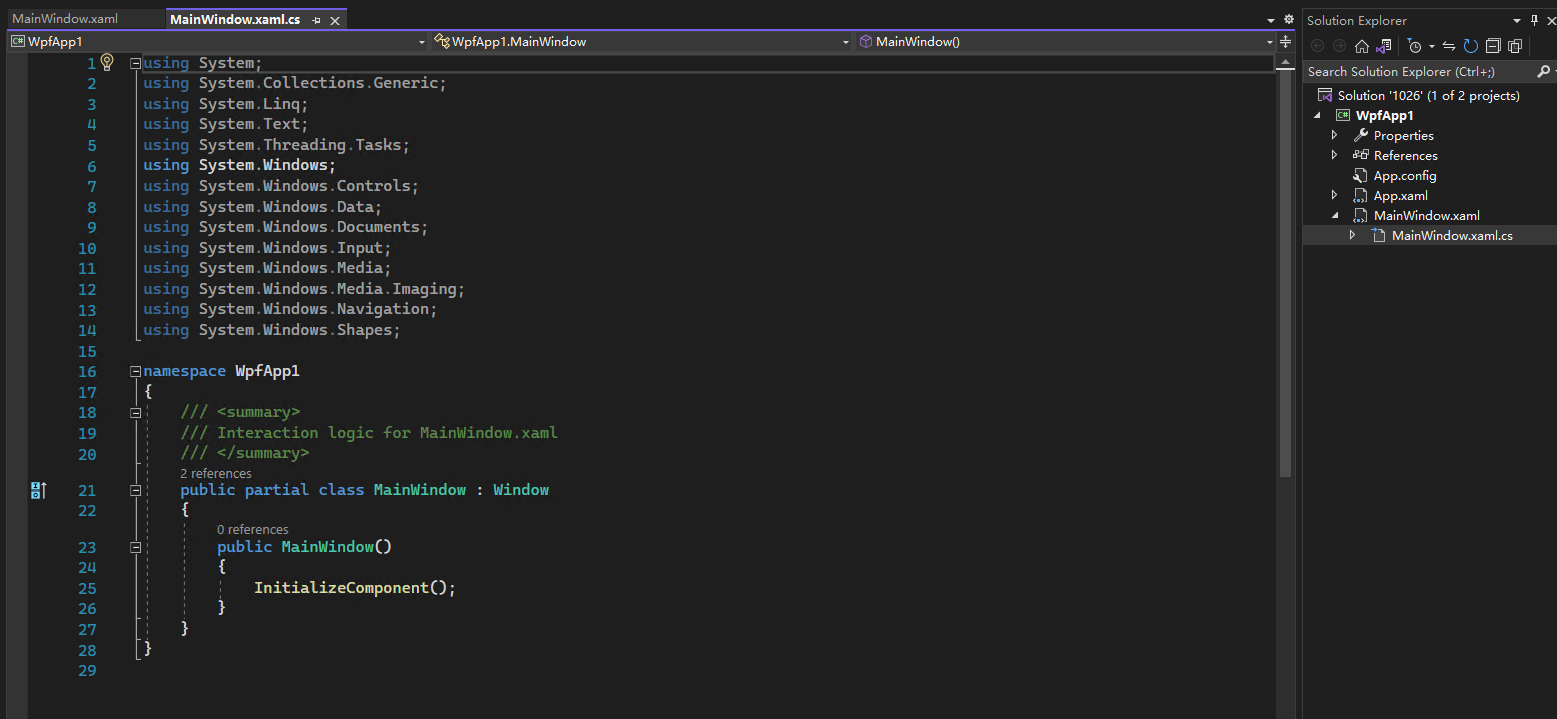
You can click on the screenshot mark 2 to view the cs code of the wpf project.
The result of clicking 1 is as shown below.
The result of clicking 2 is as shown below.
That's the whole problem
I don't see a xaml tab like what you have
What do you see?
You haven't answered my question
How to see the xaml of a cs wpf form in visual studio?