Azure Data Factory
An Azure service for ingesting, preparing, and transforming data at scale.
This browser is no longer supported.
Upgrade to Microsoft Edge to take advantage of the latest features, security updates, and technical support.
' cx='32' cy='32' r='32' /%3E%3Ctext x='50%25' y='55%25' dominant-baseline='middle' text-anchor='middle' fill='%23FFF' %3EP%3C/text%3E%3C/svg%3E)
Using ADF dataflow to copy databricks delta files to sql database. Under Source Options of dataflow , file system and folder path are not able to be parameterized. My objective is get the filesystem and folderpath value from previous activity.
' cx='32' cy='32' r='32' /%3E%3Ctext x='50%25' y='55%25' dominant-baseline='middle' text-anchor='middle' fill='%23FFF' %3EKM%3C/text%3E%3C/svg%3E)
Hello @Prakash14 ,
Thanks for the question and using MS Q&A platform.
In order to parameterize the fileSystem and folderPath of your delta source, you will have to follow the below procedure of steps:
FileSystem and FolderPath as shown below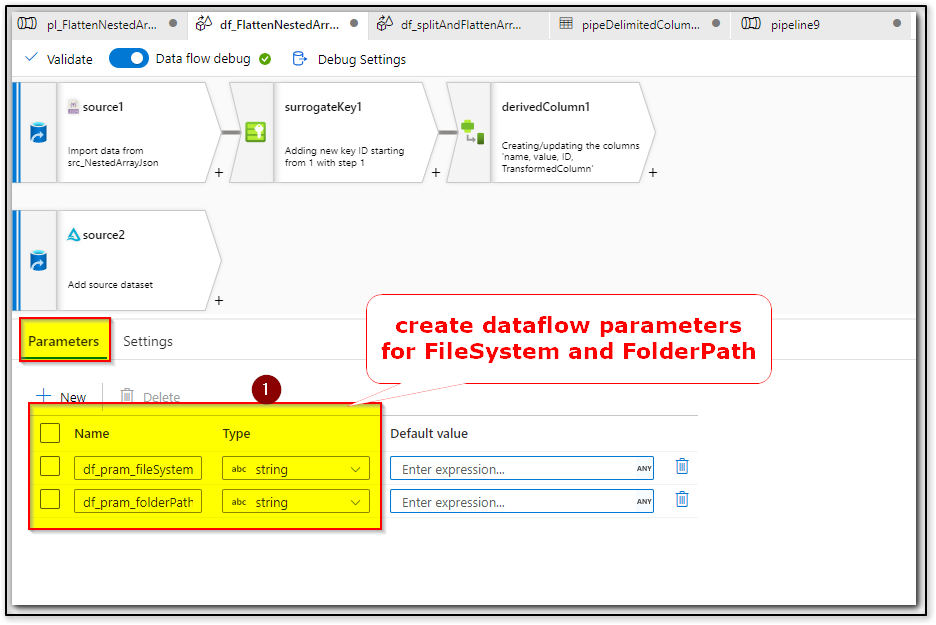
source options section, in Folder path properties, select the data flow parameters for fileSystem and folderPath you have created in step 1 using the expression builder.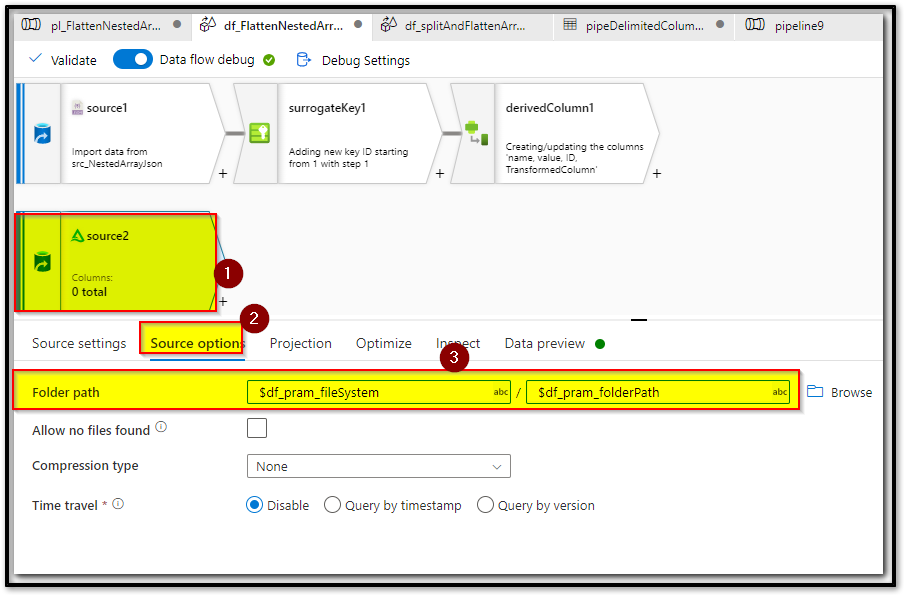
Expression field and then under value property, click on pipeline expression and add the dynamic expression to pass the output of your previous activity from which you want to pass the values. Below is a sample GIF for the same. 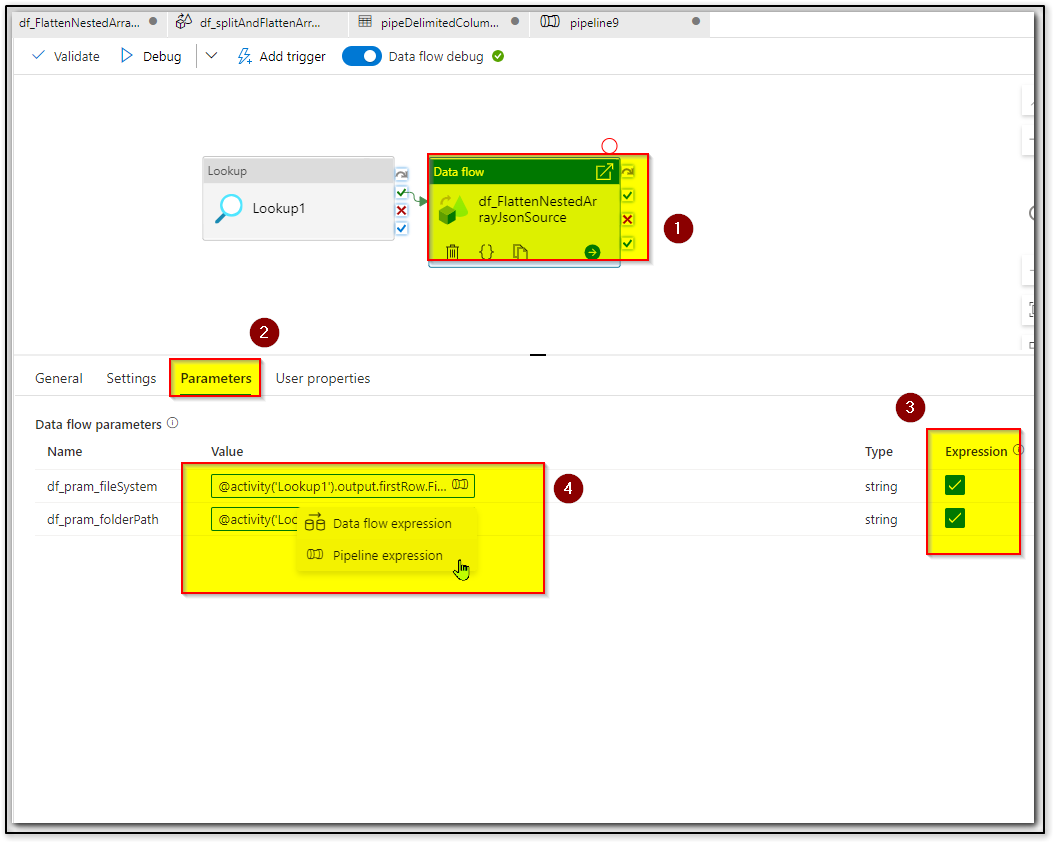
GIF:
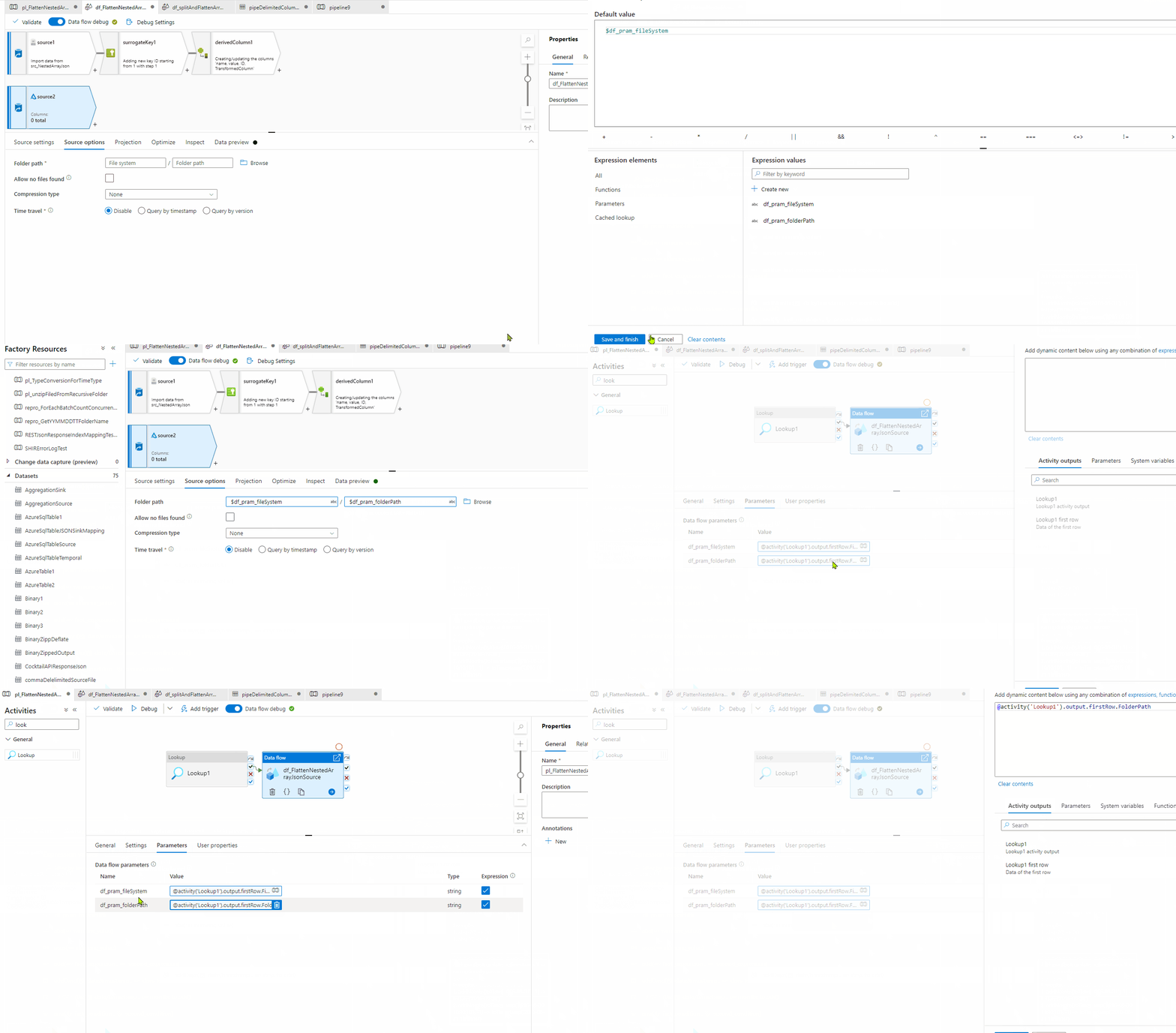
Hope this will help. Please let us know if any further queries.
 or upvote
  button whenever the information provided helps you. Original posters help the community find answers faster by identifying the correct answer. Here is how
Hello @Prakash14 ,
Just checking in to see if the above answer helped. If this answers your query, do click Accept Answer and Up-Vote for the same. And, if you have any further query do let us know.
Hello @Prakash14 ,
We still have not heard back from you. Just wanted to check if the above suggestion was helpful? If it answers your query, please do click Accept Answer and/or Up-Vote, as it might be beneficial to other community members reading this thread. And, if you have any further query do let us know.
implemented in the same way. Am still facing as path not found .
ADF fails while reading all partitioned folders under this directory
abfss://******@accountname.dfs.core.windows.net/delta/
Error :
Job failed due to reason: at Source 'source1': Path abfss://******@accountname.dfs.core.windows.net/delta does not resolve to any file(s). Please make sure the file/folder exists and is not hidden. At the same time, please ensure special character is not included in file/folder name, for example, name starting with _
my source is partitioned folder and am passing container as "source" and path as just "delta" .... Not able to pass wildcard values for partitioned folders.
abfss://@accountname.dfs.core.windows.net/delta/20221020/
abfss://@accountname.dfs.core.windows.net/delta/20221022/
Hello @Prakash14 ,
Thanks for getting back. Were you able to make the pipeline work by hardcoding the same values? If the hard coded values work fine, then we need to troubleshoot if the parameters values are exactly the same or not. It would be great if you could share few screenshots of your pipeline configuration.
Thank you
It's not hardcoded values works and parameters not working. Issue am facing is not able to read partitioned folders.
Getting error as path not found.
Screenshots :
Values from LKP is getting passed to the dataflow . Sample values are given below.
df_container : source
df_folderpath : input
df_folderpath is having databricks delta files under different partitioned folders(20221022, 20221023,..)
source/input/20221022 , source/input/20221023
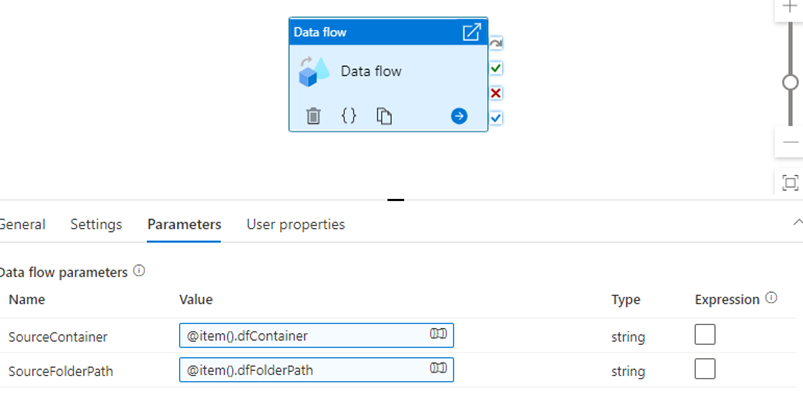
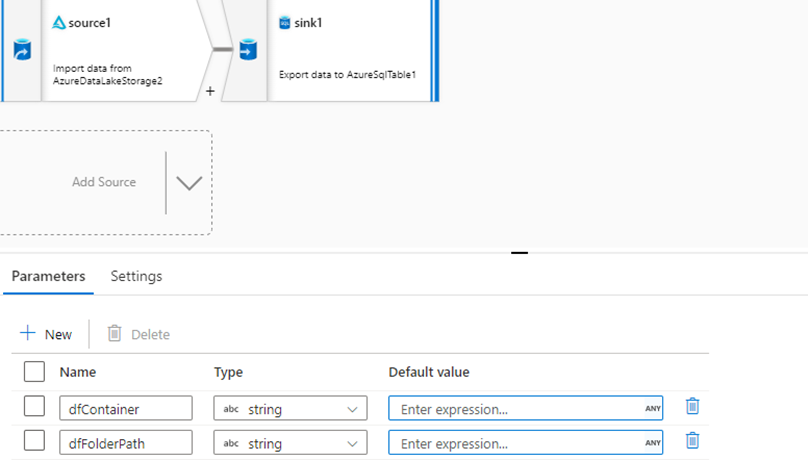
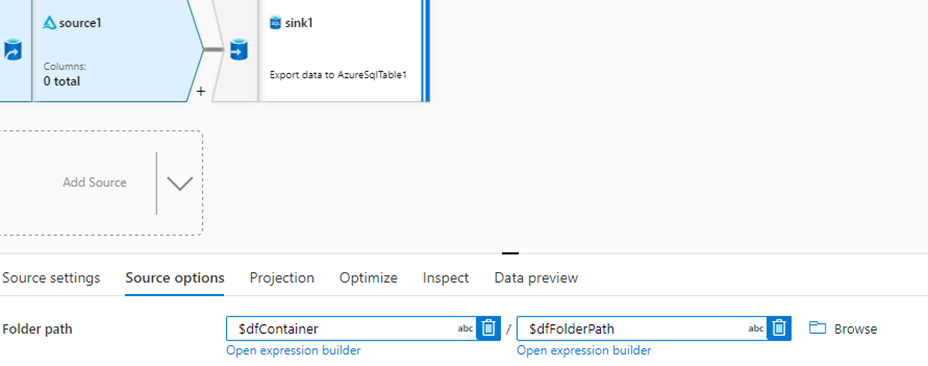
@KranthiPakala-MSFT Is there any solution for this ?
Hello @Prakash14 ,
Sorry for the delay. Would it be possible to share or attach Lookup activity output json payload so that I can try to reproduce and figure out where exactly is the issue. This definitely needs step by step troubleshooting as I feel like the mapping of parameters from lookup activity output to data flow parameters is missing something and resulting in failure. In case if you lookup output only returns df_container : source and df_folderpath : input then how will you decide to which date date we have to look for? Is there any specific requirement? Based on the requirement we may have to append the required /date to df_folderpath : input. so that the issue will be resolved. Please save lookup output JSON Payload as .txt file and do attach in your response.
Please note: Please mask any sensitive information in your JSON payload or provide dummy data to reproduce the issue.
Thank you
' cx='32' cy='32' r='32' /%3E%3Ctext x='50%25' y='55%25' dominant-baseline='middle' text-anchor='middle' fill='%23FFF' %3EZY%3C/text%3E%3C/svg%3E)
It's very detailed explanations. But it only works when there are only two parameters for the path. If there have more than two parameters for the path, there are errors. For example: successful: $df_param_fileSystem/$df_param_folderPath fail: $df_param_fileSystem/$df_param_folderPath/$df_parm_name/$df_parm_version Do you have any solutions for more parameters in the path? Thanks
df_container is the ADLS gen2 container name.
df_folderpath is the ADLS gen2 folder path
df_container : source , df_folderpath : input/data/
Inside the source container - source/input/data/ there will be multiple directories and delta format files(databricks) will be there under each partition .
date=2017-01-01/abc.parquet
date=2017-03-01/xyz.parquet
date=2017-04-01/pqr.parquet