Azure Blob Storage
An Azure service that stores unstructured data in the cloud as blobs.
This browser is no longer supported.
Upgrade to Microsoft Edge to take advantage of the latest features, security updates, and technical support.
' cx='32' cy='32' r='32' /%3E%3Ctext x='50%25' y='55%25' dominant-baseline='middle' text-anchor='middle' fill='%23FFF' %3EST%3C/text%3E%3C/svg%3E)
Hi,
my activity is - 
I am getting this issue where my source is blob file -

on data preview My data is getting changed -
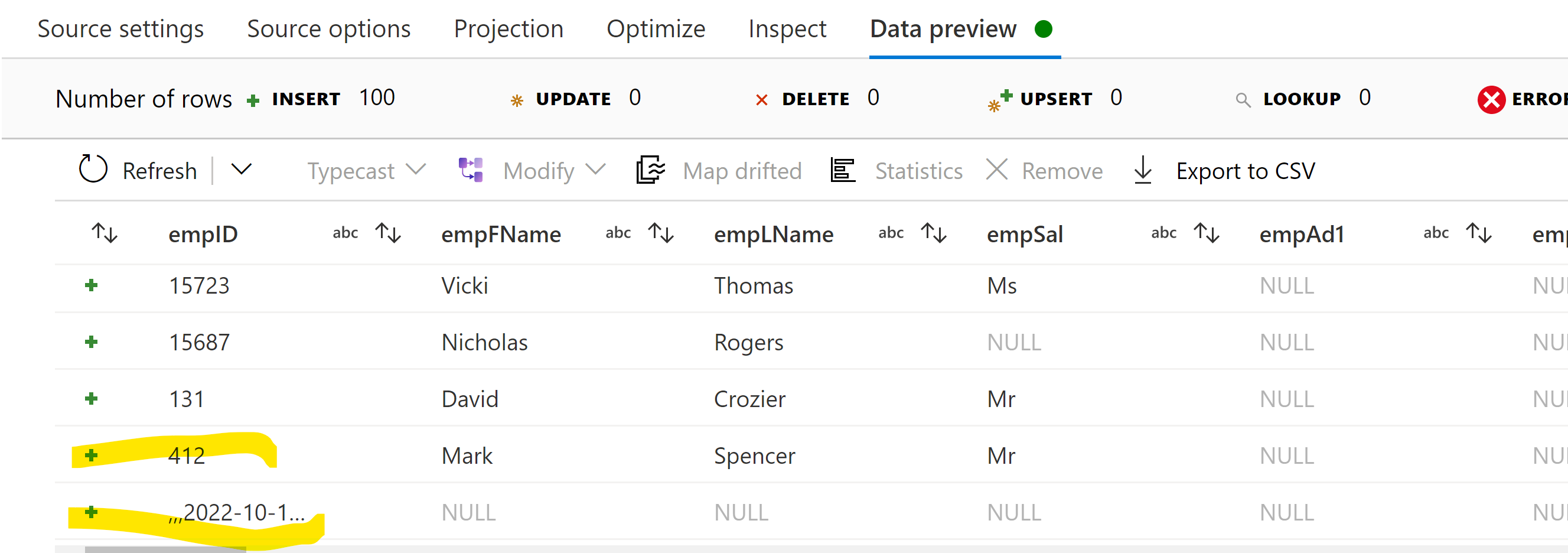
3 commas are getting apended and the value of last 2 columns is moved to next row in just single activity.
what should be the issue?
Any help will be highly appreciated.
Thank you,
Shivani Tyagi

Hi @Shivani Tyagi ,
Thank you for posting query in Microsoft Q&A Platform.
Are you using csv file as source data here? What are settings inside csv file dataset in your case?
It seems your data or dataset settings are little improper which is resulting in data to be appear like this in preview. Your data may have some extra or less delimiters or your dataset may not have column delimiters properly defined.
Kindly recheck also, if possible, feel free to share your data along with screenshots of dataset and implementation so that I can try at my end too and help better.
Thanks for replying @ShaikMaheer-MSFT .
It gets sorted now. :)
Thanks,
Shivani Tyagi
Hi @Shivani Tyagi , Glad to know your issue resolved. Kindly consider marking above answer as Accepted Answer. Accepted answers help community as well.