Azure Key Vault
An Azure service that is used to manage and protect cryptographic keys and other secrets used by cloud apps and services.
This browser is no longer supported.
Upgrade to Microsoft Edge to take advantage of the latest features, security updates, and technical support.
' cx='32' cy='32' r='32' /%3E%3Ctext x='50%25' y='55%25' dominant-baseline='middle' text-anchor='middle' fill='%23FFF' %3EJD%3C/text%3E%3C/svg%3E)
Hi,
In my azure function (developed by using Java), I need to read files from a location and process those files based on my custom code. While developing this, I used files from my local directory. But I want to deploy this application to Cloud and want to read files from the file share or blob storage. How I can send my file share/blob storage path as a parameter in the request body.
Local Path:
{
"inputFile": "C:/Users/Desktop/abc.txt"
}
Expected file share path once deployed:
{
"inputFile": "/archive/abc.txt"
}
Here archive is one of the file share from my storage account. How Can provide my file share/blob storage access to my azure function, so it can access all the files on the file share/blob storage. Also, I am trying to pass the key value secrets to my azure function as well. Please suggest how I can achieve this.
Example:

In this example, I am passing my input and output streams as part of post body and trying to read those paths in my code. I am getting file/path not found exception if I directly pass the blob storage path as an input.
Thanks,
Jeevi
' cx='32' cy='32' r='32' /%3E%3Ctext x='50%25' y='55%25' dominant-baseline='middle' text-anchor='middle' fill='%23FFF' %3EMM%3C/text%3E%3C/svg%3E)
@Jeevi Danda Thank you for reaching out to Microsoft Q&A. Based on your statement, you need help in reading files or blobs from Storage account in your Function app code (Java).
FileInputStream can be used to read files that are either in local (during development) or azure deployment path such as "/home/site/wwwroot/". However, for reading files or blobs from azure storage account, you would need to use Azure SDK for Java v12 library and samples are available at https://learn.microsoft.com/en-us/azure/storage/common/storage-samples-java. Refer Blob samples or File samples respectively for your scenario.
I am not sure about the need to pass Key Vault secrets in the request body. You can use Key Vault references in Azure Functions and refer Use Key Vault references for App Service and Azure Functions for more info on this. If this doesn't match your needs, please clarify and it would help to understand better.
We would be happy to assist you for any questions and upvote if it helped.
Hi @MuthuKumaranMurugaachari-MSFT Thanks for providing a solution. As you said I am trying to read the vault secrets from the Key vault. But I am getting "Caused by: com.azure.core.exception.HttpResponseException: Status code 401, "{"error":{"code":"Unauthorized","message":"AKV10032: Invalid issuer." error. Please suggest if i am missing aything.

@Jeevi Danda I found troubleshooting guide for AKV10032: Invalid issuer in Azure SDK for Java and would like to check if you already reviewed this. This appears to be cross tenant issue and upgrading to newer package versions should help with automatic tenant discovery. Can you please upgrade the package version? Also, validate user/service principal or Managed Identity are in the same tenant as the vault as mentioned below.
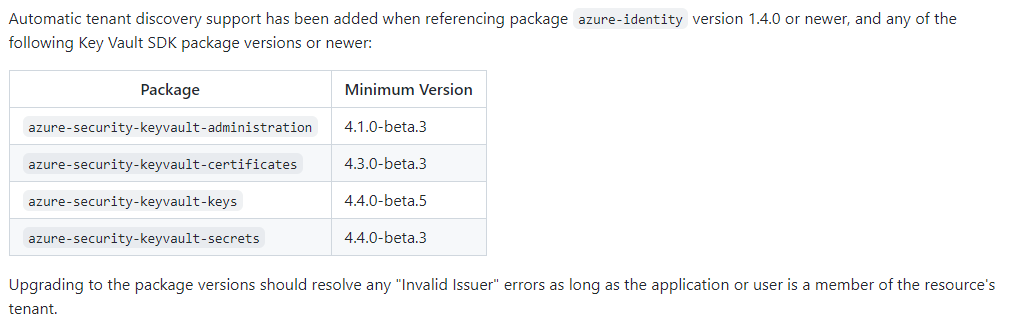
Let us know if you have any other questions. Would be happy to assist.
@MuthuKumaranMurugaachari-MSFT Upgrading version actually resolved my problem. Thanks a lot!
@Jeevi Danda Awesome! glad to hear that and thanks for confirming.

You can use Azure Storage File Shares client library for .NET for reading your azure file share from Azure Functions:
https://learn.microsoft.com/en-us/dotnet/api/overview/azure/storage.files.shares-readme?view=azure-dotnet
Credentials to access the file share can be stored in your function code, in config files or (better) on Azure KeyVault.
From an Azure Function accessing an Azure file share you can read the files content exactly like in your local development environment. When you have the content, you can process the file accordingly.