Azure Data Factory
An Azure service for ingesting, preparing, and transforming data at scale.
This browser is no longer supported.
Upgrade to Microsoft Edge to take advantage of the latest features, security updates, and technical support.

Hello All,
Good day!
@AnnuKumari-MSFT @Nasreen Akter @MarkKromer-MSFT @MartinJaffer-MSFT
below is the image of the dynamic body in Web activity wherein I am leveraging a pipeline parameter

and the parameter value is

With the above set of configuration and values, the web activity is successfully getting executed.
Now for the same REST API, I am trying to use it as source in dataflow :
with the same aspect of configuration and it is failing with below error :
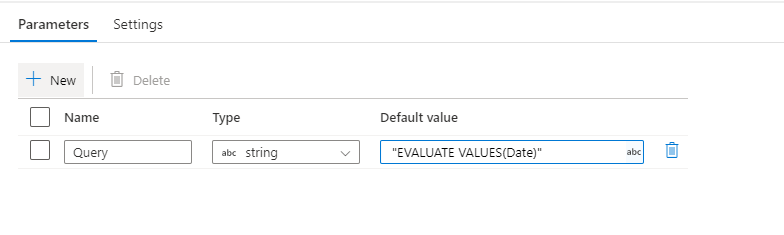
Dataflow param:
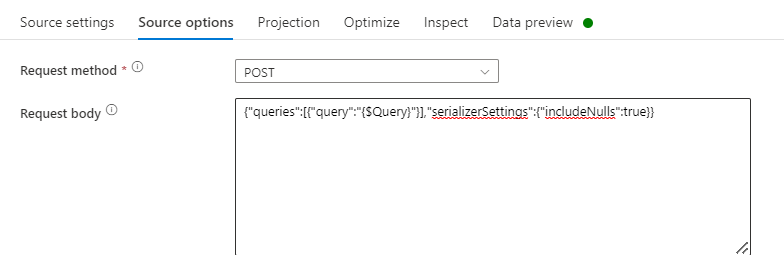
Dataflow body config:
Error:
ailure to read most recent page request: DF-REST_001 - Error response from server: Some({"error":{"code":"DatasetExecuteQueriesError","pbi.error":{"code":"DatasetExecuteQueriesError","parameters":{},"details":[{"code":"DetailsMessage","detail":{"type":1,"value":"The JSON DDL request failed with the following error: Invalid JavaScript property identifier character: }. Path '', line 1, position 7.."}},{"code":"AnalysisServicesErrorCode","detail":{"type":1,"value":"3239182519"}}]}}}), Status code: 400. Please check your request url and body.
Can someone please help what I am doing Wrong?
' cx='32' cy='32' r='32' /%3E%3Ctext x='50%25' y='55%25' dominant-baseline='middle' text-anchor='middle' fill='%23FFF' %3EKM%3C/text%3E%3C/svg%3E)
Hello @Nandan Hegde ,
Thanks for the question and using MS Q&A platform.
In mapping data flow, you will have to concatenate in order to form a request body using dataflow parameters.
Please try concatenating the request body as below and it should help achieve your requirement:
'{"queries": [{"query":' + $df_param_requestBody + '}],"serializerSettings": {"includeNulls": true}}'
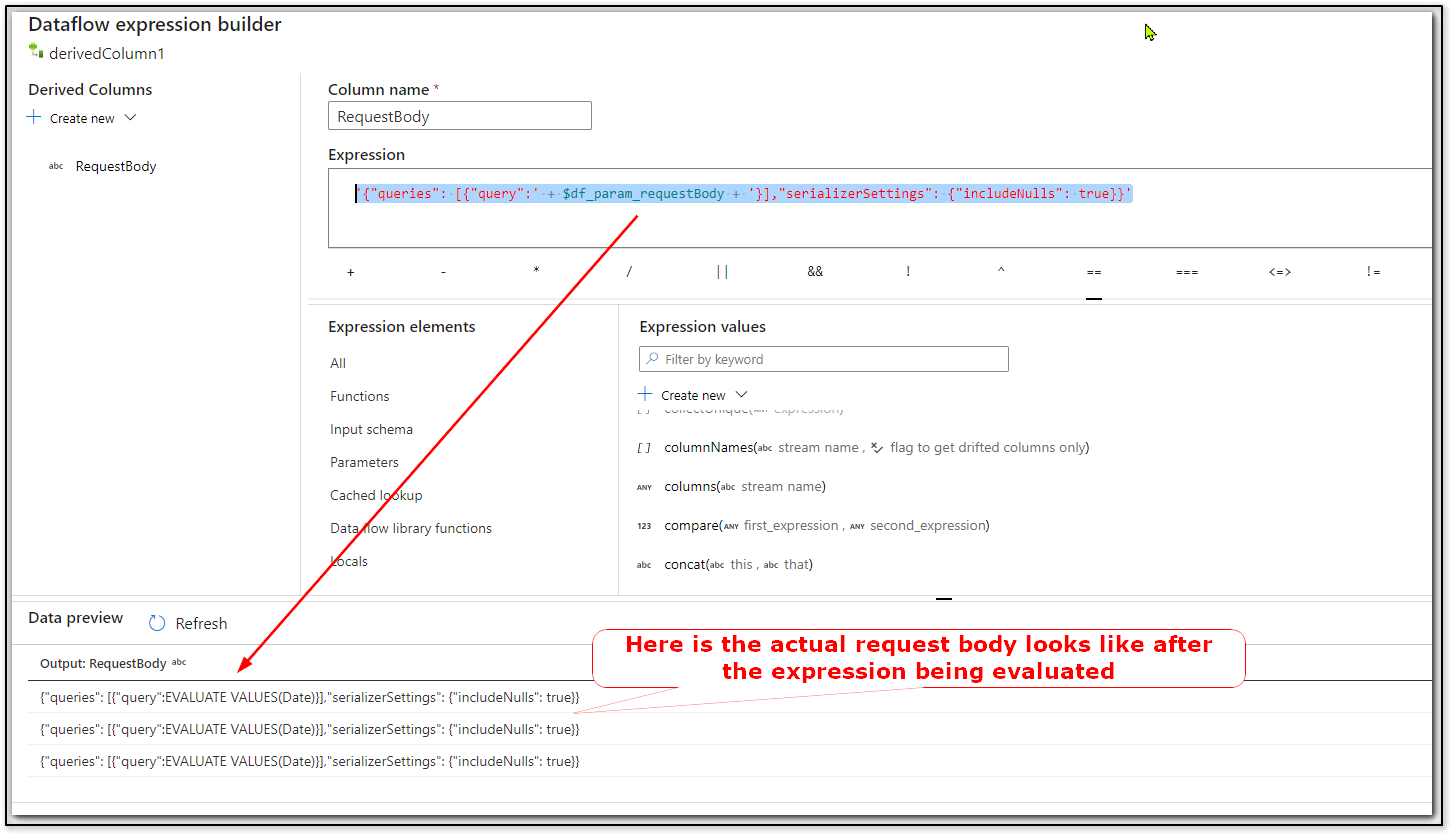
Please note I have tested the expression in derived column so that I can be able to see what request body is being generated after the expression has been evaluated at runtime. (Nothing but similar to our set variable activity to play around with dynamic expressions ;) ). But it should be same behavior with Request body expression builder as well.
Hope this helps. Please let us know if any further queries.
------------------------------
 or upvote
  button whenever the information provided helps you. Original posters help the community find answers faster by identifying the correct answer. Here is how
Hey @KranthiPakala-MSFT Thank you very much :)
There was no proper documentation w.r.t this and I had to scratch my brains .
I have created a PR to update the doc :
https://github.com/MicrosoftDocs/azure-docs/pull/100080
Can you please take a look into it and update/approve it as needed
Hello @Nandan Hegde ,
Thanks much for submitting the PR. I will make sure to get this PR reviewed by our content owners and merge the changes.
Appreciate much! :)
Hello @Nandan Hegde ,
Wanted to update you that your changes have been merged. Appreciate much for helping us improve the doc content.