Dont specify the STOPAT parameter.
Sql differential backup Restoration
' cx='32' cy='32' r='32' /%3E%3Ctext x='50%25' y='55%25' dominant-baseline='middle' text-anchor='middle' fill='%23FFF' %3EAN%3C/text%3E%3C/svg%3E)
Anashwar N
46
Reputation points
Hi Team
I have full backup on Sunday , differential backups on Monday, Tuesday, Wednesday
I want to make my DB available till Monday for testing some data
I am trying to restore my database on new server
Restored full backup ,restored differential backup took on monday
It throw s an error database cannot be restored to earlier state
How do I make my db available till Monday
Regards
SQL Server | Other
6 answers
Sort by: Most helpful
-
-
 m 4,281 Reputation points
2020-09-24T03:22:32.757+00:00 Hi @Anonymous ,
1.First of all, you must first clarify the file you want to restore and the time point to restore to,you can execute code as next to check all your backup files:
restore headeronly from disk = 'x:\xxx\xxx.bak'2.Follow screenshot as next to restore and then click ok, you will successfully finish it.(on my side, I choose overwrite the existing database to have a test, I restore my db at 20200924 10:34:20am )
--test code:use master drop database test1 create database test1 use test1 go create table testbak (id int, cname varchar) --insert values 10:33 insert into testbak values(1,'a') --full backup at 20200924 10:33am backup database test1 to disk = 'C:\testbackupfiles\testbak.bak' backup log test1 to disk='C:\testbackupfiles\testbak.bak' --insert into values 10:34 insert into testbak values (2,'b') --backup at 10:34 am backup database test1 to disk = 'C:\testbackupfiles\testbak.bak' with differential --insert into values at 10:35 insert into testbak values (3,'c') --backup at 10:35am backup database test1 to disk = 'C:\testbackupfiles\testbak.bak' with differential--damage the mdf files and then restore as next
--1.check
--check
restore headeronly from disk = 'C:\testbackupfiles\testbak.bak'
--2restore to 10:34am
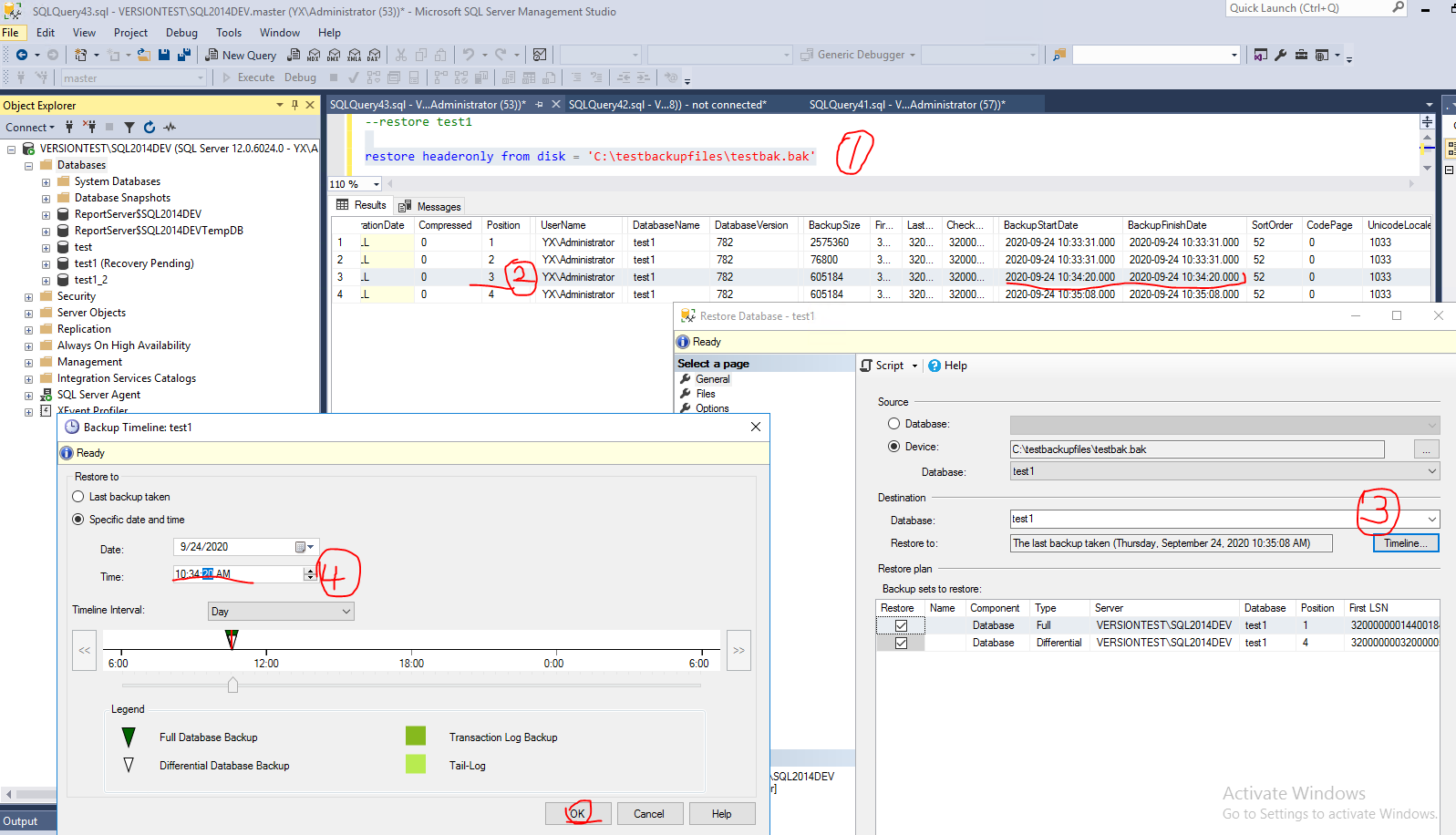
3.check the resulte (on my side, it only shows the values (1,a) (2,b))
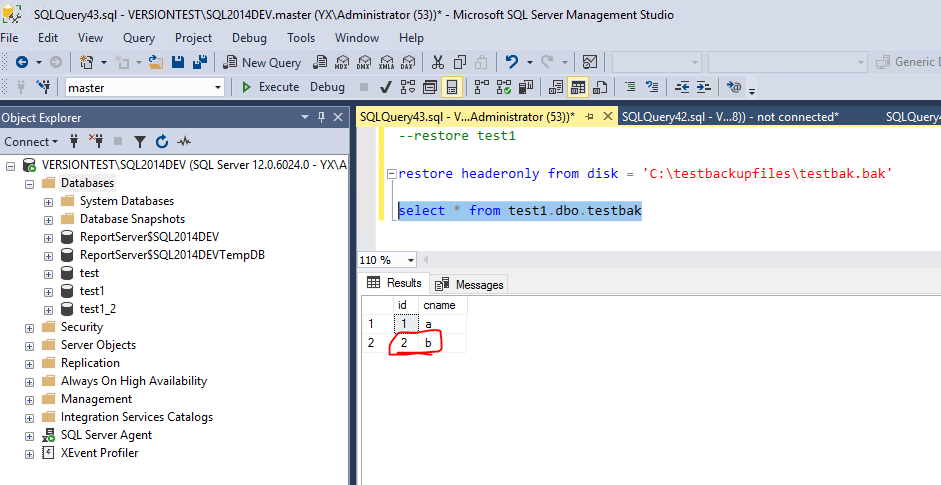
You can also use t_sql to restore it as this doc.: restore-a-sql-server-database-to-a-point-in-time-full-recovery-model
More information: revert-a-database-to-a-point-in-time
BR,
Mia -
m 4,281 Reputation points
2020-09-24T03:39:53.427+00:00 Hi @Anonymous ,
You can firstly read this blog or test as next workaround: sql-server-fix-error-msg-3136-level-16-state-1-this-differential-backup-cannot-be-restored-because-the-database-has-not-been-restored-to-the-correct-earlier-state
1.First of all, you must first clarify the file you want to restore and the time point to restore to,you can execute code as next to check all your backup files:
restore headeronly from disk = 'x:\xxx\xxx.bak'2.Follow screenshot as next to restore and then click ok, you will successfully finish it.(on my side, I choose overwrite the existing database to have a test, I restore my db at 20200924 10:34:20am )
--test code:use master drop database test1 create database test1 use test1 go create table testbak (id int, cname varchar) --insert values 10:33 insert into testbak values(1,'a') --full backup at 20200924 10:33am backup database test1 to disk = 'C:\testbackupfiles\testbak.bak' backup log test1 to disk='C:\testbackupfiles\testbak.bak' --insert into values 10:34 insert into testbak values (2,'b') --backup at 10:34 am backup database test1 to disk = 'C:\testbackupfiles\testbak.bak' with differential --insert into values at 10:35 insert into testbak values (3,'c') --backup at 10:35am backup database test1 to disk = 'C:\testbackupfiles\testbak.bak' with differential--damage the mdf files and then restore as next
--1.check
--check
restore headeronly from disk = 'C:\testbackupfiles\testbak.bak'
--2restore to 10:34am
3.check the resulte (on my side, it only shows the values (1,a) (2,b))
You can also use t_sql to restore it as this doc.: https://learn.microsoft.com/en-us/sql/relational-databases/backup-restore/restore-a-sql-server-database-to-a-point-in-time-full-recovery-model?view=sql-server-ver15
More information: https://solutioncenter.apexsql.com/revert-a-database-to-a-point-in-time/
BR,
Mia -
' cx='32' cy='32' r='32' /%3E%3Ctext x='50%25' y='55%25' dominant-baseline='middle' text-anchor='middle' fill='%23FFF' %3ETH%3C/text%3E%3C/svg%3E) tibor_karaszi@hotmail.com 4,316 Reputation points
tibor_karaszi@hotmail.com 4,316 Reputation points2020-09-24T09:18:06.993+00:00 To add a bit to my earlier reply. You restore the full backup and the Monday differential backup. Please show is the RESTORE command you are executing if that doesn't work. You can script it if you use the GUI in SSMS to restore. Also the full error messages.
-
m 4,281 Reputation points
2020-09-25T01:43:15.31+00:00 Hi @Anonymous ,
Is the reply helpful?
BR,
Mia
If the answer is helpful, please click "Accept Answer" and upvote it.