Azure Data Factory
An Azure service for ingesting, preparing, and transforming data at scale.
This browser is no longer supported.
Upgrade to Microsoft Edge to take advantage of the latest features, security updates, and technical support.
' cx='32' cy='32' r='32' /%3E%3Ctext x='50%25' y='55%25' dominant-baseline='middle' text-anchor='middle' fill='%23FFF' %3EM%3C/text%3E%3C/svg%3E)
Hello everyone, newbie here with ADF :-)
I'm trying to build a simple dataflow with ADFv2 that reads data from an Azure Data Lake gen 2 storage and sync it to an Azure SQL database table. (data in the Lake comes from Dataverse and synched with Azure Synapse Link)
If I do a simple "source to destination" flow everything works fine, but when I activate the "Allow upsert" update method and set the Key column in the sink settings, I get the following error message when validating: "Key column 'SectorCode' does not exist in mapped columns." However, the column exists in the Azure SQL schema and is present in the mapping list. Am I doing something wrong? I've searched for a solution on the web but could not find anything.

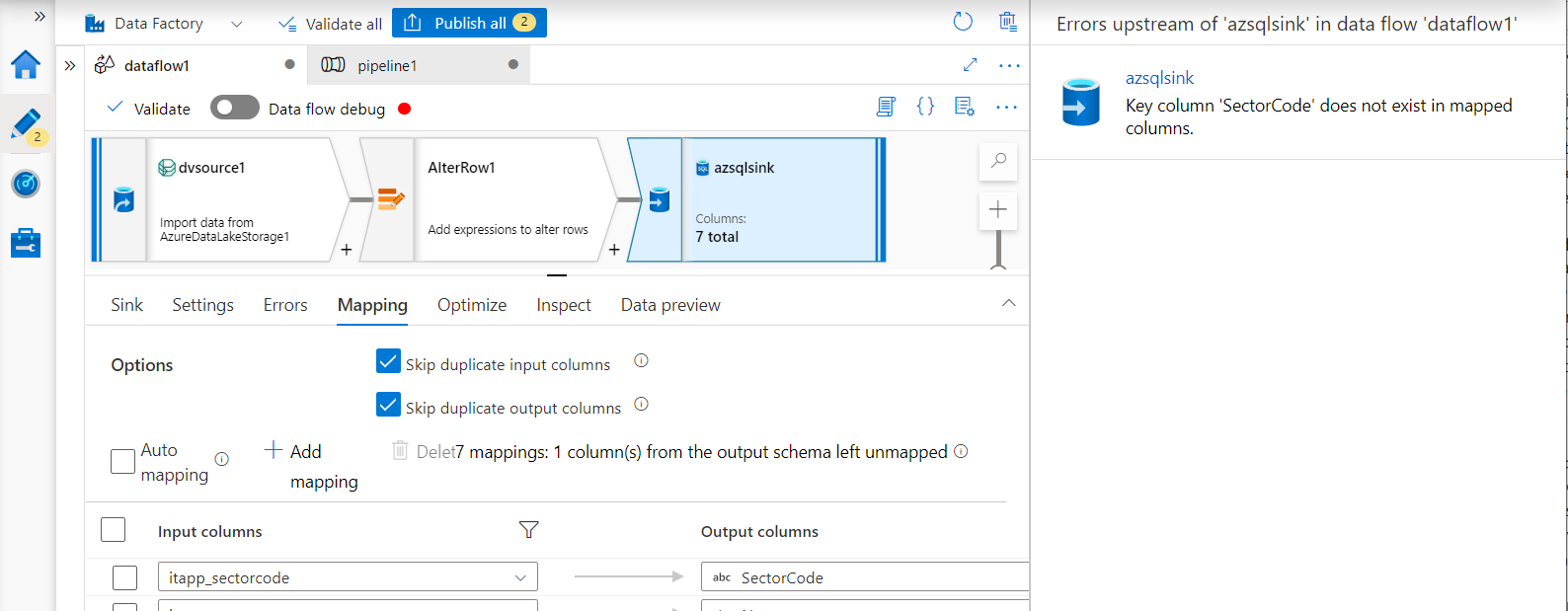
Any help would be appreciated.
Thanks
' cx='32' cy='32' r='32' /%3E%3Ctext x='50%25' y='55%25' dominant-baseline='middle' text-anchor='middle' fill='%23FFF' %3ESM%3C/text%3E%3C/svg%3E)
Hi @MarcArsenault-7348,
Just checking if the below workaround helped in your issue. If not, do let us know to further assist you. Thanks
Hi @MarcArsenault-7348,
Great! Happy that you are able to move on.
Thanks for visiting Microsoft Q&A platform. Have a good day!
' cx='32' cy='32' r='32' /%3E%3Ctext x='50%25' y='55%25' dominant-baseline='middle' text-anchor='middle' fill='%23FFF' %3EJF%3C/text%3E%3C/svg%3E)
I am running into the same issue. I have a parameterized linked service for connecting to a SQL server, plus a parameterized dataset. My sink is a parameterized lakehouse in fabric, when I type in my 2 key columns from my source SQL database [Document Type] and [No_] I get the validation error, despite everything being parameterized and neither source nor sink should be defined until run time The workaround of selecting another dataset in the sink and then reselecting my desired dataset does not work
Hi @MarcArsenault-7348,
Welcome to Microsoft Q&A platform and thanks for using Azure Services.
This issue is transient and occurs sometimes. It’s a bug on our UX tool, it complains the key column as “undefined” because the schema of sink is not published so the UX tool can’t recognize it properly. We will check on the work item for it and fix this issue soon.
The workaround steps and video to follow are below:
1). Go to the Sink tab Dataset and Deselect the Azure SQL DB dataset and select any other dataset from the dropdown.
2). Again, re-select the Azure SQL DB dataset.
3). Next go to the Settings tab and click Validate.
4). The Error will no longer exist, and the Data flow will be validated.
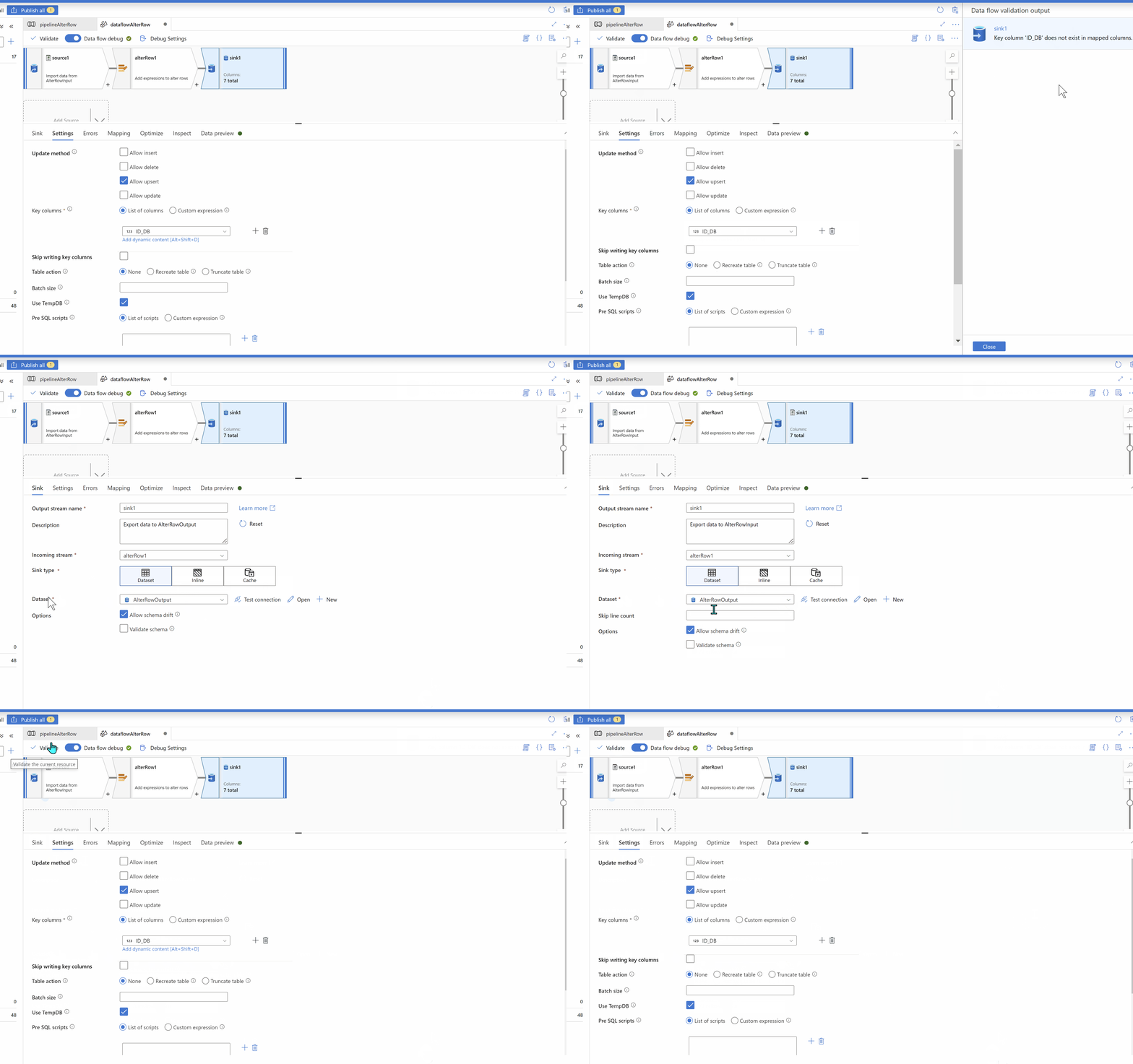
Hope this will help. Sorry for the inconvenience.
Please try and let us know in case of further queries.
------------------------------
 or upvote
  button whenever the information provided helps you.
 ' cx='32' cy='32' r='32' /%3E%3Ctext x='50%25' y='55%25' dominant-baseline='middle' text-anchor='middle' fill='%23FFF' %3EZL%3C/text%3E%3C/svg%3E)
Hello @MarcArsenault-7348
We have already had a fix for this. Could you please try it again? If this issue still exists, please provide us with some repro steps. And thank you for reporting this.