Developer technologies | VB
An object-oriented programming language developed by Microsoft that can be used in .NET.
This browser is no longer supported.
Upgrade to Microsoft Edge to take advantage of the latest features, security updates, and technical support.
' cx='32' cy='32' r='32' /%3E%3Ctext x='50%25' y='55%25' dominant-baseline='middle' text-anchor='middle' fill='%23FFF' %3EPP%3C/text%3E%3C/svg%3E)
Please help me to translate C# code below to Vb Net:
private void AssosiateAndRaiseViewEvents()
{
btnSearch.Click += delegate{searchEvent?.Invoke(this, EventArgs.Empty);};
txtSearch.KeyDown += (s, e) =>
{
if (e.KeyCode == Keys.Enter)
SearchEvent?.Invoce(this, EventArgs.Empty);
};
}

Hi
One of the many good convertion sites is THIS ONE
Some very difficult to understand code shown for the conversion. You may be better to just ask how to do whatever it is you want that code for.
For example: did you add a Button called btnSearch to Form1? Likewise, did you add a TextBox called txtSearch? If so, what data needs to be searched?
Thank you for reply,
i like to Associate/Subscribe SearchEvent for interface IPetView to button.Click and textbox.Keypress on winform .net
Public Event SearchEvent(sender As Object, e As EventArgs) Implements IPetView.SearchEvent
Because i like to do on VB code, i refer code C#, I had not idea how to convert this code , i used converted C# to vb not working
private void AssosiateAndRaiseViewEvents()
{
btnSearch.Click += delegate{searchEvent?.Invoke(this, EventArgs.Empty);};
txtSearch.KeyDown += (s, e) =>
{
if (e.KeyCode == Keys.Enter)
SearchEvent?.Invoce(this, EventArgs.Empty);
};
}
' cx='32' cy='32' r='32' /%3E%3Ctext x='50%25' y='55%25' dominant-baseline='middle' text-anchor='middle' fill='%23FFF' %3EJL%3C/text%3E%3C/svg%3E)
Hi @pthsoon pthsoon ,
Please check if the follwing code works for you.
    Private Sub AssosiateAndRaiseViewEvents()
        AddHandler btnSearch.Click, AddressOf btnSearch_Click
        AddHandler txtSearch.KeyDown, AddressOf txtSearch_KeyDown
    End Sub

    Private Sub btnSearch_Click()
        searchEvent?.Invoke(Me, EventArgs.Empty)
    End Sub
    Private Sub txtSearch_KeyDown(sender As Object, e As KeyEventArgs)
        If e.KeyCode = Keys.Enter Then SearchEvent?.Invoce(Me, EventArgs.Empty)
    End Sub
Best Regards.
Jiachen Li
----------
If the answer is helpful, please click "Accept Answer" and upvote it.
Note: Please follow the steps in our documentation to enable e-mail notifications if you want to receive the related email notification for this thread.
Thank you Jiachen Li @Jiachen Li-MSFT reply with you help and this website
https://stackoverflow.com/questions/1013048/determine-if-an-event-has-been-attached-to-yet
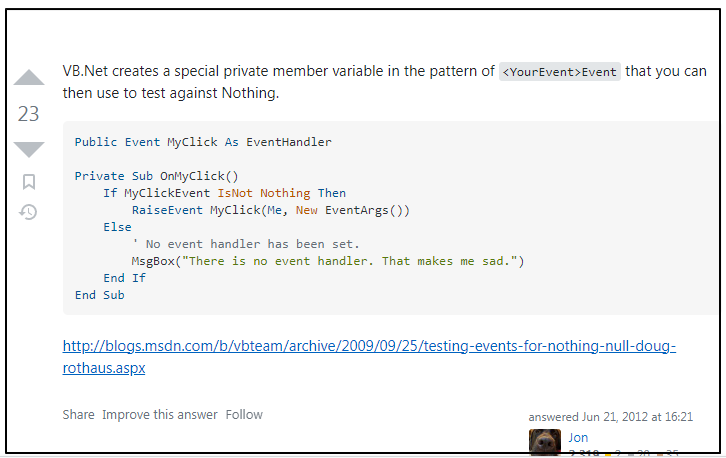
i manage make to code as below from C# to VB
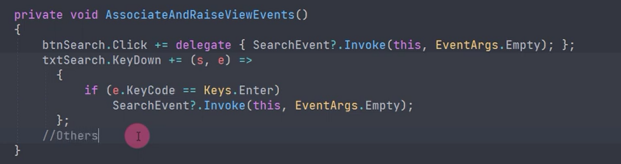
Pubic Event SearchEvent As EventHandler

Private Sub AssociateAndRaiseEvent()
    AddHandler btnSearch.Click, AddressOf btnSearch_Click
    AddHandler txtSearch.KeyDown, AddressOf txtSearch_KeyDown
End Sub

Private Sub btnSearch_Click()
    If SearchEventEvent IsNot Nothing Then
        SearchEventEvent.Invoke(Me, EventArgs.Empty)
    End If

End Sub
Private Sub txtSearch_KeyDown(sender As Object, e As KeyEventArgs)
    If e.KeyCode = Keys.Enter Then
        If SearchEventEvent IsNot Nothing Then
            SearchEventEvent.Invoke(Me, EventArgs.Empty)
        End If
    End If

End Sub