Azure API Management
An Azure service that provides a hybrid, multi-cloud management platform for APIs.
This browser is no longer supported.
Upgrade to Microsoft Edge to take advantage of the latest features, security updates, and technical support.
' cx='32' cy='32' r='32' /%3E%3Ctext x='50%25' y='55%25' dominant-baseline='middle' text-anchor='middle' fill='%23FFF' %3EL%3C/text%3E%3C/svg%3E)
Hi, we have 2 questions about Authorizations (preview) , for design and login process.
Design
Our scenario
API Backend : Jira Cloud (OAuth 2.0 - Authorization Code flow)
API Client : team 1, team 2, team 3, etc
API use cases :
sample
team A creates tickets to Jira project A
team B update tickets to Jira project B
Each team holds their own client id/secret by registering an App on Jira to define API access scope.
The game rule here is similar to Azure App Registration, API permissions.
--
We've successfully try Authorizations (preview) in test account, it works to fire the Jira Cloud API via OAuth 2.0.
But when it comes to real case, say multiple API clients, not sure how to map the structure to the Authorizations (preview).
Two ideas in my mind, which one is the best practice for my scenario ?
Idea 1 :
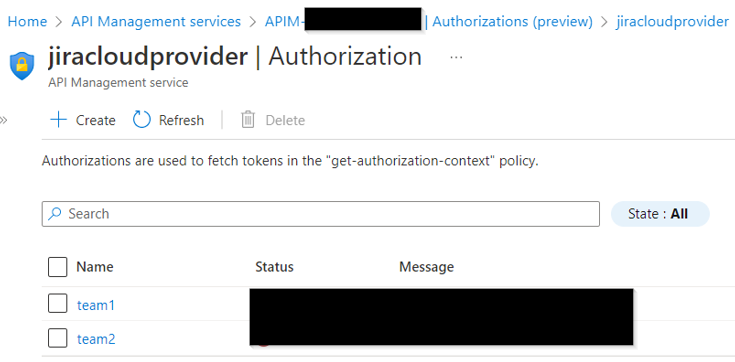
One identity provider with multiple Authorizations.
It looks good , but it seems team1 and team2 cannot separate their client_id and client_secret.
How do team1 and team2 use their own client_id, client_secret here ?
--
Idea 2
Each team has their own identity provider and the client_id, client_secret can be separated.
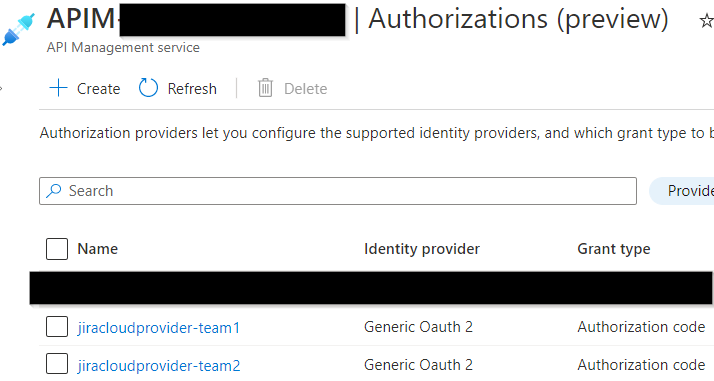
If go this way, how do I setup the policy for provider-id and authorization-id ?
Perhaps API client should add provider-id and authorization-id in the request header and I dynamically fetch its value ?
Like this

--
Login process
It seems login process can only be triggered manually.
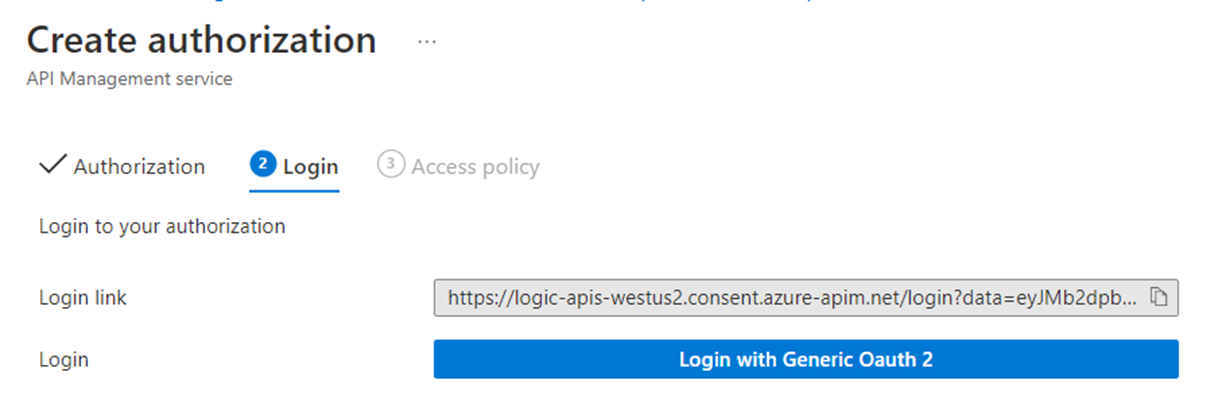
How do I let team1 and team2 to conduct this ?
Idea 1 : I grant APIM management plane access right to team1 , team2 , and they hit the button on their own
Idea 2 : team1, team2 give me their credential, then I manually hit the button on behalf of them.
Both processes are a bit not natural for me , perhaps there's 3rd way ?
Need your advice
Thank you
PS : Jira Cloud API reference : https://developer.atlassian.com/cloud/jira/platform/rest/v3/intro#version
' cx='32' cy='32' r='32' /%3E%3Ctext x='50%25' y='55%25' dominant-baseline='middle' text-anchor='middle' fill='%23FFF' %3EMM%3C/text%3E%3C/svg%3E)
@Lily Thank you for reaching out to Microsoft Q&A and sorry for the delay in response.
I hope these answers help with your questions and feel free to add a comment if you have any other questions. We would be happy to assist you. Please 'Accept as answer' and ‘Upvote’ if it helped so that it can help others in the community.
Hi @MuthuKumaranMurugaachari-MSFT ,
Thank you for such detailed explanation.
Item 1 and 2 are good for us and also test good at our end.
Two further questions for item 3 'Authorization Code` need your help
-. The limitation in Preview on this page
https://learn.microsoft.com/en-us/azure/api-management/authorizations-overview
Maximum configured number of authorizations per authorization provider: 10,000
Maximum configured number of access policies per authorization: 100
Maximum requests per minute per service: 250
Is the service here backend service which needs OAuth 2.0 authorization ?
If yes, say we have multiple teams calling Jira Cloud API, does that mean the total requests by all teams cannot exceed 250 requests per minute ?
Not sure when go GA, if PROD team have plan to remove the limitation or enlarge the maximum ? 250 requests per minutes is a bit few in some real case.
-----
-. follow "Login with Generic Oauth 2" button and complete the authorization workflow
Like you mentioned, this sample does not have multiple authorization scenario and it seems inevitable for API consumer to manual login in API management console.
Just wonder if there's any least privilege (or role setting ) that we can assign to API consumer to do Authorization (Preview) function only ?
Or a standalone user-interface to do this "Login with Generic Oauth 2" to clear cut the user behavior for APIM management side vs API consumer side. I believe least privilege can avoid other settings be changed accidentally.
@Lily service represents apim instance and maximum number of requests per apim is 250. I understand this is few in real case and please feel free to submit feedback on this feature to our product team directly via this form. It would be better to understand the context and numbers you are interested in.
The login link from "Login with Generic Oauth 2" button is for provider (not APIM). You can get login links from portal, or REST Api https://learn.microsoft.com/en-us/rest/api/apimanagement/current-preview/authorization-login-links/post?tabs=HTTP or ARM/bicep and then users can perform the authorization at provider end (Jira Cloud in this case).
Note: you can configure authorizations via portal, REST API, or ARM/bicep in APIM, but login link authorization has to be at JIRA cloud.
I hope that makes sense and let me know if any further questions.