Developer technologies | Transact-SQL
A Microsoft extension to the ANSI SQL language that includes procedural programming, local variables, and various support functions.
This browser is no longer supported.
Upgrade to Microsoft Edge to take advantage of the latest features, security updates, and technical support.
' cx='32' cy='32' r='32' /%3E%3Ctext x='50%25' y='55%25' dominant-baseline='middle' text-anchor='middle' fill='%23FFF' %3ER%3C/text%3E%3C/svg%3E)
Given a data set in MS SQL Server 2016
StoreID PurchaseID ShopID LocationID Starttime          Endtime
1020    20200102    9856  0010    2020-01-08 09:08:53  2020-01-08 09:11:52
1021    20200102    9856  0020    2020-01-08 09:09:48  2020-01-08 09:11:52
Here the StoreID is primary key. I'm looking for a query that will change the value of the first record end time to the value present in the starttime of next second record. To be precise I need to look for records that happened on same day for PurchaseID & shopkeeperID combination where the location id is different for both and then grab the starttime of later record and update the value in the prior row endtime.
Note: Here I gave sample size of just two but in my dataset I have more than 2 with above scenarios.
My result set should like:
StoreID PurchaseID  ShopkID LocationID Starttime         Endtime
1020    20200102    9856    0010  2020-01-08 09:08:53  2020-01-08 09:09:48
1021    20200102    9856    0020  2020-01-08 09:09:48  2020-01-08 09:11:52
' cx='32' cy='32' r='32' /%3E%3Ctext x='50%25' y='55%25' dominant-baseline='middle' text-anchor='middle' fill='%23FFF' %3EEM%3C/text%3E%3C/svg%3E)
Do you have any updates?
Please remember to accept the answers if they helped. Your action would be helpful to other users who encounter the same issue and read this thread.
Echo

A general piece of advice: when asking a question like this, you help yourself by posting CREATE TABLE + INSERT statements for your table and sample data. That makes it easy to copy and paste into a query window to develop a tested query.
Thus, here comes here is an untested query:
; WITH numbering AS (
     SELECT *, row_number() OVER(PARTITION BY shopk, purchaseID) ORDER BY Startime) AS rowno
      FROM tbl
)
UPDATE a
SET        a.StartTime = b.EndTime
FROM   numbering a
JOIN     numbering b ON a.Shopk = b.ShopK
                               AND a.PurhcaseID = b.purchaseID
                               AND a.rowno = b.rowno -1
WHERE  a.Location <> b.Location
Thanks for sending this information. I would like this change to get updated to only records that occurred in that particular day. This logic is updating all the prior records end date. To be precise I would like this logic to get updated only those instances that are generated on same day with different LocationID.
CREATE TABLE [dbo].TestTab1 ON [PRIMARY]
INSERT INTO [TestTab1]
VALUES (1020,20200102,9856,0010,'2020-01-08 09:08:53','2020-01-08 09:11:52'),
(1021,20200102,9856,0020,'2020-01-08 09:09:48','2020-01-08 09:11:52'),
(1022,20200102,9856,0030,'2020-01-09 09:08:53','2020-01-09 09:11:52'),
(1023,20200102,9856,0040,'2020-01-10 09:09:48','2020-01-10 09:11:52')
Existing Data:
StoreID PurchaseID ShopID LocationID starttime Endtime
1020 20200102 9856 10 2020-01-08 09:08:53.000 2020-01-08 09:11:52.000
1021 20200102 9856 20 2020-01-08 09:09:48.000 2020-01-08 09:11:52.000
1022 20200102 9856 30 2020-01-09 09:08:53.000 2020-01-09 09:12:52.000
1023 20200102 9856 40 2020-01-10 09:09:48.000 2020-01-10 09:13:52.000
Final Result set:
StoreID PurchaseID ShopID LocationID starttime Endtime
1020 20200102 9856 10 2020-01-08 09:08:53.000 2020-01-08 09:09:48.000
1021 20200102 9856 20 2020-01-08 09:09:48.000 2020-01-08 09:11:52.000
1022 20200102 9856 30 2020-01-09 09:08:53.000 2020-01-09 09:12:52.000
1023 20200102 9856 40 2020-01-10 09:09:48.000 2020-01-10 09:13:52.000
Hi @red ,
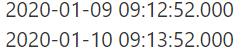
I am not sure what the logic of these two data updates is, so I give my update logic:
CREATE TABLE [dbo].[TestTab1](
StoreID [int] NOT NULL,
PurchaseID [int] NOT NULL,
ShopID [int] NOT NULL,
LocationID [int] NOT NULL,
starttime [datetime] NOT NULL,
Endtime [datetime] NOT NULL,
) ON [PRIMARY]

INSERT INTO [TestTab1]
VALUES (1020,20200102,9856,0010,'2020-01-08 09:08:53','2020-01-08 09:11:52'),
(1021,20200102,9856,0020,'2020-01-08 09:09:48','2020-01-08 09:11:52'),
(1022,20200102,9856,0030,'2020-01-09 09:08:53','2020-01-09 09:11:52'),
(1023,20200102,9856,0040,'2020-01-10 09:09:48','2020-01-10 09:11:52')


 ; WITH cte AS (
      SELECT *, row_number() OVER(PARTITION BY shopid, purchaseID ORDER BY Starttime) AS rn
       FROM [dbo].[TestTab1])

 UPDATE a
 SET    a.EndTime = b.Starttime
 FROM   cte a
 JOIN     cte b ON a.Shopid = b.Shopid
                                AND a.PurchaseID = b.purchaseID
                                AND a.rn = b.rn -1
 AND datepart(dd,a.Starttime)=datepart(dd,b.Starttime)
 WHERE  a.Locationid <> b.Locationid

; WITH cte AS (
      SELECT *, row_number() OVER(PARTITION BY datepart(dd,Starttime) ORDER BY Starttime) AS rn
       FROM [dbo].[TestTab1])

 update a
 set a.EndTime = dateadd(mi,datepart(dd,Starttime)-8,EndTime)
 from cte a
 where datepart(dd,Starttime) not in (select datepart(dd,Starttime) from cte where rn>1)

 select * from [dbo].[TestTab1]


 drop table [dbo].[TestTab1]

In addition, what is the relationship between your existing data and the final Result set?
If you have any question, please feel free to let me know.
If the response is helpful, please click "Accept Answer" and upvote it.
Best Regards
Echo
If the answer is helpful, please click "Accept Answer" and upvote it.
Note: Please follow the steps in our documentation to enable e-mail notifications if you want to receive the related email notification for this thread.
The first cte is modified on the basis of ErlandSommarskog , thanks to ErlandSommarskog.
Echo
After Red posted the CREATE TABLE + INSERT I was able to write this query:
; WITH numbering AS (
SELECT *, row_number() OVER(PARTITION BY ShopID, PurchaseID ORDER BY starttime) AS rowno
FROM TestTab1
)
UPDATE a
SET a.Endtime = b.starttime
FROM numbering a
JOIN numbering b ON a.ShopID = b.ShopID
AND a.PurchaseID = b.PurchaseID
AND a.rowno = b.rowno -1
WHERE a.LocationID <> b.LocationID
AND convert(date, a.Endtime) = convert(date, b.starttime)
I think the condition that Echo overlooked was that the dates should be the same. I almost missed that myself.
AND datepart(dd,a.Starttime)=datepart(dd,b.Starttime)
No, I don’t think the date is ignored. My statement can guarantee the same date.
Echo