

No computers in my network window ... only this computer ???

KeldSor 371 Reputation points
2022-10-20T20:31:49.967+00:00

Only this computer is shown up in the window !

I've reset the network - still no other computers to see !

I haven't had this problem for a long time and the suddenly it's there !

What is wrong and how do I cure it ?

Windows for business | Windows Client for IT Pros | Devices and deployment | Other
0 comments No comments
{count} votes

5 answers

Sort by: Most helpful
  1. Anonymous
    2022-10-20T21:23:39.313+00:00

    For the newer OS's enabling network discovery may help.

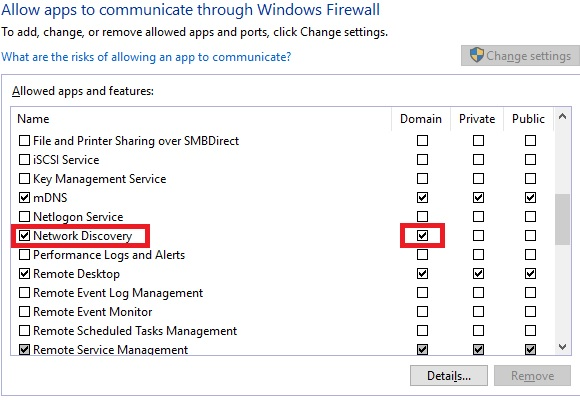
    Check these services are started on all members DNS Client, Function Discovery Resource Publication, SSDP Discovery UPnP Device Host and also check the firewalls allow Network Discovery for the network profile you're using (in my example below using domain).

    --please don't forget to upvote and Accept as answer if the reply is helpful--
    252713-image.png

    0 comments No comments

  2. KeldSor 371 Reputation points
    2022-10-21T09:17:42.817+00:00

    I'm not sure what name these services have in the danish version - but why should it just stop working from one hour to the next ... I just was working with Word/Excel/Outlook and so ???

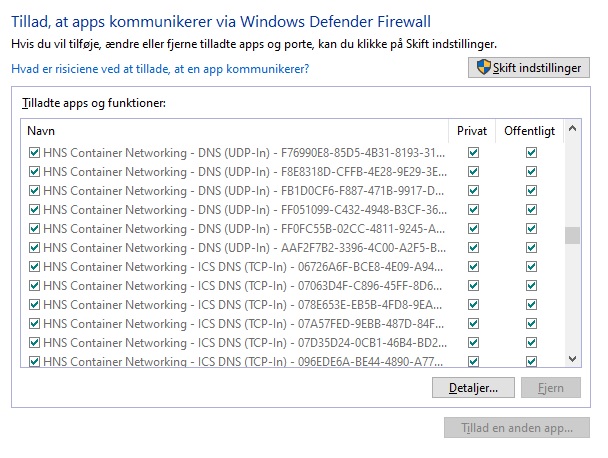
    My list of apps allowed in the Firewall are a little mysterious I think - I have 100's - and I mean 100's of these lines in the list:

    252963-dump.jpg

    What are these lines and are they a problem ?


  3. KeldSor 371 Reputation points
    2022-10-21T12:03:55.717+00:00

    Not a new topic ... I just wonder if all these 100's of mysterious lines maybe could be the problem :-)

    I still have the problem missing all other computers on the network in my network window, and
    I think I have the services you pointed out all up and running !

    I my frustration and looking around in the setup I noticed that I have been updated:

    Udgave Windows 10 Pro
    Version 22H2
    Installeret d. ‎23-‎04-‎2021
    Operativsystemets build 19045.2130
    Visning Windows Feature Experience Pack 120.2212.4180.0

    I think I had the 21H2 before - could the problem be here ?

    0 comments No comments

  4. Anonymous
    2022-10-21T12:08:02.72+00:00

    I think Credentials Guard is turned on by default in 22H2. You could try turning off for testing.
    https://learn.microsoft.com/en-us/windows/security/identity-protection/credential-guard/credential-guard-manage

    --please don't forget to upvote and Accept as answer if the reply is helpful--
    0 comments No comments

  5. KeldSor 371 Reputation points
    2022-10-21T12:25:13.863+00:00

    ?????? Way out of my reach ...


Your answer

Answers can be marked as 'Accepted' by the question author and 'Recommended' by moderators, which helps users know the answer solved the author's problem.