Azure API Management
An Azure service that provides a hybrid, multi-cloud management platform for APIs.
This browser is no longer supported.
Upgrade to Microsoft Edge to take advantage of the latest features, security updates, and technical support.
' cx='32' cy='32' r='32' /%3E%3Ctext x='50%25' y='55%25' dominant-baseline='middle' text-anchor='middle' fill='%23FFF' %3EUG%3C/text%3E%3C/svg%3E)
............................................

' cx='32' cy='32' r='32' /%3E%3Ctext x='50%25' y='55%25' dominant-baseline='middle' text-anchor='middle' fill='%23FFF' %3EMM%3C/text%3E%3C/svg%3E)
@Upasana Ghosh Thank you for reaching out to Microsoft Q&A. I would start with Validation Polices and to validate request headers, you can use Validate parameters and for response headers, use Validate headers against API schema. Validate JWT policy can extract access token from specific HTTP header (or query parameter or matching value) and validate the token against issuers and audiences. Check out the samples and attributes in the docs and also refer Techcommunity article which describes the similar scenario and let me know if any questions.
If this doesn't match your needs, please share more information about your scenario so that it will help in assisting you better.
Thank you for your answer . help me to understand where exactly this matches the requirement with "apim will match the access token to ensure the token have obtained by the same client " -. I have tried with validation one but it does not fulfil the part to make sure whether the access tke have obtained by the same client .
Thats why i thought for help of custom policies
@Upasana Ghosh I assume that you have used Azure AD & App registration to obtain the token using OAuth 2.0 grant types. Use the following snippet to validate that app-client-id must present on the token for the validation to succeed (refer docs). This way you can validate the token was obtained from specific client(s) (or same client in your case).
    <validate-jwt header-name="Authorization" failed-validation-httpcode="401" failed-validation-error-message="Unauthorized. Access token is missing or invalid.">
        <openid-config url="https://login.microsoftonline.com/{aad-tenant}/v2.0/.well-known/openid-configuration" />
        <required-claims>
            <claim name="aud">
                <value>{app-client-id}</value>
            </claim>
        </required-claims>
    </validate-jwt>
Refer Claims docs which describe about different claims in the token such as aud, oid (user or service principal), roles or groups etc.

Note: In short, application (or user) acquires a token from Azure AD and the token is sent in Authorization header to APIM and then gets validated with set of claims in APIM.
TechCommunity article describes roles with audience as APIM (hence audience was set along with required-claims).
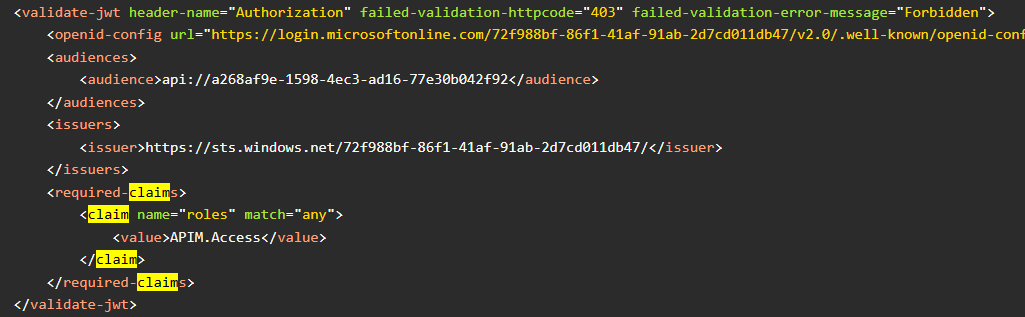
I hope this answers your question or feel free to add a comment for any other questions. We would be happy to assist you.
Hello ,
Thank you for previous explanation . can you please help me out here with the following :
@Upasana Ghosh Identity providers like Okta, CID use JWT tokens based on their docs. Unfortunately, we don't have a built-in method in APIM to validate other than JWT tokens. Alternatively, you can explore Authorizations (preview) where APIM can retrieve and refresh access tokens and supported identity providers are listed here.
You can submit feedback directly to our product team via aka.ms/apimwish so that others can also upvote it with similar interests. Feel free to reach out for any other questions.
Hello ,
Thank you for your answer .