Azure Monitor
An Azure service that is used to collect, analyze, and act on telemetry data from Azure and on-premises environments.
This browser is no longer supported.
Upgrade to Microsoft Edge to take advantage of the latest features, security updates, and technical support.
' cx='32' cy='32' r='32' /%3E%3Ctext x='50%25' y='55%25' dominant-baseline='middle' text-anchor='middle' fill='%23FFF' %3EB%3C/text%3E%3C/svg%3E)
Hi,
I was scrolling down the Azure Monitor Agent docs and was wondering following: When destination is Azure Monitor Metrics how can I decide which Log Analytics the data will be saves because seems that that part is not configurable?
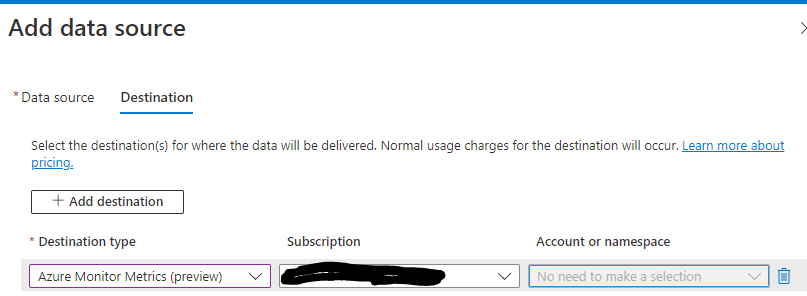

Azure Monitor Metrics is a performance table that is built into the subscription. When the destination is "Metrics" you cannot specify a workspace name. Metrics is the destination.
Change the Destination to "Azure Monitor Logs" to set the workspace name.
True! I thought Azure Monitor Logs were Events, not performance counters...
Hi Bombbe,
the workspace is specified in the data collection rule. I'm seeing more use of DCRs in Azure...
reference:
data-collection-rule-azure-monitor-agent
The picture that I attached to post is from data collection rule and as you can see 'Account or namespace' are gray are not configurable so is laws settings configurable if I want to collect normal metrics like cpu, ram and disk from the vms?