Microsoft 365 and Office | SharePoint | For business | Windows
A group of Microsoft Products and technologies used for sharing and managing content, knowledge, and applications.

This browser is no longer supported.
Upgrade to Microsoft Edge to take advantage of the latest features, security updates, and technical support.
' cx='32' cy='32' r='32' /%3E%3Ctext x='50%25' y='55%25' dominant-baseline='middle' text-anchor='middle' fill='%23FFF' %3ELR%3C/text%3E%3C/svg%3E)
Greetings!
We have Sharepoint 2016 onprem version. When users open url https://portal.company.com they are redirected to their personal sites(OneDrive) For example https://portal.company.com/personal/user/_layouts/15/onedrive.aspx.
We need to achieve the goal when user come to https://portal.company.com he should be redirected to https://portal.company.com/_layouts/15/sharepoint.aspx by default. There are two apps in applist - OneDrive and SharePoint. How could we change the default one? Thank you!
A group of Microsoft Products and technologies used for sharing and managing content, knowledge, and applications.

This is a quick note to let you know that we are performing research on this issue.
Hi @Lazarev Roman ,
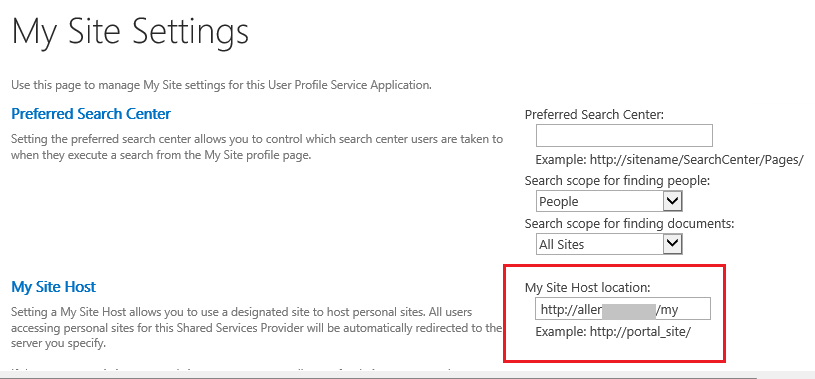
We usually don't set the root path to my site host location, since you have already created it with the root path, you can only recreate it. If you are not created with root path, you will be redirected directly to the home page of the site.
If the answer is helpful, please click "Accept Answer" and kindly upvote it. If you have extra questions about this answer, please click "Comment".
Note: Please follow the steps in our documentation to enable e-mail notifications if you want to receive the related email notification for this thread.
Hi @Lazarev Roman ,
I’m checking how the things are going on about this issue. Whether the answer helps you?
Is there any progress on this thread? Please feel free to let me know.
' cx='32' cy='32' r='32' /%3E%3Ctext x='50%25' y='55%25' dominant-baseline='middle' text-anchor='middle' fill='%23FFF' %3EYJ%3C/text%3E%3C/svg%3E)
Hi @Lazarev Roman ,
Is there anything else I can help with regarding this issue?
You can comment us at any time and we will continue to follow up.