Microsoft 365 and Office | SharePoint | For business | Windows
A group of Microsoft Products and technologies used for sharing and managing content, knowledge, and applications.

This browser is no longer supported.
Upgrade to Microsoft Edge to take advantage of the latest features, security updates, and technical support.
' cx='32' cy='32' r='32' /%3E%3Ctext x='50%25' y='55%25' dominant-baseline='middle' text-anchor='middle' fill='%23FFF' %3EU%3C/text%3E%3C/svg%3E)
We are moving over to teams and like the idea of sharing docs, but how do we share docs and limit editing?
A group of Microsoft Products and technologies used for sharing and managing content, knowledge, and applications.
Additional features, settings, or issues not covered by specific Microsoft Teams categories

' cx='32' cy='32' r='32' /%3E%3Ctext x='50%25' y='55%25' dominant-baseline='middle' text-anchor='middle' fill='%23FFF' %3EMM%3C/text%3E%3C/svg%3E)
For compliance requirement, how to change default Team members can edit attach file to default Team member only read only access.
' cx='32' cy='32' r='32' /%3E%3Ctext x='50%25' y='55%25' dominant-baseline='middle' text-anchor='middle' fill='%23FFF' %3EKY%3C/text%3E%3C/svg%3E)
Hi @UtauyoNASE
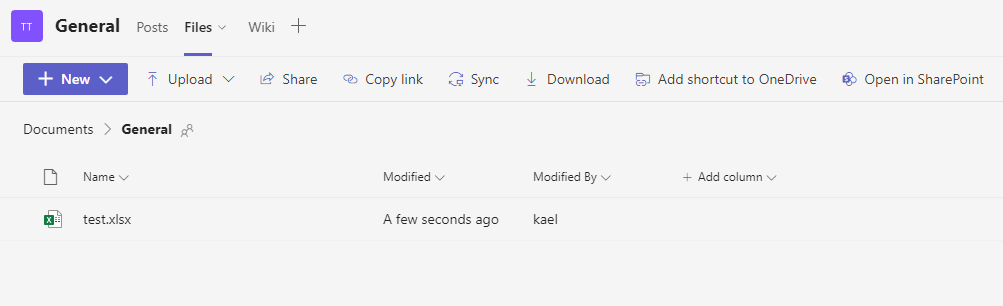
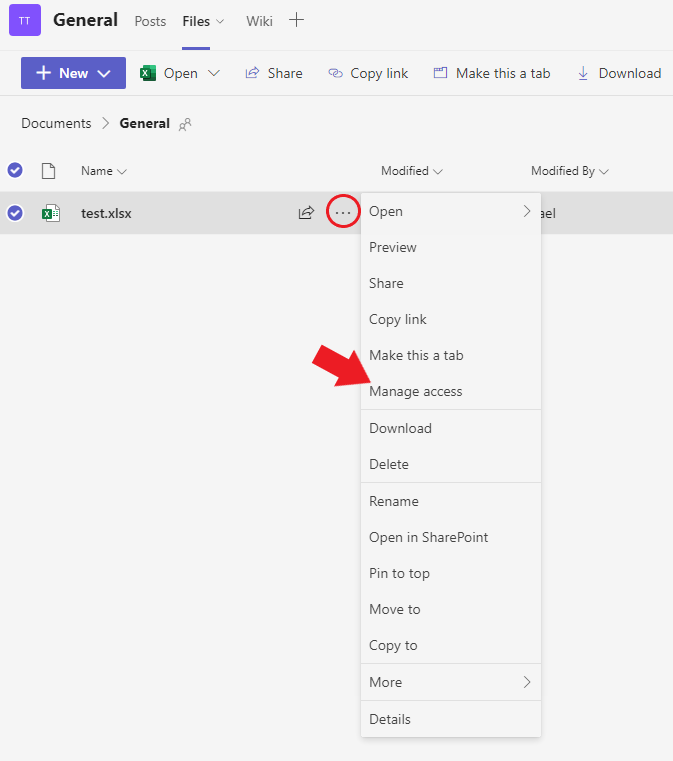
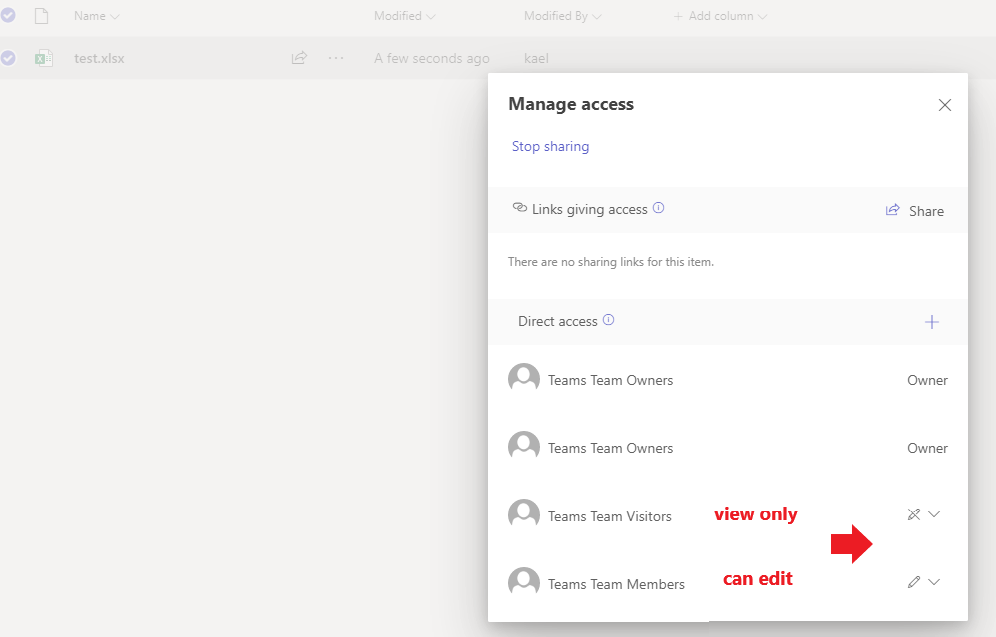
Files shared in Teams are stored in Onedrive (chat files) or Sharepoint sites (channel files), so the permissions can be modified in Onedrive or Sharepoint.
Take channel file for example:
If the answer is helpful, please click "Accept Answer" and kindly upvote it. If you have extra questions about this answer, please click "Comment".
Note: Please follow the steps in our documentation to enable e-mail notifications if you want to receive the related email notification for this thread.
' cx='32' cy='32' r='32' /%3E%3Ctext x='50%25' y='55%25' dominant-baseline='middle' text-anchor='middle' fill='%23FFF' %3ET%3C/text%3E%3C/svg%3E)
Hi @UtauyoNASE
With Teams there are 2 share options, If you sharing a doc user to user, It uses the users Onedrive, If you share the file with in a Team, that file is then uploaded to SharePoint.
So you can control the share settings with in each of those apps.
Regards,
T