Microsoft 365 and Office | Access | Development
The creation and customization of database applications using Microsoft Access

This browser is no longer supported.
Upgrade to Microsoft Edge to take advantage of the latest features, security updates, and technical support.
' cx='32' cy='32' r='32' /%3E%3Ctext x='50%25' y='55%25' dominant-baseline='middle' text-anchor='middle' fill='%23FFF' %3EA%3C/text%3E%3C/svg%3E)
I am using Allen Browne's code to lock bound controls to minimize the chances of users overwriting data when they are only viewing records. The handy code is here:
http://allenbrowne.com/ser-56.html
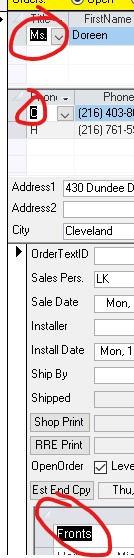
The problem is that the first field is highlighted as if selected on each subform when locking the form which is very confusing for the user because it isn't clear where they are on the form.
Any ideas on how to prevent highlighting? I attached a screenshot showing the problem.