Microsoft 365 and Office | SharePoint | Development
The process of building custom applications and tools that interact with Microsoft SharePoint, including SharePoint Online in Microsoft 365.

This browser is no longer supported.
Upgrade to Microsoft Edge to take advantage of the latest features, security updates, and technical support.
' cx='32' cy='32' r='32' /%3E%3Ctext x='50%25' y='55%25' dominant-baseline='middle' text-anchor='middle' fill='%23FFF' %3ERS%3C/text%3E%3C/svg%3E)
I'm trying to modify some code that I found, I'm on SharePoint 2016 so I do not think I can use excel style. My column name is SSPDate and it is a date data type. I am trying to set up a dashboard so I can see what is overdue, coming due in the next 30 days, or 30 days or more out. I think this is the section I'm trying to modify I want to basically add 30 days to @now or what is a better way to accomplish this? I see quite a few posts very similar but have not been able to make them work.
{
              "operator": ":",
              "operands": [
                {
                  "operator": "==",
                  "operands": [
                    {
                      "operator": "Date()",
                      "operands": [
                        {
                          "operator": "toDateString()",
                          "operands": [
                            "@currentField"
                          ]
                        }
                      ]
                    },
                    {
                      "operator": "Date()",
                      "operands": [
                        {
                          "operator": "toDateString()",
                          "operands": [
                            "@now"
                          ]
' cx='32' cy='32' r='32' /%3E%3Ctext x='50%25' y='55%25' dominant-baseline='middle' text-anchor='middle' fill='%23FFF' %3EYJ%3C/text%3E%3C/svg%3E)
Thanks for your question.
We are currently looking into this issue and will give you an update as soon as possible.
Thank you for your understanding and support.
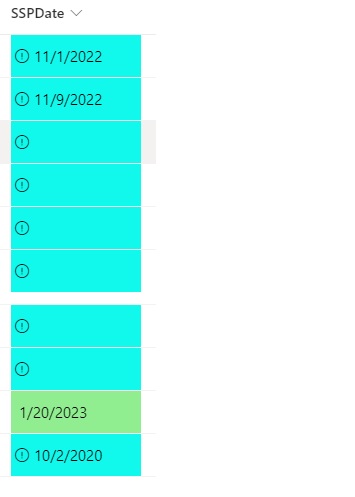
This is the latest attempt found on a forum somewhere I am getting a color change but what should be red or orange is blue, the green appears to be working
{
"$schema": https://developer.microsoft.com/json-schemas/sp/v2/column-formatting.schema.json,
"elmType": "div",
"style": {
"background-color": "=if(@currentField>=@now + 3888000000,'lightgreen',if((@currentField >@now ) && (@currentField <@now +864000000),'#F4AC56',if(@currentField <=@now ),'#C70707',if(@currentField ==0),'#10F8ec ','#F5F1F1'))",
"color": "black",
"font-size": "1.25em"
},
"children": [
{
"elmType": "span",
"style": {
"display": "inline-block",
"padding": "0 4px"
},
"attributes": {
"iconName": "=if(@currentField <= @now + 1814400000,'Error', '')"
}
},
{
"elmType": "span",
"txtContent": "@currentField"
}
]
}
Hi @Ray Shadow ,
As far as I know, JSON formatting will not work in the SharePoint 2016 classic experience, so please confirm that the version of SharePoint you are using is SharePoint 2019. You can refer to this method.
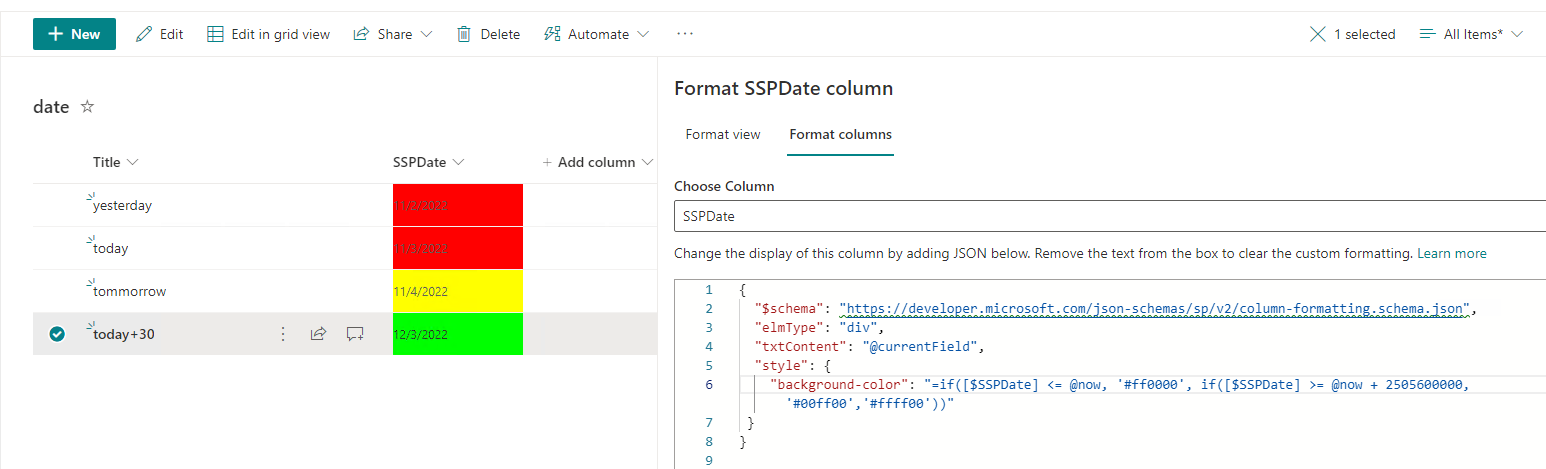
According to my test, you can use the code as below:
{
   "$schema": "https://developer.microsoft.com/json-schemas/sp/v2/column-formatting.schema.json",
   "elmType": "div",
   "txtContent": "@currentField",
   "style": {
     "background-color": "=if(@currentField <= @now, '#ff0000', if(@currentField >= @now + 2505600000, '#00ff00','#ffff00'))"
  }
 }
Then the result will be this:
For more information on column formatting of dates, please refer to here.
*
If the answer is helpful, please click "Accept Answer" and kindly upvote it. If you have extra questions about this answer, please click "Comment".
Note: Please follow the steps in our documentation to enable e-mail notifications if you want to receive the related email notification for this thread.
Works great, not sure what I was doing wrong when I tried similar but who cares. THANKS!!!!